11. WebXR
Sections
Reading settings
No voice for this language in this browser.
More voices
Code and English terms
Off: the page’s voice reads everything, with no pause between two voices.
No voice for this language in this browser.
More voices
More voices: Microsoft Edge has natural online voices, and Windows (Settings › Time & language › Speech), macOS and Android install others.
Code: the page in src/11-xr/main.ts.
WebXR in one table
Section titled “WebXR in one table”The WebXR Device API is the browser’s access to headsets and phones in AR or VR. If you have used OpenXR, the C API behind Windows Mixed Reality, SteamVR and the Quest’s native apps, the concepts map closely; WebXR is its browser counterpart, and Chromium implements it on top of OpenXR on Windows.
| OpenXR | WebXR | three.js | |
|---|---|---|---|
| Is there a device? | xrGetSystem |
navigator.xr.isSessionSupported('immersive-vr') |
VRButton checks it and shows the button |
| Start | xrCreateSession |
navigator.xr.requestSession(mode, features), from a user gesture |
renderer.xr.setSession(session) |
| Coordinate systems | reference spaces: VIEW, LOCAL, STAGE |
viewer, local, local-floor, bounded-floor, unbounded |
renderer.xr.setReferenceSpaceType('local-floor'), the default |
| Frame loop | xrWaitFrame, xrBeginFrame, xrEndFrame |
session.requestAnimationFrame |
renderer.setAnimationLoop, which switches to the session’s loop |
| Eyes | views from xrLocateViews |
frame.getViewerPose(space).views |
an ArrayCamera with one camera per eye |
| Where to draw | swapchains | XRWebGLLayer or WebXR Layers; XRGPUBinding for WebGPU, in progress |
the renderer’s XR render target |
| Controllers | actions bound to paths | session.inputSources, select and squeeze events, a Gamepad |
renderer.xr.getController(i), an Object3D that follows the controller |
setAnimationLoop is the reason lesson 1 prefers it to requestAnimationFrame: in a session, the window’s requestAnimationFrame stops firing, and the headset drives the frames at its own rate, 72, 90 or 120 Hz. A loop written with setAnimationLoop keeps running, unchanged.
Emulating a Quest 3
Section titled “Emulating a Quest 3”Headless Chromium has a navigator.xr, but no device behind it: isSessionSupported('immersive-vr') answers false. IWER 2.4.0, Meta’s Immersive Web Emulation Runtime, replaces navigator.xr with a JavaScript implementation whose headset and controllers are moved by code: the same runtime as the Immersive Web Emulator browser extension. The page installs it before creating the renderer (lines 25-38):
// The emulated headset must be installed before the renderer: XRManager checks for XRWebGLBinding in its constructorlet device: XRDevice | null = null;if (params.get('device') !== 'none') { device = new XRDevice(metaQuest3); // Chromium already has a navigator.xr, with no device behind it: IWER leaves it alone unless forced device.installRuntime({ forceInstall: true, polyfillLayers: params.has('layers') }); // IWER draws one view on the page unless stereo is on: then the left and right eyes share the canvas device.stereoEnabled = true; device.position.set(-0.2, 1.6, 0.9); // Looking down at the fretboard, 40° below the horizon const look = new THREE.Quaternion().setFromAxisAngle(new THREE.Vector3(1, 0, 0), (-40 * Math.PI) / 180); device.quaternion.set(look.x, look.y, look.z, look.w); result.emulated = { device: device.name, immersiveVR: await navigator.xr!.isSessionSupported('immersive-vr') };}Two things took a failed run each to find. Without forceInstall, IWER sees Chromium’s navigator.xr and leaves it in place, and no session starts. Without stereoEnabled, IWER renders one view: the right eye’s viewport is 0 pixels wide.
The session and the controllers
Section titled “The session and the controllers”In a session, units are meters and, with local-floor, y = 0 is the floor. The page puts lesson 5’s fretboard, scaled to a quarter, on a virtual table 0.8 m high. A real page requests the session from a click, often through three.js’s VRButton, since browsers require a user gesture; IWER doesn’t, so the probe calls requestSession directly (lines 131-143).
renderer.xr.getController(i) returns an Object3D that three.js moves to the pose of the session’s i-th input source on every frame. Its index is not a hand: the connected event says which one it is. A select event, the trigger, becomes a ray from the controller with Raycaster.setFromXRController, and lesson 5’s fretAt and stringAt, in the board’s own coordinates (lines 85-99):
for (const index of [0, 1]) { const controller = renderer.xr.getController(index); scene.add(controller); controller.addEventListener('connected', (event) => (controller.userData.handedness = (event.data as XRInputSource).handedness)); controller.addEventListener('select', () => { raycaster.setFromXRController(controller as THREE.XRTargetRaySpace); const [hit] = raycaster.intersectObject(board, true); const hand = controller.userData.handedness; if (!hit) return void picks.push({ controller: index, hand, hit: null }); const local = board.worldToLocal(hit.point.clone()); const fret = fretAt(local.x); const string = stringAt(local.z); picks.push({ controller: index, hand, object: hit.object.name, fret, string, note: fret === null ? null : noteName(string, fret) }); });}The probe then aims IWER’s right controller at string 3, fret 5, and pulls its trigger: updateButtonValue('trigger', 1), then 0, which IWER turns into the session’s select events (lines 161-178).
With the classic WebGLRenderer
Section titled “With the classic WebGLRenderer”?classic draws with WebGLRenderer from three, the renderer three.js’s WebXR examples were written for:
$ node scripts/probe.mjs 11-xr --query classic{ "native": { "navigatorXR": true, "immersiveVR": false, "XRGPUBinding": false }, "emulated": { "device": "Meta Quest 3", "immersiveVR": true }, "rendererBeforeSession": "WebGLRenderer", "session": { "mode": "immersive-vr", "enabledFeatures": [ "local-floor", "viewer", "local" ] }, "presenting": true, "rendererInSession": "WebGLRenderer", "frames": [ { "eyes": 2, "eyeDistanceMm": 63, "viewport": [ [0, 0, 400, 450], [400, 0, 400, 450] ], "calls": 38, "triangles": 1560 } ], "picks": [ { "controller": 1, "hand": "right", "object": "neck", "fret": 5, "string": 3, "note": "C4" } ], "inputSources": 2, "errors": [], "after": { "in the session": { "presenting": true }, "end the session": { "presenting": false } }}- The session was granted with
local-floor, andviewerandlocal, which every immersive session has. - Two eyes, 63 mm apart, IWER’s default interpupillary distance, each drawn into half of the 800 × 450 canvas.
- 38 draw calls and 1,560 triangles: the fretboard’s 19 meshes and 780 triangles, drawn once per eye.
WebGLRendererrenders the scene twice; multiview, which draws both eyes in one pass, needs theOVR_multiview2extension and a headset browser that offers it (to verify on a Quest). - The trigger on controller 1, the right hand, picked string 3, fret 5: C4, the note lesson 5 found with the mouse.
session.end()stopped the presentation.
The screenshot, taken during the session, shows what IWER composites to the page: the left eye, then the right one, each seeing the fretboard from its own position.
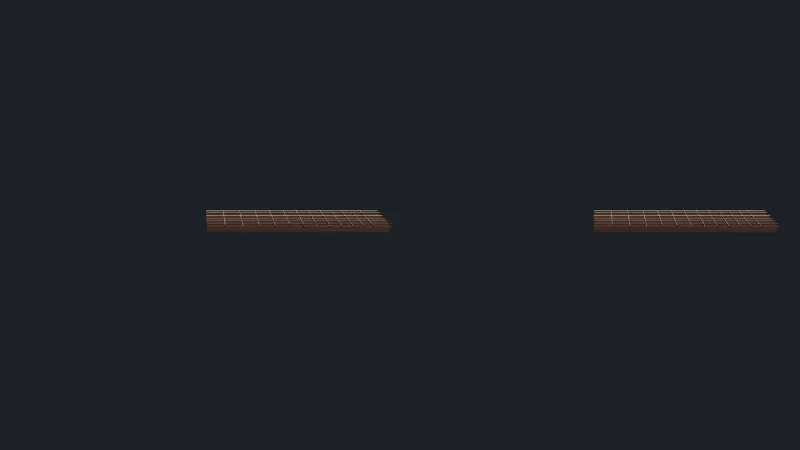
Open full screen. Try it: this page shows nothing without the probe; the live demo at the end of the lesson enters the same emulated session with a button, and answers exercises 1 and 3.
With WebGPURenderer
Section titled “With WebGPURenderer”The default page uses WebGPURenderer:
$ node scripts/probe.mjs 11-xr{ ... "rendererBeforeSession": "WebGPURenderer, WebGPU", "session": { "mode": "immersive-vr", "enabledFeatures": [ "local-floor", "viewer", "local" ] }, "errors": [ "Error: THREE.XRManager: WebGPU XR sessions require the \"webgpu\" session feature. Use VRButtonGPU/XRButton with \"webgpu\" enabled or use a WebGL backend." ]}In r186, the WebGPU backend draws into a WebXR session only through XRGPUBinding, from the WebXR/WebGPU binding proposal, and only in a session requested with the webgpu feature (XRManager.js, lines 739-749, called from setSession at line 1211). Headless Chromium has no XRGPUBinding, and IWER doesn’t emulate one. Two details of the message don’t match r186: there is no VRButtonGPU in examples/jsm/webxr/, and XRButton.js doesn’t request a webgpu feature. Which browsers and headsets offer XRGPUBinding in September 2026 is to verify.
The WebGL 2 backend
Section titled “The WebGL 2 backend”On a machine without WebGPU, or with --webgl, WebGPURenderer uses its WebGL 2 backend, which the message calls the way out. With IWER, the session starts, but every frame throws:
$ node scripts/probe.mjs 11-xr --webgl ... "rendererInSession": "WebGPURenderer, WebGL 2", "frames": [ { "eyes": 2, "eyeDistanceMm": 63, "viewport": [ [0, 0, 400, 450], [400, 0, 400, 450] ], "calls": 4, "triangles": 780 } ], ... "errors": [ "TypeError: Invalid value used as weak map key" ]IWER’s XRWebGLLayer.framebuffer returns null (XRWebGLLayer.js, lines 44-46, in the published package): IWER draws into the page’s own canvas, whose framebuffer WebGL represents as null, as the WebXR specification does for inline sessions, which draw to the page. The WebGL backend keeps that value as its XR target (WebGLBackend.js, lines 365-367), and WebGLState.drawBuffers uses the framebuffer as a key in a WeakMap (WebGLState.js, lines 1149-1164), which refuses null. WebGLRenderer binds null as the default framebuffer, and works. On a real headset, the layer’s framebuffer is an opaque framebuffer, not null, so this failure belongs to the combination of the emulator and the WebGL backend, not to headsets (to verify on a Quest).
The first version of this page didn’t catch the exception: the frames stopped, the probe waited for them, and the run hung until it was stopped by hand, holding the machine’s GPU lock for ten minutes. The page now catches render errors, keeps each message once, and gives up waiting for frames after 5 seconds; probe.mjs also exits on its own after twice its timeout.
The WebGL fallback addon
Section titled “The WebGL fallback addon”r186 adds WebGLXRFallback.js: it wraps renderer.xr.setSession, and when a session starts on the WebGPU backend without XRGPUBinding, it creates a second renderer with a WebGL backend, moves the animation loop and the XR settings to it, and lets the page swap the canvases (lines 21-69). ?fallback installs it:
$ node scripts/probe.mjs 11-xr --query fallback ... "fallback": "switched to WebGPURenderer, WebGL 2", "presenting": true, "rendererInSession": "WebGPURenderer, WebGL 2", ... "picks": [], "inputSources": 2, "errors": [ "TypeError: Invalid value used as weak map key" ],The switch worked, and ran into the same null framebuffer. It shows something else: picks is empty. The controllers came from the first renderer’s renderer.xr.getController, and the fallback renderer has its own XRManager, which moves its own controllers. The addon copies the loop and the settings, not the objects the page already took from renderer.xr: a page that uses it must get its controllers again in onFallback.
check.sh compares the four runs. On the Linux and Windows runners, which have no WebGPU, the default page and ?fallback start on the WebGL 2 backend directly, and their outputs come from expected/l11_probe_webgpu.webgl.txt and expected/l11_probe_fallback.webgl.txt, generated with chromium-headless-shell.
What a headless browser can’t check
Section titled “What a headless browser can’t check”- The frame rate. A Quest 3 runs at 72, 90 or 120 Hz, and a missed frame is felt, not seen. The CPU time per frame from lesson 8, doubled for two eyes, is where to start; the headset’s own performance overlay is where to finish (to verify).
- Foveated rendering and the framebuffer scale.
renderer.xr.setFoveationandsetFramebufferScaleFactorchange what the headset’s compositor does; IWER accepts them and draws the same pixels. - Hand tracking, which IWER emulates with poses, and AR passthrough, hit tests and anchors, which the course doesn’t cover.
- Comfort. The fretboard 0.8 m high, 0.9 m from the eyes, at a quarter scale, was chosen on paper.
In GuitarAlchemist/ga
Section titled “In GuitarAlchemist/ga”GA has no WebXR code at commit 05c8eda: no renderer.xr, no VRButton, no navigator.xr. The only mention is a Claude skill file, .claude/skills/three-best-practices/rules/webxr-setup.md, written for agents, not used by the app. A VR mode for the fretboard would start from ThreeFretboard.tsx’s WebGPURenderer, which, as this lesson found, can’t enter a session in r186 without XRGPUBinding: the fallback addon or a WebGLRenderer would be the first step.
Live demo: the guitar in VR
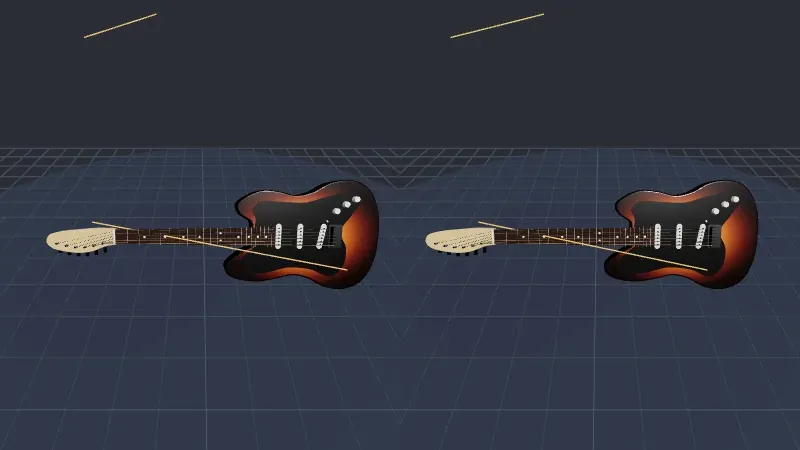
Section titled “Live demo: the guitar in VR”Exercises 1 and 3 on a whole guitar: the classic WebGLRenderer, the one this lesson saw render both eyes with IWER, a VRButton, and a select handler that takes the controller’s ray into the guitar’s own coordinates, finds the string and the fret as lesson 5’s guitar does, plays the note and sends a 40 ms haptic pulse. IWER is imported only with ?emulate, so a real headset downloads nothing of it. The page ignores resize during a session: WebGLRenderer refuses to change its size while presenting, and warns. Its probe enters an emulated session, aims the right controller at string 3, fret 5, pulls the trigger and reads string 3, fret 5: C4, with 2 eyes and no error. The source is in code/threejs/demos/xr.
Live page: run it here
Open full screen. Try it: press Enter VR: the emulated right controller then plays a C major arpeggio by itself. With a headset, open the page without ?emulate in its browser, point at the neck and pull the trigger; to verify, the author has no headset.
GA experiment
Section titled “GA experiment”Lesson 14’s experiment 12 puts a real-size neck in an emulated Quest 3: two views 63 mm apart, and the nut-to-12th-fret distance as measured. How it feels in the hand, and IWER’s 25 mm head offset, are to verify on a headset.
Key takeaways
Section titled “Key takeaways”- WebXR gives the page a session, reference spaces in meters, one camera per eye, and input sources; three.js wraps them in
renderer.xr,setAnimationLoopandgetController. - IWER emulates a Quest 3 in a headless browser: sessions, stereo views, controller poses and triggers can be tested in CI.
- In r186,
WebGPURendererenters a WebXR session on WebGPU only withXRGPUBindingand thewebgpufeature; otherwise it throws. - The WebGL fallback addon swaps renderers, but not the controllers the page already holds.
- With IWER, only the classic
WebGLRendererrendered: the WebGL 2 backend doesn’t accept anulllayer framebuffer. - Put a hard timeout on anything that waits for frames: an XR session that stops producing them waits forever.
Exercises
Section titled “Exercises”- Add a
VRButtonto the?classicpage, so that a real headset’s browser can enter the session. What must the page not do, now that the session is no longer started by the probe? - In the
?fallbackpage, get the controllers from the new renderer insideonFallback, and move theirselectlisteners there. What shouldpicksshow then, and why would it still fail with IWER? - Make the trigger play the note: list what the
selecthandler needs, and what the headset changes compared with a mouse click.
Solution 1
import { VRButton } from 'three/addons/webxr/VRButton.js';
document.body.append(VRButton.createButton(renderer));
VRButton checks isSessionSupported('immersive-vr'), shows “ENTER VR” or “VR NOT SUPPORTED”, and requests the session with local-floor, bounded-floor and layers as optional features when clicked (VRButton.js, lines 68-74), which is the user gesture browsers require. The page must no longer call requestSession itself, or the click would fail with a session already running: keep startSession for the probe only. The page’s if (probing) block already does that. Not run on a headset (to verify).
Solution 2
onFallback(fallback, previous) receives the new renderer: call fallback.xr.getController(0) and (1) there, add them to the scene, and attach the connected and select listeners, the same loop as before, turned into a function that takes the renderer. With IWER, picks should then hold the C4 pick, since the ray is computed on the CPU from the controller’s pose, which the fallback renderer’s XRManager updates. But every frame still throws on the null framebuffer before the scene is drawn, and whether the controllers’ poses are updated before that exception is to verify: in XRManager, the controllers are updated in the XR animation frame, before the loop’s callback that throws (XRManager.js, lines 1991-1997), so they probably are.
Solution 3
The handler needs the note (it has it), a sound, and a way to play it: the Web Audio API with an AudioContext created or resumed from a user gesture, which entering the session provides. Compared with a click: the trigger is analog, and inputSource.gamepad.buttons[0].value gives how hard it is pressed, a natural velocity; inputSource.gamepad.hapticActuators can pulse the controller on the note; and the sound can be positioned at the string with a PannerNode, or three.js’s PositionalAudio, attached to the fretboard, so it comes from where the string is. A design, not code run (to verify).
Sources
Section titled “Sources”- W3C: WebXR Device API, WebXR Gamepads Module; Immersive Web Community Group: WebXR/WebGPU binding explainer
- MDN: WebXR Device API
- three.js source at r186:
XRManager.js,WebGLXRFallback.js,VRButton.js,WebGLBackend.js,WebGLState.js - Meta: IWER, Immersive Web Emulator
- Khronos: OpenXR