16. Desktop UI in Rust, then Tauri
Sections
Reading settings
No voice for this language in this browser.
More voices
Code and English terms
Off: the page’s voice reads everything, with no pause between two voices.
No voice for this language in this browser.
More voices
More voices: Microsoft Edge has natural online voices, and Windows (Settings › Time & language › Speech), macOS and Android install others.
Full example: l16-tauri/, a desktop chord explorer. Lessons 16 to 21 build it; run npm install then npm run tauri dev from that folder.
Lessons 1 to 15 covered the language. This second part answers a question every C# or Java developer asks sooner or later: can I write a desktop application in Rust, and with what?
What you already know
Section titled “What you already know”On .NET and the JVM, the choice is between toolkits that draw their own controls and toolkits that embed a browser engine:
| Toolkit | UI described in | Rendering |
|---|---|---|
| WinForms | C# code, designer | Win32 controls, Windows only |
| WPF | XAML + bindings | its own DirectX renderer, Windows only |
| .NET MAUI | XAML + bindings | the platform’s native controls (WinUI on Windows) |
| Avalonia | XAML-like .axaml |
its own renderer, on every OS |
| Swing, JavaFX | Java code, FXML | their own renderer, on every OS |
| Electron | HTML, CSS, JavaScript | a Chromium shipped with every application, plus Node.js |
| Blazor Hybrid | Razor components | the system webview (WebView2 on Windows) inside a MAUI, WPF or WinForms window |
Rust has both families too. What it lacks is the first-party framework: there is no WPF of Rust, only community projects, and none of them is as mature as WPF or JavaFX.
Native rendering: egui, iced, Slint
Section titled “Native rendering: egui, iced, Slint”These crates draw every pixel themselves, usually on the GPU, in a window opened by winit:
| Crate | Model | UI described in | License | Closest to |
|---|---|---|---|---|
| egui with eframe | immediate mode: the UI is redrawn from your data at each frame | Rust code | MIT or Apache-2.0 | Dear ImGui, game debug UIs |
| iced | Elm architecture: state, messages, update, view |
Rust code | MIT | Model-View-Update, as in F#’s Elmish |
| Slint | declarative markup compiled to Rust | .slint files |
GPLv3, royalty-free or commercial | XAML, FXML |
Versions on crates.io on 2026-09-15: egui and eframe 0.36.2, iced 0.14.0, Slint 1.17.1. egui and iced are still 0.x, and their APIs change between minor versions; Slint has been 1.x since April 2023.
Dioxus looks like a fourth option, with React-style components written in Rust. Its desktop renderer, though, depends on wry and tao (dioxus-desktop 0.7.10): the same system webview as Tauri.
egui in IX: ix-demo
Section titled “egui in IX: ix-demo”IX has an egui application, crates/ix-demo (commit a7e5fbc, 2026-09-15): 23 tabs of interactive demos over the workspace’s crates. Its main opens a window (main.rs, lines 28-40):
fn main() -> eframe::Result<()> { let options = eframe::NativeOptions { viewport: egui::ViewportBuilder::default() .with_inner_size([1280.0, 800.0]) .with_title("ix — ML Algorithm Explorer"), ..Default::default() }; eframe::run_native( "ix Demo", options, Box::new(|_cc| Ok(Box::new(IxApp::default()))), )}and each demo is a struct with a ui method that egui calls every time it repaints (demos/stats.rs, lines 29-37):
impl StatsDemo {    pub fn ui(&mut self, ui: &mut egui::Ui) {        ui.heading("Statistics (ix-math)");        ui.label("Enter comma-separated values:");        ui.text_edit_singleline(&mut self.data_text);
        if ui.button("Compute").clicked() {            self.compute();        }
There is no XAML, no binding and no event handler. text_edit_singleline(&mut self.data_text) draws the text box and writes what the user typed into the field; button(…).clicked() draws the button and returns true during the frame in which it was clicked. For a WPF developer, it is as if OnRender rebuilt the whole window from the view model, without INotifyPropertyChanged.
Reading the 28 files (7,411 lines) of ix-demo shows the other side of immediate mode:
- The work runs in
ui, on the thread that draws the window. There are 58clicked()handlers and not a single thread, channel orspawn. The workloads are small (a sieve up to 1,000,000, at most 2,000 epochs of an XOR network), so it goes unnoticed; a longer computation would freeze every tab. Tauri solves that with asynchronous commands (lesson 17) and channels (lesson 18). - The Neural Network (ix-nn) tab does not call
ix-nn: it trains its own network withndarray(demos/neural_net.rs, line 77: “demonstrates the concepts in ix-nn”). Cargo.tomlasks foreframe = "0.31"while crates.io is at 0.36.2, and IX does not commit aCargo.lock: each build takes the latest 0.31.x.
In Tauri, the same demo would be a Rust command per button, returning the numbers as JSON, and an HTML page drawing the plot with a JavaScript library. The Rust code gets simpler, the UI moves to a second language: that is the trade.
Web UI in a system webview: Tauri
Section titled “Web UI in a system webview: Tauri”Tauri takes the Electron idea without shipping Chromium or Node.js. Your application is a Rust executable, the core process; the window’s content is HTML, CSS and JavaScript rendered by the webview that the operating system already provides (process model):
| OS | Webview | Engine |
|---|---|---|
| Windows | WebView2 | Chromium (Microsoft Edge) |
| macOS | WKWebView | WebKit (Safari) |
| Linux | WebKitGTK | WebKit |
flowchart LR subgraph core["Core process: your Rust executable"] commands["your commands and state"] tauri["tauri"] tao["tao: windows, menus"] wry["wry: webview"] end subgraph webview["Webview process: WebView2, WKWebView or WebKitGTK"] ui["HTML, CSS, JavaScript"] end ui -- "invoke: JSON request" --> tauri tauri -- "JSON response, events, channels" --> ui tauri --> commands tauri --> tao tauri --> wry wry -. "creates" .-> webview- Only the core process can touch the file system, the network or other processes. The page reaches Rust through commands (
invoke, lesson 17) and events (lesson 18), serialized as JSON: it is message passing, not shared memory. tao(a fork of winit) opens the windows,wryembeds the webview;tauriadds the IPC, the configuration, the permissions and the bundler on top.- Three engines means three browsers to test, as on the web: a CSS feature that works in WebView2 may be missing from the WebKitGTK of an older Linux distribution.
This course pins Tauri 2.11.5 (published on 2026-07-01), the Tauri CLI 2.11.4 and create-tauri-app 4.7.4. A first 3.0.0-alpha was published on 2026-09-13; among its crates is a new tauri-runtime-cef, a runtime based on the Chromium Embedded Framework. It is an alpha: the course stays on 2.
The size difference, measured
Section titled “The size difference, measured”Electron ships its runtime with every application. Electron 44.3.0 for Windows x64, downloaded with npm install electron@44.3.0 on 2026-09-15, is a 158 MB zip that unpacks to 385 MB in 73 files, electron.exe alone weighing 246 MB — before any line of your application.
The chord explorer built by these lessons, in release mode with tauri build --no-bundle, is a single chord-explorer.exe of 4.2 MB (4,244,992 bytes) on Windows, HTML included; the build took 2 min 43 s. It relies on the WebView2 runtime installed with Windows 11 (version 153.0.4234.32 on my machine).
A small binary does not mean a small memory footprint: WebView2 starts its own browser processes. With the release build’s window open, measured with PowerShell (Get-Process, private bytes of the process and of its children):
Name           Type             Sub                          PrivateMB WorkingSetMB----           ----             ---                          --------- ------------chord-explorer                                                    5.60        27.10msedgewebview2 browser                                           40.70       125.00msedgewebview2 crashpad-handler                                   2.50         9.70msedgewebview2 gpu-process                                       81.90        67.00msedgewebview2 renderer                                          25.10        60.10msedgewebview2 utility          network.mojom.NetworkService     12.70        37.90msedgewebview2 utility          storage.mojom.StorageService      8.10        18.40
total private MB: 176.6; total working set MB: 345.2; processes: 7
The Rust process itself uses 5.6 MB; the other six processes are WebView2’s, about 170 MB. The working sets add up to more because they count the pages shared between processes several times. A Tauri application is light on disk, not free in memory: it runs a browser engine, as Electron does.
Prerequisites
Section titled “Prerequisites”Tauri needs Rust (lesson 1) and each OS’s webview development libraries; Node.js is only needed for the npm version of the CLI and for JavaScript frameworks (prerequisites).
- The MSVC build tools, already installed in lesson 1; the Tauri guide asks for the Desktop development with C++ workload.
- WebView2: included in Windows 11 and in Windows 10 since version 1803. To check its version:
(Get-ItemProperty 'HKLM:\SOFTWARE\WOW6432Node\Microsoft\EdgeUpdate\Clients\{F3017226-FE2A-4295-8BDF-00C3A9A7E4C5}').pv153.0.4234.32- Node.js LTS for
npm(this course: Node 24.12.0, npm 11.7.0).
On Debian and Ubuntu, the list from the Tauri guide:
sudo apt updatesudo apt install libwebkit2gtk-4.1-dev \ build-essential \ curl \ wget \ file \ libxdo-dev \ libssl-dev \ libayatana-appindicator3-dev \ librsvg2-devOther distributions have their own package names in the guide. On WSL, Linux GUI applications need WSLg (Windows 11): the window then opens on the Windows desktop (to verify: the course has not run Tauri under WSL yet).
xcode-select --install # enough for desktop apps; iOS needs the full XcodeWKWebView is part of macOS: nothing else to install. CI builds and tests the explorer on macOS runners that way; opening its window is to verify on a Mac.
Creating a project
Section titled “Creating a project”create-tauri-app generates a project. The options skip the questions:
npx create-tauri-app@4.7.4 hello-tauri --manager npm --template vanilla --identifier dev.learn.hello --yesTemplate created! To get started run: cd hello-tauri npm install npm run tauri android init
For Desktop development, run: npm run tauri dev
For Android development, run: npm run tauri android devThe first suggestion is the Android setup, even on Windows and for a desktop project; for the desktop, skip to the second block. The vanilla template is plain HTML, CSS and JavaScript, with no bundler (lesson 19 covers Vite and TypeScript). The generated layout (project structure):
hello-tauri/├── package.json ← only the Tauri CLI, as a dev dependency├── src/ ← the frontend: index.html, main.js, styles.css└── src-tauri/ ← a normal Cargo package ├── Cargo.toml ├── build.rs ← tauri_build::build(): reads the config, embeds icons ├── tauri.conf.json ← window, identifier, frontend folder, security, bundle ├── capabilities/ │ └── default.json ← what the window may call (lesson 20) ├── icons/ └── src/ ├── main.rs ← calls hello_tauri_lib::run() └── lib.rs ← the app: commands and BuilderThree details surprise a Rust developer:
Cargo.tomldeclaresedition = "2021", not 2024. The course’s project uses 2024, as in lesson 1, and compiles the same.- The library is called
hello_tauri_liband is built as["staticlib", "cdylib", "rlib"]: on iOS and Android the application is a library loaded by the platform, somain.rsonly callslib.rs, where everything lives. The comment explains the_libsuffix: a library and a binary with the same name clash on Windows. main.rsstarts with#![cfg_attr(not(debug_assertions), windows_subsystem = "windows")]: without it, a release build would open a console window next to the application.
tauri.conf.json is to Tauri what App.xaml plus the .csproj are to WPF (configuration reference):
{ "$schema": "https://schema.tauri.app/config/2", "productName": "hello-tauri", "version": "0.1.0", "identifier": "dev.learn.hello", "build": { "frontendDist": "../src" }, "app": { "withGlobalTauri": true, "windows": [ { "title": "hello-tauri", "width": 800, "height": 600 } ], "security": { "csp": null } }, "bundle": { "active": true, "targets": "all", "icon": [ "icons/32x32.png", "icons/128x128.png", "icons/128x128@2x.png", "icons/icon.icns", "icons/icon.ico" ] }}frontendDistis the folder of static files embedded in the executable; a framework with a dev server would adddevUrl.withGlobalTauri: trueexposes the JavaScript API aswindow.__TAURI__, so a page without a bundler can callwindow.__TAURI__.core.invoke."csp": nulldisables the Content Security Policy. The course’s project sets one, and lesson 20 explains why the template’s default deserves a second look.
Running it: tauri dev
Section titled “Running it: tauri dev”From the course’s folder, npm install installs the CLI pinned by package-lock.json, then npx tauri dev builds and starts the application:
cd code/rust-for-csharp-java/l16-taurinpm installnpx tauri dev Running DevCommand (`cargo run --no-default-features --color always --`) Info Watching C:\Users\spare\source\repos\learn\code\rust-for-csharp-java\l16-tauri\src-tauri for changes... Info Watching C:\Users\spare\source\repos\learn\code\rust-for-csharp-java\l16-tauri\theory for changes... Compiling chord-explorer v0.1.0 (C:\Users\spare\source\repos\learn\code\rust-for-csharp-java\l16-tauri\src-tauri) Finished `dev` profile [unoptimized + debuginfo] target(s) in 25.84s Running `C:\Users\spare\source\repos\learn\code\rust-for-csharp-java\l16-tauri\target\debug\chord-explorer.exe`- It is
cargo rununderneath: the first run compiles all of Tauri’s dependencies and takes minutes; the run above only recompiled the application. - The CLI watches
src-tauriand the crates it depends on by path, heretheory. Changing the window’s title intauri.conf.jsonrebuilt the application (20.84 s) and restarted it with the new title. - With no
devUrl, the CLI serves thefrontendDistfolder itself: the page’s address in the webview washttp://127.0.0.1:1430/.
The course’s application: a chord explorer
Section titled “The course’s application: a chord explorer”The following lessons build one application, in the spirit of Guitar Alchemist: spell a chord (Bbm7 is Bb Db F Ab), transpose it, list the chords of a key, keep favourites, and search every way to play a chord on a guitar.
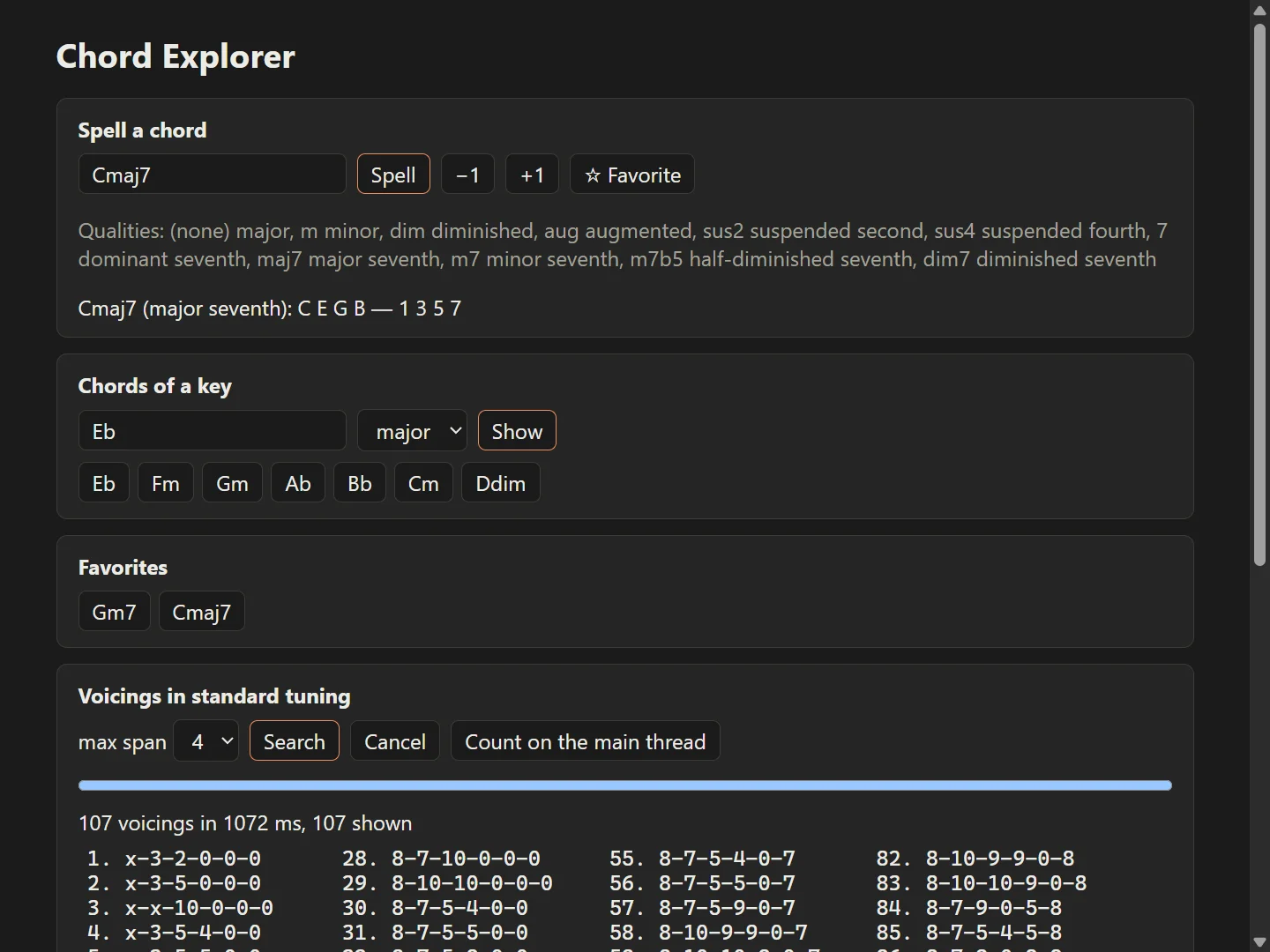
The music theory is a separate crate that knows nothing about Tauri (l16-tauri/Cargo.toml):
[workspace]resolver = "3"members = ["theory", "src-tauri"]l16-tauri/├── Cargo.toml ← the workspace (lesson 10)├── package.json ← @tauri-apps/cli 2.11.4, with its package-lock.json├── theory/ ← notes, chords, scales, voicings: plain Rust, no dependencies├── src-tauri/ ← the Tauri app: commands and state that call theory└── ui/ ← index.html, main.js, styles.cssIt is the layering you would use in .NET, with a class library referenced by the WPF project, or in Java, with a domain module under the JavaFX one: the logic can be tested without a window. cargo test -p theory runs its 15 tests without compiling any of the 236 other crates that the Tauri application pulls in on Windows (cargo tree):
running 15 teststest chord::tests::reports_what_is_wrong ... oktest chord::tests::every_quality_round_trips ... oktest chord::tests::spells_chords_with_the_right_letters ... oktest chord::tests::mask_ignores_spelling ... oktest note::tests::rejects_what_is_not_a_note ... oktest scale::tests::one_letter_per_degree ... oktest note::tests::parses_and_prints_notes ... oktest voicing::tests::rejects_muted_strings_between_sounding_ones ... oktest note::tests::spells_by_letter_then_semitones ... oktest scale::tests::diatonic_triads ... oktest chord::tests::transposes_with_common_spellings ... oktest note::tests::enharmonic_notes_share_a_pitch_class ... oktest voicing::tests::reports_every_batch_and_stops_when_cancelled ... oktest voicing::tests::every_result_is_a_root_position_voicing ... oktest voicing::tests::finds_the_open_chords ... ok
test result: ok. 15 passed; 0 failed; 0 ignored; 0 measured; 0 filtered out; finished in 4.13s
Key takeaways
Section titled “Key takeaways”- Rust desktop UIs come in two families: native rendering (egui, iced, Slint) and a web UI in a webview (Tauri, and Dioxus on the desktop).
- egui redraws the UI from your data at each frame; simple to write, but the work you put in
uiruns on the drawing thread. - A Tauri app is a Rust core process plus the OS webview: WebView2, WKWebView or WebKitGTK. The UI talks to Rust by message passing, in JSON.
- Not shipping Chromium makes the executable a few megabytes instead of hundreds, but the webview’s processes still use memory, and three engines must be tested.
src-tauriis a normal Cargo package;tauri.conf.jsondescribes the windows, the frontend and the security settings.
Exercises
Section titled “Exercises”- Which webview, and which engine version, renders a Tauri window on your machine? Find out from JavaScript, in the window’s developer tools (right-click, Inspect, in a debug build).
Solution
navigator.userAgent describes the engine. In the explorer’s window on Windows:
Mozilla/5.0 (Windows NT 10.0; Win64; x64) AppleWebKit/537.36 (KHTML, like Gecko) Chrome/153.0.0.0 Safari/537.36 Edg/153.0.0.0The Edg/ token is WebView2; its version is the one found in the registry above. On macOS the user agent contains AppleWebKit without Chrome, and on Linux the WebKitGTK version.
- Change the explorer’s window so that it opens at 1100 × 800, cannot be made smaller than 700 × 500, and is titled Chords.
Solution
In src-tauri/tauri.conf.json, the window object accepts minWidth and minHeight (WindowConfig):
"windows": [ { "title": "Chords", "width": 1100, "height": 800, "minWidth": 700, "minHeight": 500 }]tauri dev notices the change and restarts the application. The configuration is read at compile time by tauri::generate_context!(), so a release build must be rebuilt as well.
- Why does the
theorycrate not depend onserde, even though every result reaches JavaScript as JSON?
Solution
Because JSON is a concern of the boundary, not of the music theory. src-tauri converts theory’s types into small serializable structs (ChordView, lesson 17), the equivalent of DTOs in an ASP.NET Core or Spring controller. theory stays usable from a command-line tool, a test or an egui application, and its tests compile in about a second. Adding serde behind an optional Cargo feature (lesson 10) would also be reasonable if several front ends needed the same JSON.