3. Color, tone mapping and HDR environments
Sections
Reading settings
No voice for this language in this browser.
More voices
Code and English terms
Off: the page’s voice reads everything, with no pause between two voices.
No voice for this language in this browser.
More voices
More voices: Microsoft Edge has natural online voices, and Windows (Settings › Time & language › Speech), macOS and Android install others.
Code: the color patches in src/03-color/main.ts, the environment page in src/03-environment/main.ts, and two Node.js scripts: scripts/l03-color.ts and scripts/make-studio-hdr.ts.
Two kinds of numbers
Section titled “Two kinds of numbers”In WPF, Color.FromRgb(128, 128, 128) is a gray, and the number goes to the screen as it is. That works for a 2D interface. It fails for lighting: light adds up linearly, two lamps give twice the light, but the bytes of an image don’t. A monitor’s byte 128 emits about 22 % of the light of byte 255, not 50 %. The sRGB encoding spends more of its 256 steps on dark tones, where the eye sees differences, and less on bright ones.
So three.js keeps two kinds of numbers apart:
- Linear values, proportional to light. Lighting, blending and tone mapping compute with them. This is the working color space,
LinearSRGBColorSpace, writtensrgb-linear. - sRGB values, the ones in color pickers, CSS, PNG and JPEG images, and the canvas. They are converted to linear on the way in and back to sRGB on the way out.
scripts/l03-color.ts shows the conversions without a renderer:
$ node scripts/l03-color.tsworking color space: srgb-linearColor(0x4a2c1d) stores [ 0.0685, 0.0252, 0.0123 ]getHexString() 4a2c1d | getHexString(LinearSRGBColorSpace) 110603setRGB(0.5, 0.5, 0.5).getHexString() bcbcbcsetRGB(0.5, 0.5, 0.5, SRGBColorSpace) stores [ 0.214, 0.214, 0.214 ]new Texture().colorSpace: ""...- A hex color is sRGB. Lesson 2’s rosewood,
0x4a2c1d, has a red byte of 74, which is 0.29 of 255;Colorstores 0.0685, its linear value.getHexString()converts back and gives the hex you wrote; asked for linear values, it gives110603. setRGBwithout a color space takes linear values.setRGB(0.5, 0.5, 0.5)is half the light of white, which isbcbcbcin sRGB, not808080. WithSRGBColorSpaceas fourth argument, the same numbers mean an sRGB gray and are stored as 0.214.- A new texture has no color space, the empty string
NoColorSpace: its values go to the shader as they are. That is right for data, such as normal, roughness or metalness maps, and wrong for a color image, which needstexture.colorSpace = THREE.SRGBColorSpace.GLTFLoadersets it for the textures of a glTF material (lesson 4); for a texture you create yourself, it is your job.
This is the color management of the manual, enabled by default since r152 (migration guide).
Measuring it
Section titled “Measuring it”A page of flat patches makes the rules visible. MeshBasicMaterial ignores lights, so a patch’s pixel is its color after the renderer’s output conversion. The top row holds linear intensities from 0.05 to 8; the bottom row the same gray given four ways (main.ts, lines 40-56):
// Linear values, as a light would produce them: 1 is not the brightest a scene can be[0.05, 0.18, 0.5, 1, 2, 8].forEach((value, i) => {  const color = new THREE.Color().setRGB(value, value, value, THREE.LinearSRGBColorSpace);  patch(`linear ${value}`, new THREE.MeshBasicMaterial({ color }), -6.25 + i * 2.5, 2);});
// A one-pixel texture holding the byte 128, read as sRGB or as raw datafunction grayTexture(colorSpace: string) {  const texture = new THREE.DataTexture(new Uint8Array([128, 128, 128, 255]), 1, 1);  texture.colorSpace = colorSpace;  texture.needsUpdate = true;  return texture;}patch('texture 128, SRGBColorSpace', new THREE.MeshBasicMaterial({ map: grayTexture(THREE.SRGBColorSpace) }), -3.75, -2);patch('texture 128, NoColorSpace', new THREE.MeshBasicMaterial({ map: grayTexture(THREE.NoColorSpace) }), -1.25, -2);// A hex color is sRGB; setRGB() without a color space takes working-space (linear) valuespatch('Color(0x808080)', new THREE.MeshBasicMaterial({ color: new THREE.Color(0x808080) }), 1.25, -2);patch('setRGB(0.5, 0.5, 0.5)', new THREE.MeshBasicMaterial({ color: new THREE.Color().setRGB(0.5, 0.5, 0.5) }), 3.75, -2);
The page reports where each patch’s center is on the screen, and scripts/probe.mjs reads those pixels from the screenshot:
$ node scripts/probe.mjs 03-color --query tone=none{ ... "render": { "calls": 6, "drawCalls": 11, "triangles": 21 }, ... "tone": "none", "pixels": { "linear 0.05": "rgb(63, 63, 63)", "linear 0.18": "rgb(118, 118, 118)", "linear 0.5": "rgb(188, 188, 188)", "linear 1": "rgb(255, 255, 255)", "linear 2": "rgb(255, 255, 255)", "linear 8": "rgb(255, 255, 255)", "texture 128, SRGBColorSpace": "rgb(128, 128, 128)", "texture 128, NoColorSpace": "rgb(188, 188, 188)", "Color(0x808080)": "rgb(128, 128, 128)", "setRGB(0.5, 0.5, 0.5)": "rgb(188, 188, 188)" }}- The output conversion turns linear 0.18, the gray of a photographer’s gray card, into byte 118, and 0.5 into 188: the bytes
bcbcbcof the script. - The texture holding 128 and marked sRGB comes out as 128: decoded on the way in, encoded on the way out. The same texture without a color space comes out as 188: its 128 was taken for a linear 0.5 and encoded. An image with the wrong color space looks washed out.
Color(0x808080)gives 128 andsetRGB(0.5, 0.5, 0.5)gives 188, as the script predicted.- Without tone mapping, 1, 2 and 8 all give 255: the output clips everything above 1.
Tone mapping
Section titled “Tone mapping”A real scene holds far more than 0 to 1. A lit wall can be 0.5 and a lamp in the same view 20: the environment of this lesson has exactly those values. Clipping at 1 turns every highlight into flat white. A tone mapping curve compresses the high values into the displayable range, like a camera or the eye, before the sRGB encoding. It is set on the renderer, and applies to the whole image:
renderer.toneMapping = THREE.ACESFilmicToneMapping;renderer.toneMappingExposure = 1; // the default: a multiplier applied before the curveThe same page with the three curves most used today:
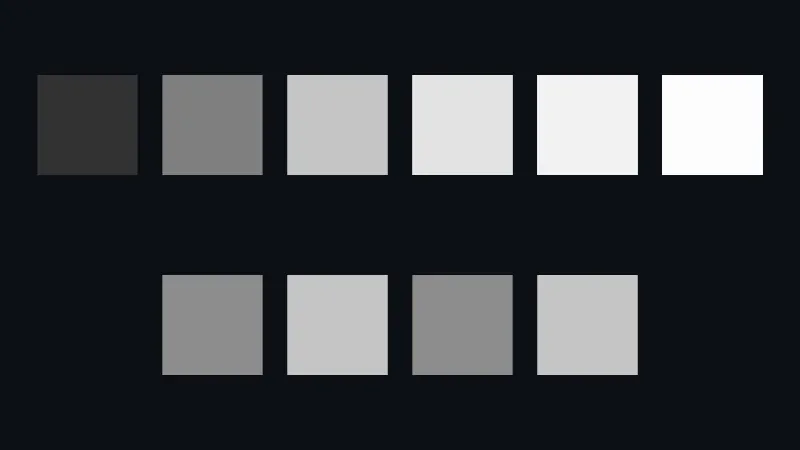
Live page: run it here
Open full screen. Try it: pick agx in tone mapping, then set exposure to 2 and to 4: the two runs of exercise 3.
| Patch | none | ACES Filmic | AgX | Neutral |
|---|---|---|---|---|
| linear 0.05 | 63 | 50 | 70 | 33 |
| linear 0.18 | 118 | 127 | 128 | 105 |
| linear 0.5 | 188 | 197 | 174 | 181 |
| linear 1 | 255 | 227 | 202 | 240 |
| linear 2 | 255 | 242 | 224 | 250 |
| linear 8 | 255 | 253 | 248 | 254 |
| texture 128, sRGB | 128 | 141 | 136 | 116 |
| texture 128, no color space | 188 | 197 | 175 | 181 |
The values are the red channel of each pixel, from node scripts/probe.mjs 03-color --query tone=aces, tone=agx and tone=neutral, with WebGPU on the author’s machine.
- ACES Filmic comes from the film industry’s color system. It raises the mid-tones (0.18 gives 127 instead of 118), darkens the shadows, and still separates 1, 2 and 8. It also shifts saturated colors, which bright oranges and blues show more than grays.
- AgX, from Blender since version 4.0, is the flattest: dark tones brighter, bright tones lower, 8 at 248. Highlights of saturated colors fade toward white instead of changing hue, as film does.
- Neutral, the Khronos PBR Neutral curve, leaves the colors below about 0.8 almost unchanged, except for a darker bottom, and compresses only the top. It is meant for product views, where the base color of a material must match its swatch.
Tone mapping is a choice of look, not a correction: the course uses ACES where a scene has strong highlights, as GA does, and would use Neutral to show a guitar’s finish true to its color. WebGLRenderer draws the same pixels: with ?webgl, ACES gives the same values as WebGPU on this machine. On the CI runners, which draw with a software rasterizer, a few values differ by one, which is why check.sh accepts a difference of two per channel.
WebGPURenderer applies tone mapping and the sRGB encoding in the output pass that lesson 1 counted: one more draw call and one more triangle, 11 draw calls and 21 triangles for 10 patches. WebGLRenderer applies them in each material’s shader instead.
HDR environments
Section titled “HDR environments”A studio photo of a guitar isn’t lit by two lamps: the walls, the ceiling and the softboxes all reflect into the lacquer. Image-based lighting lights a scene from a picture of everything around it, an environment map, instead of light objects. The picture has to hold real light levels, so it is an HDR file, not a PNG.
scripts/make-studio-hdr.ts writes such a file instead of downloading a photo: an equirectangular image, the whole sphere unrolled like a world map, 256 by 128 pixels, with dim walls, a warm floor and two softboxes 40 times brighter than the walls. The format is Radiance RGBE: three 8-bit mantissas that share an 8-bit exponent, so a pixel can hold 20 in 4 bytes (lines 9-15):
function rgbe([r, g, b]: [number, number, number]): number[] { const max = Math.max(r, g, b); if (max < 1e-32) return [0, 0, 0, 0]; const exponent = Math.ceil(Math.log2(max)); const scale = 255.9999 / 2 ** exponent; return [Math.floor(r * scale), Math.floor(g * scale), Math.floor(b * scale), exponent + 128];}$ node scripts/make-studio-hdr.tspublic/generated/studio.hdr: 256×128, 131174 bytes$ node scripts/l03-color.ts...HDRLoader.parse: { width: 256, height: 128, type: 'HalfFloatType', values: 'Uint16Array'}a wall texel (0, 20): [ 0.4038, 0.4038, 0.4451 ] | a softbox texel (64, 32): [ 19.9375, 19.9375, 18.9375 ]HDRLoader decodes the file into half floats, 16 bits per channel, which the GPU filters on every platform, and marks the texture srgb-linear: HDR values are linear light. The softbox comes back as 19.94 instead of 20: RGBE keeps 8 bits of mantissa, and the 16-bit half float rounds again. HDRLoader is the new name of RGBELoader, deprecated in r180: the old class still loads, and warns RGBELoader has been deprecated. Please use HDRLoader instead. (RGBELoader.js).
The page uses the file as both the environment and the background, with no light object at all (main.ts, lines 15-31):
const environment = await new HDRLoader().loadAsync('generated/studio.hdr');environment.mapping = THREE.EquirectangularReflectionMapping;scene.environment = environment;scene.background = environment;scene.backgroundBlurriness = 0.4;
// Rows: a dielectric (metalness 0) and a metal (metalness 1). Columns: roughness from 0 to 1.const sphere = new THREE.SphereGeometry(0.45, 64, 32);for (const [row, metalness] of [0, 1].entries()) {  for (let column = 0; column < 5; column++) {    const material = new THREE.MeshStandardMaterial({ color: 0xd4a373, metalness, roughness: column / 4 });    const mesh = new THREE.Mesh(sphere, material);    mesh.position.set((column - 2) * 1.2, 0.6 - row * 1.2, 0);    scene.add(mesh);  }}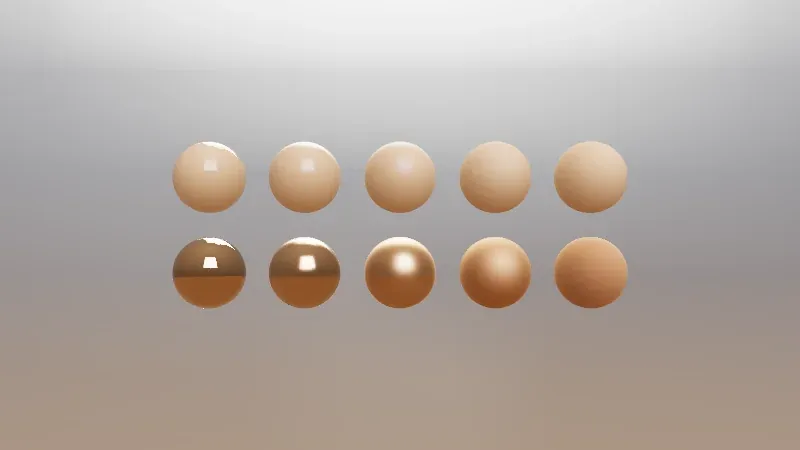
Live page: run it here
Open full screen. Try it: the studio scene of lesson 7 lights a whole guitar with the same studio.hdr, and its panel changes environmentIntensity and the exposure.
Lesson 2’s rules show on every sphere. The dielectrics of the top row keep their tan color and reflect the softbox in white; the metals of the bottom row have no diffuse color, and tint the reflection, which is sharp at roughness 0 and spread over the whole sphere at roughness 1.
PMREM: what the renderer does with the environment
Section titled “PMREM: what the renderer does with the environment”A rough surface reflects a blurred environment, so the renderer needs the environment already blurred at several levels of roughness. It builds a PMREM (prefiltered, mipmapped radiance environment map) from any equirectangular or cube texture given to scene.environment or to a material’s envMap, without being asked: WebGPURenderer wraps the texture in a PMREM node (EnvironmentNode.js, line 64), and WebGLRenderer does the same in WebGLEnvironments.js. The counters show the work:
$ node scripts/probe.mjs 03-environment{ "backend": "WebGPU", "gpu": "nvidia, blackwell", "frame": 4, "render": { "calls": 23, "drawCalls": 12, "triangles": 41665 }, "memory": { "geometries": 12, "textures": 6, "programs": 10 }, "environment": { "width": 256, "height": 128, "halfFloat": true, "colorSpace": "srgb-linear" }}- 23 calls for 3 frames, where the patches page had 6. The frames account for 6: the scene and the output pass. The other 17 are the PMREM, built once during the first frame.
PMREMGenerator.jssizes the cube faces at a quarter of the image’s width, 64 pixels, which gives 9 levels of roughness (_createPlanes, line 747). It draws the image into the first level (1 render), then filters each of the 8 others from the previous one, with a render into a temporary target and a copy back (lines 590-667): 1 + 8 × 2 = 17. - 12 draw calls: 10 spheres, the background and the output pass. The spheres share one geometry, 64 by 32 segments, which is 2 × 64 × 32 − 2 × 64 = 3,968 triangles each. The background is a sphere of its own, 32 by 32 segments (
Background.js, line 131): 1,984 triangles. 39,680 + 1,984 + 1 = 41,665. backgroundBlurrinessreads the background from a blurrier level of the same PMREM, so it costs no extra texture.
A larger HDR file costs more PMREM work at load time, not per frame: a 2K environment gives 512-pixel faces and more levels. A scene that changes environment often should keep its textures and reuse them, since the PMREM is cached per texture.
In GuitarAlchemist/ga
Section titled “In GuitarAlchemist/ga”GA’s fretboard at 05c8eda already uses ACES and an environment. It draws the environment on a canvas, a vertical gray gradient, instead of loading an HDR file:
      const envTexture = new THREE.CanvasTexture(envCanvas);      envTexture.mapping = THREE.EquirectangularReflectionMapping;      envTexture.colorSpace = THREE.SRGBColorSpace;
      // Apply environment map directly (no PMREM for performance)      scene.environment = envTexture;
What this lesson’s measurements say about it:
- The PMREM happens anyway. The comments above that code say PMREM is skipped for WebGPU, to avoid warnings and for performance. Since the renderer builds a PMREM for any equirectangular
scene.environment, as the 17 extra calls above show, assigning the texture directly doesn’t skip it; it only moves it to the first frame. Whether r180, GA’s version, prints the warnings the comment mentions is to verify. - An 8-bit gradient has no highlights. A canvas holds bytes: the brightest part of the gradient,
#e0e0e0, is a linear 0.75, below the 0.5 to 20 range of a studio with softboxes. The metallic strings and frets reflect a gray ceiling, andtoneMappingExposure = 1.2brightens the whole image, not the highlights. An HDR environment, even a generated one like this lesson’s, would give the metal real highlights. - The wood texture has no color space.
createWoodTexture(lines 563-654) paints the wood in#4a3525on a canvas and returns aCanvasTexturewithout settingcolorSpace, and the material uses it asmap(lesson 2). The measurement above predicts the result: the red byte 74 is taken for a linear 0.29, and shown as 147 before lighting, whereSRGBColorSpacewould keep it at 74. The fretboard is lighter and grayer than the color written in the code, which the material’scolormay have been tuned to hide (to verify in a browser). Guitar3D.tsxbuilds its environment withpmremGenerator.fromSceneon a scene that holds only anAmbientLight(lines 171-187). A light with nothing to light renders nothing: the environment is black, and glTF models loaded into that component get no reflections from it.
GA experiment
Section titled “GA experiment”Lesson 14’s experiment 7 lights a grid of metal and plastic spheres, as for strings and frets: different metalness and roughness values don’t add shader programs, since they are uniforms, and physical materials cost shading time, not compilation.
Key takeaways
Section titled “Key takeaways”- The working color space is linear; hex colors and images are sRGB, and three.js converts on the way in and out.
setRGBtakes linear values unless given a color space; a texture you create needscolorSpace = SRGBColorSpacewhen it holds colors, and nothing when it holds data.- Without tone mapping, everything above 1 is white. ACES Filmic, AgX and Neutral compress highlights differently; the choice is a look.
WebGPURendererapplies tone mapping and the sRGB encoding in its output pass.- HDR environments light a scene with real light levels; the renderer turns them into a PMREM once, at a cost that
renderer.infoshows.
Exercises
Section titled “Exercises”- A texture holds a pixel with the bytes (200, 100, 50) and has
NoColorSpace. With no tone mapping and aMeshBasicMaterial, will the red channel on the screen be above or below 200? What about green? - What does
new THREE.Color('#808080').getHexString(THREE.LinearSRGBColorSpace)return? Predict, then check both answers withscripts/l03-exercises.ts. - With AgX, linear 1 gives 202. Which
toneMappingExposurewould you try to make it close to 240, the value Neutral gives, and what happens to linear 0.05? The page takes an?exposure=parameter: check withnode scripts/probe.mjs 03-color --query "tone=agx&exposure=2", then 4.
Solution 1
$ node scripts/l03-exercises.tsbytes [ 200, 100, 50 ] with NoColorSpace are shown as [ 229, 168, 122 ]Color('#808080').getHexString(LinearSRGBColorSpace): 373737Both above. Without a color space, the bytes are taken as linear values, 200/255 = 0.784 and 100/255 = 0.392, and the output encodes them to sRGB. The encoding raises every value between 0 and 1, and dark ones the most: red becomes 229 and green 168. The row “texture 128, no color space” measured the same effect: 128 became 188. The image looks brighter and less saturated than it is.
Solution 2
373737, as the output of solution 1 shows. #808080 is sRGB 0.502, stored as linear 0.2158, and 0.2158 × 255 = 55, which is 37 in hex. It is the same conversion as the rosewood’s 110603 in the script’s output: asking for the linear hex shows what the shader receives.
Solution 3
$ node scripts/probe.mjs 03-color --query "tone=agx&exposure=2"{ ... "tone": "agx", "exposure": 2, "pixels": { "linear 0.05": "rgb(100, 100, 100)", "linear 0.18": "rgb(160, 160, 160)", "linear 0.5": "rgb(202, 202, 202)", "linear 1": "rgb(224, 224, 224)", "linear 2": "rgb(239, 239, 239)", "linear 8": "rgb(254, 254, 254)", ... }}$ node scripts/probe.mjs 03-color --query "tone=agx&exposure=4"{ ... "pixels": { "linear 0.05": "rgb(133, 133, 133)", "linear 0.18": "rgb(189, 189, 189)", "linear 0.5": "rgb(224, 224, 224)", "linear 1": "rgb(239, 239, 239)", "linear 2": "rgb(248, 248, 248)", "linear 8": "rgb(255, 255, 255)", ... }}An exposure of 4 brings linear 1 to 239. Exposure multiplies the linear values before the curve, so each patch moves along the same AgX curve: with exposure 2, linear 1 gives 224, the value linear 2 had with exposure 1, and linear 0.5 gives 202, the old value of linear 1. Everything else moves too: linear 0.05 goes from 70 to 133, and the whole image is much brighter, where Neutral kept 0.05 at 33. Exposure can’t turn AgX into Neutral: the shape of the curve stays.
Sources
Section titled “Sources”- three.js manual: Color management
- three.js documentation:
Color,Texture.colorSpace,Renderer.toneMapping,HDRLoader,PMREMGenerator - three.js source at r186:
ToneMappingFunctions.js,PMREMGenerator.js,EnvironmentNode.js - W3C: sRGB; Khronos: PBR Neutral tone mapper
- Blender manual: AgX view transform
- Greg Ward: the RGBE format