9. Upscaling, seamless textures and HDR
Sections
Reading settings
No voice for this language in this browser.
More voices
Code and English terms
Off: the page’s voice reads everything, with no pause between two voices.
No voice for this language in this browser.
More voices
More voices: Microsoft Edge has natural online voices, and Windows (Settings › Time & language › Speech), macOS and Android install others.
Code: the workflows 09-upscale-model.api.json, 09-hires-fix.api.json, 09-latent-upscale.api.json, 09-seamless.api.json and 09-exr.api.json; the 16-bit PNG decoder in csharp/Png.cs.
Z-Image-Turbo draws 1024 × 1024 images. A print, a desktop background or a texture on a 3D guitar neck needs more pixels, edges that repeat without a visible seam, or more than 8 bits per channel. This lesson does each of these with core nodes, and checks what the files really contain.
The renders ran on an RTX 5080 with ComfyUI v0.36.0. The RAM rule of lesson 8 chose the model at each start: Z-Image-Turbo nvfp4 with the fp4 text encoder when 22 GB of RAM was free, int8 with fp8 when 24 GB was. Each caption names the one it used.
Upscale models
Section titled “Upscale models”An upscale model is a small convolutional network trained to turn a small image into a larger, sharper one. ComfyUI loads it with UpscaleModelLoader, from the models/upscale_models folder, through the spandrel library, and runs it with ImageUpscaleWithModel, “Upscale Image (using Model)”. No diffusion model is involved, and the prompt plays no part.
The course uses Real-ESRGAN x4plus, the model of ComfyUI’s Image Upscale (Z-image-Turbo) blueprint. Comfy-Org repackages it as RealESRGAN_x4plus.safetensors, 66,857,836 bytes, in Comfy-Org/Real-ESRGAN_repackaged. Its license is BSD-3-Clause.
Licenses matter here too. spandrel’s README says the package “only contains architectures with permissive and public domain licenses”, but that covers its code, not the weights: 4x-UltraSharp, a popular ESRGAN model, is CC BY-NC-SA 4.0, non-commercial, according to OpenModelDB. The docs’ upscale tutorial uses another file, 4x-ESRGAN from OpenModelDB, as a .pth.
The node works in tiles: 512 pixels with 32 of overlap, halving the tile size after each out-of-memory error, down to 128. The size has no input in the interface.
09-upscale-model.api.json crops a 256 × 256 detail out of a render and enlarges it four times in three ways:
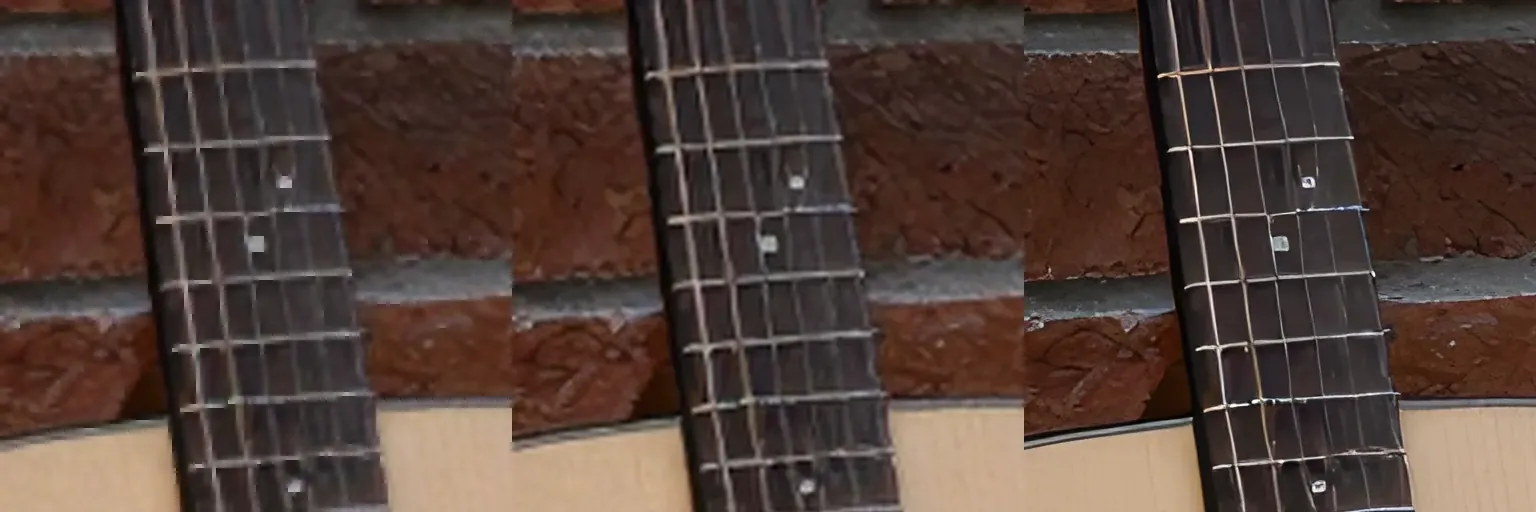
Rendered by ComfyUI v0.36.0: the detail at (384, 384) of the first render of the next section, enlarged 4 × with ImageScaleBy nearest-exact, ImageScaleBy lanczos, and ImageUpscaleWithModel with RealESRGAN_x4plus.safetensors, workflow 09-upscale-model.api.json. Each panel shows the middle 512 × 512 pixels of the 1024 × 1024 result, at 1:1.
The upscale model invents plausible edges; Lanczos only interpolates. The run took 2.08 seconds, including loading the model.
The hires fix
Section titled “The hires fix”An upscale model sharpens what is there; it doesn’t add detail. The hires fix does: “Hires fix is just creating an image at a lower resolution, upscaling it and then sending it through img2img”, says ComfyUI’s 2-pass example. The second pass is lesson 5’s img2img, at a low denoise, on the larger image.
09-hires-fix.api.json follows the Image Upscale (Z-image-Turbo) blueprint:
- Z-Image-Turbo draws a 1024 × 1024 image, as in lesson 8.
- Real-ESRGAN enlarges it to 4096 × 4096, and
ImageScaleBylanczos0.5 brings it back to 2048 × 2048. VAEEncode, then aKSamplerwith 5 steps, CFG 1,dpmpp_2m_sde,betaand denoise 0.33, the blueprint’s values.VAEDecodeTileddecodes the 2048 × 2048 latent in 1024-pixel tiles.
The blueprint’s second prompt is “masterpiece, 8k”; the workflow keeps the first prompt instead.
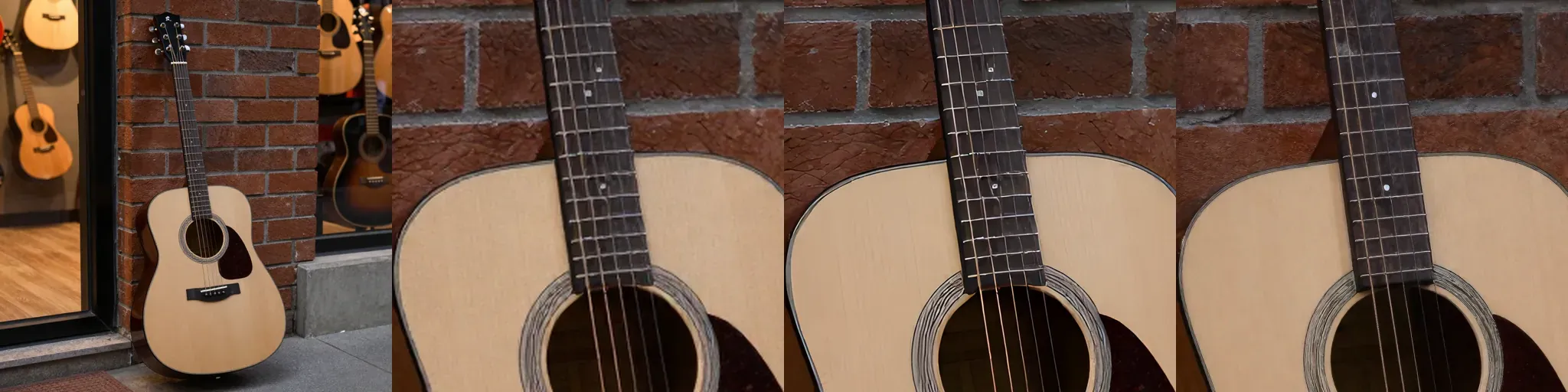
Rendered by ComfyUI v0.36.0: Z-Image-Turbo nvfp4 with Qwen3 4B fp4 mixed, seed 42, 8 steps, CFG 1, res_multistep, simple, shift 3, prompt “an acoustic guitar leaning against a brick wall in a small music shop, warm evening light, photograph”, workflow 09-hires-fix.api.json. From left to right: the first pass; the crop (768, 768) to (1280, 1280) of Lanczos 2 ×, Real-ESRGAN then Lanczos 0.5, and the hires fix at denoise 0.33 with seed 42.
Look at the neck: the hires fix adds wood grain and texture, and also moves the fret markers. Denoise decides how much it may change:
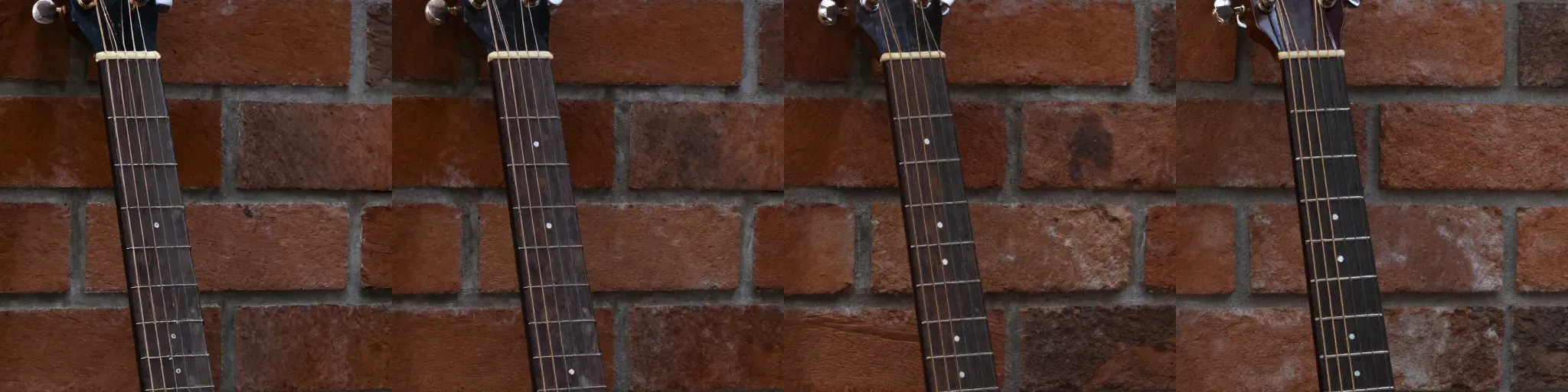
Rendered by ComfyUI v0.36.0: the same workflow and first pass, second pass denoise 0.2, 0.33, 0.5 and 0.7, crop (768, 256) to (1280, 768).
Time and memory
Section titled “Time and memory”At 1024 × 1024 a step took about 0.3 seconds. At 2048 × 2048 a step took 2.2 to 2.8 seconds: four times the pixels, and about eight times the time. The attention layers compare every patch with every other patch, so their cost grows with the square of the number of patches. With the model loaded, the whole workflow with a new seed took 26.4 seconds; changing only the second pass’s denoise took 16.4 seconds, because ComfyUI reused the cached first pass and upscale (lesson 4).
VAEDecodeTiled isn’t needed for memory here. The same graph with a plain VAEDecode ran without the “Ran out of memory when regular VAE decoding, retrying with tiled VAE decoding” warning ComfyUI prints when it falls back. The two images differ by 0.93 levels per channel on average, at most 29 of 255, and by more than 8 levels on 0.02 % of the pixels: the tile blending of VAEDecodeTiled is close, not identical. Keep it for 4K images, video, or a smaller GPU.
In latent space
Section titled “In latent space”The older hires fix skips the pixels: LatentUpscaleBy enlarges the latent itself, here with bislerp, and a second KSampler samples at denoise 0.3, 0.55 or 0.75.
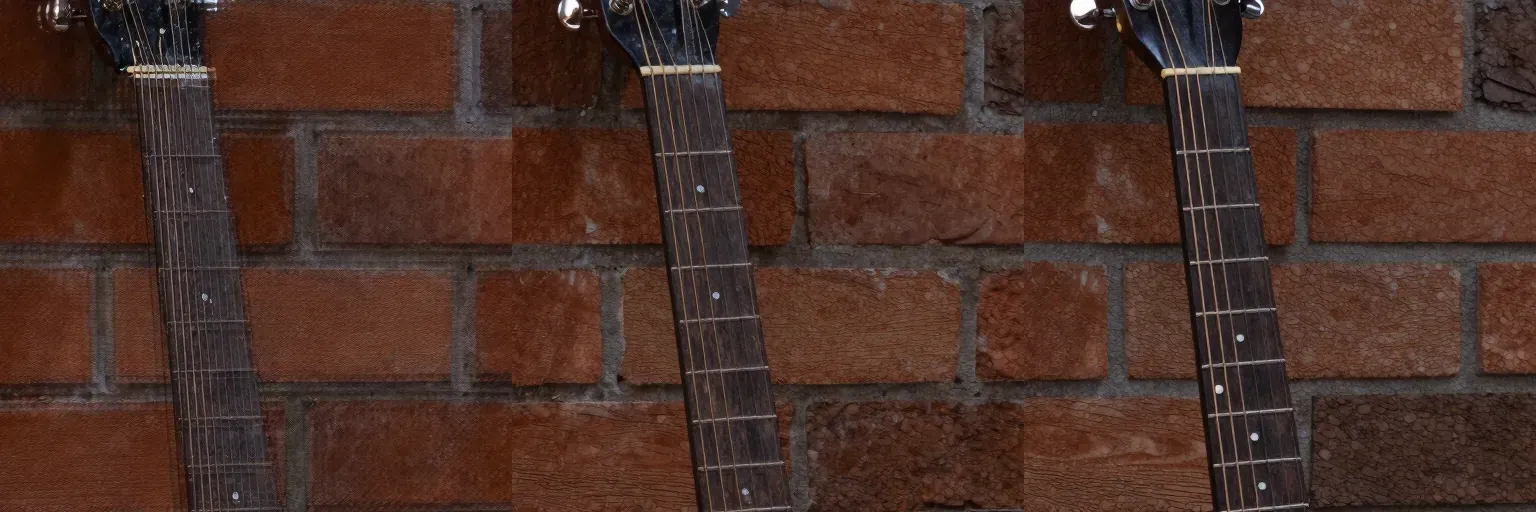
Rendered by ComfyUI v0.36.0: Z-Image-Turbo nvfp4, same first pass, LatentUpscaleBy bislerp 2 ×, second KSampler with 8 steps, res_multistep, simple, denoise 0.3, 0.55 and 0.75, workflow 09-latent-upscale.api.json.
An enlarged latent isn’t a latent the VAE could have produced: at denoise 0.3 the sampler doesn’t have enough steps left to clean it, and the grain stays. It needs about 0.55, which also changes more of the image. The pixel route keeps the composition at a lower denoise, at the price of an upscale model. The second pass took 17.8 seconds here, with 8 steps at 2048 × 2048.
For large images in pieces, core also has SplitImageToTileList and ImageMergeTileList, which blend the tiles with a sine window; sampling each tile and merging them is to verify. Tiled diffusion nodes such as Ultimate SD Upscale are custom nodes (lesson 11).
Seamless textures
Section titled “Seamless textures”A texture tiles when its right edge continues its left edge, and its bottom edge its top one. A render doesn’t: repeating it 2 × 2 shows a grid. Some tools make the model’s convolutions wrap around the image; ComfyUI’s core has no such option in v0.36.0. circular padding appears in pad_to_patch_size, for patching, where no input reaches it.
The classic workaround works with core nodes:
- Offset by half. Four
ImageCropV2nodes cut the quarters, and threeImageStitchnodes swap them. The old edges now meet in a cross in the middle, and the new edges were neighbours in the render, so they tile. - Mask the cross.
SolidMask,FeatherMaskandMaskCompositebuild a soft cross, 384 pixels wide with 128 pixels of feather on each side. - Repaint the cross.
VAEEncodeandSetLatentNoiseMask(lesson 5), then aKSamplerat denoise 1.0 with the same prompt. - Keep the edges.
ImageCompositeMaskedpastes the repainted pixels back through the mask, so the edges stay exactly as they were.

Rendered by ComfyUI v0.36.0: Z-Image-Turbo int8 convrot with Qwen3 4B fp8 mixed, seed 42 for both passes, 8 steps, CFG 1, res_multistep, simple, prompt “flat top-down photograph of dark rosewood, fine straight grain, even soft lighting, no shadows, wood texture”, workflow 09-seamless.api.json. From left to right: the render, the offset, the mask, the result.
The workflow also stitches each texture 2 × 2, to check the tiling by eye:

Rendered by ComfyUI v0.36.0: the same workflow and model. From left to right: rosewood as rendered, repaired; maple, prompt “flat top-down photograph of pale maple wood, a planed board with fine straight grain, even soft lighting, wood texture”, as rendered, repaired. Each panel is a 2048 × 2048 repeat shown at 512 × 512.
To measure a seam, compare the jump across it with the jump between ordinary neighbouring pixels. The mean absolute difference between two adjacent columns, in levels of 255:
| Rosewood, int8 | Middle row | Middle column | Typical neighbouring rows | Typical neighbouring columns |
|---|---|---|---|---|
| Offset, before the repair | 9.41 | 10.35 | 3.08 | 5.66 |
| Repaired, denoise 0.85 | 3.58 | 5.81 | 3.04 | 5.51 |
| Repaired, denoise 1.0 | 3.67 | 5.68 | 3.03 | 5.56 |
The seams are down to the texture’s own variation. What the numbers don’t show is tone: the halves came from parts of the render with different average brightness, and the repaint blends them over 384 pixels instead of removing the difference. On maple, the middle column still jumps by 9.88 against 5.71 for neighbours: its grain is smooth, so the step shows. A prompt for an evenly lit, uniform material helps more than any setting.
The first attempt, with a 160-pixel cross, 64 pixels of feather and denoise 0.7, left a speckled line and a visible step: the journal shows it.
HDR, and what the files hold
Section titled “HDR, and what the files hold”A diffusion model draws in the VAE’s range: the default output step clamps every pixel to 0 to 1. The 8-bit PNG of SaveImage rounds that range to 256 levels. SaveImageAdvanced, “Save Image (Advanced)”, writes more:
- PNG, 8 or 16 bits per channel, sRGB.
- EXR, 32-bit float.
input_color_spacesays what the pixels are: sRGB is converted to linear light,HDRis decoded from HLG, andlinearis written as is. - AVIF, 8 or 10 bits, sRGB,
HDR(BT.2020 with HLG) orHDR PQ.
In the API format, the options of a dynamic input have dotted names: "format": "exr", "format.bit_depth": "32-bit float", "format.input_color_space": "sRGB".
09-exr.api.json saves the 1024 × 1024 render of the hires fix three ways. ImageColorSpace converts it to HLG before the AVIF. The files were read back with PyAV, from the portable build’s Python:
| File | Size | What it holds |
|---|---|---|
SaveImage, 8-bit PNG |
1,623,741 bytes | 256 levels per channel |
| 16-bit PNG | 1,922,698 bytes | rgb48be, and still 256 distinct levels in the red channel |
| EXR, sRGB input | 12,600,735 bytes | gbrpf32le, uncompressed, minimum 0.0, maximum 1.0, no value above 1 |
| AVIF, HLG | 117,350 bytes | yuv420p10le, primaries 9 (BT.2020), transfer 18 (HLG) |
The deeper files hold the same 256 levels. A 16-bit PNG or a float EXR is useful as input to a later step that works in float, such as color grading. Light brighter than white doesn’t come from the model: nothing in the EXR exceeds 1.0, which in ComfyUI’s convention is the 203-nit reference white of sRGB. The node’s description says so: “Linear 1.0 uses the same 203-nit reference white as sRGB; HLG uses a 1000-nit reference display.”
Two traps:
LatentOperationTonemapReinhard, found by searching “hdr latent”, tone-maps the guidance vector, to tame high CFG. It makes no HDR pixels.LoadImagemay not list the EXR it just saved, and that depends on the machine. The filter asks Python’smimetypesfor each file’s type and keeps those that start withimage, andmimetypesreads the operating system’s table: the registry on Windows, files such as/etc/mime.typeselsewhere. Measured bydata/mime-info.pyon three machines, all with Python 3.13: on this Windows machine and on themacos-latestrunner,.exrhas no MIME type, so the list drops it; on theubuntu-latestrunner it isimage/aces, and the list keeps it. The same ComfyUI, the same workflow, a different list..glbsplits the same way, and.flacisaudio/flacon that Linux andaudio/x-flacon the other two — both start withaudio, so that one changes nothing. This is what matters when a workflow is shared: a file built on a machine where.exrhas a MIME type names an image the same list refuses to offer elsewhere — the workflow stays valid, but it is no longer reproducible. If you must reload an EXR, pass it by path from your own node or add the type to the machine.
In three.js
Section titled “In three.js”three.js reads these files. EXRLoader supports uncompressed EXR, as ComfyUI writes it, and loads it as HalfFloatType by default; loading this file in a browser is to verify. For .hdr files, RGBELoader has been deprecated since r180: use HDRLoader. For a color texture, an 8-bit PNG with texture.colorSpace = SRGBColorSpace is usually enough; MeshStandardMaterial expects data maps such as normalMap in NoColorSpace. Lesson 13 builds such textures for the site.
Key takeaways
Section titled “Key takeaways”- An upscale model sharpens without a prompt; check its weights’ license, not only its architecture’s.
- The hires fix adds detail with a second img2img pass. Denoise 0.2 to 0.35 keeps the composition in pixel space; a latent upscale needs about 0.55 and changes more.
- At 2048 × 2048 each step took about eight times as long as at 1024 × 1024.
- Core ComfyUI has no tiling convolution: offset the texture by half, repaint a soft cross, paste it back through the mask, and measure the seams.
- A 16-bit PNG, a float EXR or an HLG AVIF made from a render holds no light beyond white: the VAE’s output is clamped to 0 to 1.
Your turn
Section titled “Your turn”Make a seamless texture for something of your own: a fretboard wood, a brushed-metal pickguard, a speaker grille cloth. Render it, run 09-seamless.api.json with your prompt and --set 5.text=..., and stitch it 2 × 2. Then try to break it: a prompt with a large feature, such as “a single knot in the middle”, and see what the cross does to it.
Exercises
Section titled “Exercises”- You enlarge a 1024 × 1024 render to 2048 × 2048 for a print. Which route keeps the composition exactly, which adds detail, and what does each cost?
- A colleague saves a Z-Image-Turbo render as a 32-bit EXR and asks you to use it as an HDR environment map, “since it’s HDR”. What do you answer?
- In
09-seamless.api.json, why doesImageCompositeMaskedpaste the repainted image through the mask, instead of saving theVAEDecodeoutput?
Solution 1
Lanczos or an upscale model keeps every shape where it is: Lanczos is instant and soft, Real-ESRGAN took about 2 seconds here and sharpens edges. The hires fix adds detail by sampling again at 2048 × 2048, at about 2.5 seconds a step on this GPU, and moves small things: at denoise 0.33 the fret markers moved. For a print of this guitar, Real-ESRGAN then a hires fix at 0.2 to 0.3 is a good start; compare the crops before choosing.
Solution 2
The container is HDR, the content isn’t. The VAE clamps its output to 0 to 1, so the brightest pixel is 1.0, the sRGB white: the warm light in the picture is no brighter than a white wall, and an environment map made from it lights a scene like a flat sRGB image. The EXR is still useful for grading in float. A real HDR environment needs measured or rendered light, for example a bracketed photo or a 3D render, to verify with your renderer.
Solution 3
SetLatentNoiseMask limits the noise to the masked area, but the whole image still goes through VAEEncode and VAEDecode, and the VAE changes every pixel slightly: lesson 5 measured it outside the mask. The edges must stay exactly as they were, because they are what tiles. Pasting through the mask takes the unmasked pixels from the offset image, untouched.
Sources
Section titled “Sources”- X. Wang, L. Xie, C. Dong and Y. Shan, Real-ESRGAN: Training Real-World Blind Super-Resolution with Pure Synthetic Data, 2021.
- ComfyUI documentation: Upscale tutorial, ImageColorSpace; ComfyUI examples: 2 pass txt2img.
- ComfyUI at v0.36.0:
comfy_extras/nodes_upscale_model.py,comfy_extras/nodes_images.py,comfy_extras/nodes_latent.py,nodes.py,comfy/sd.py,folder_paths.py. - Models: xinntao/Real-ESRGAN, Comfy-Org/Real-ESRGAN_repackaged, OpenModelDB 4x-UltraSharp, chaiNNer-org/spandrel.
- three.js: EXRLoader, HDRLoader, MeshStandardMaterial.