5. Interaction, Raycaster and camera controls
Sections
Reading settings
No voice for this language in this browser.
More voices
Code and English terms
Off: the page’s voice reads everything, with no pause between two voices.
No voice for this language in this browser.
More voices
More voices: Microsoft Edge has natural online voices, and Windows (Settings › Time & language › Speech), macOS and Android install others.
Code: the page in src/05-picking/main.ts, the fretboard it shares with the scripts in src/05-picking/fretboard.ts, the ray tests without a browser in scripts/l05-raycaster.ts, and the exercises in scripts/l05-exercises.ts.
Hit testing, in three toolkits
Section titled “Hit testing, in three toolkits”A 3D scene doesn’t know where the pointer is. WPF does the work for you: VisualTreeHelper.HitTest on a Viewport3D returns a RayMeshGeometry3DHitTestResult with the mesh, the point and the triangle. JavaFX puts a PickResult in every mouse event. MonoGame gives you the pieces: Viewport.Unproject to turn a screen point into two points in the world, a Ray between them, and Ray.Intersects against bounding boxes and spheres, never against triangles.
three.js is in between. Raycaster turns a pointer position into a ray from the camera, and tests it against the triangles of meshes; wiring the pointer events is your job.
| WPF 3D | MonoGame | JavaFX 3D | three.js | |
|---|---|---|---|---|
| Input | a point in the Viewport3D |
a point in the window | a mouse event | normalized device coordinates, −1 to 1 |
| Tested against | ModelVisual3D triangles |
BoundingBox, BoundingSphere, Plane |
Node triangles |
Mesh triangles, Points and Line within a threshold, sprites |
| Result | the nearest hit, or a callback per hit | a distance | the nearest node, point, face and texture coordinate | every hit, sorted by distance: object, point, face, UV, instance |
| Skipping objects | IsHitTestVisible |
your code | mouseTransparent |
layers, or the list of objects you pass |
The scene: a fretboard to point at
Section titled “The scene: a fretboard to point at”fretboard.ts builds the neck of lesson 2 again, longer: a box, 12 frets and 6 strings, all in one Group. The frets follow the rule of a real guitar, each one a twelfth root of two closer to the bridge (line 16), so a point’s X gives the fret back with a logarithm, and its Z gives the nearest string (lines 20-36):
// Where a finger at x presses: 0 before the nut side of fret 1, n between fret n − 1 and fret nexport function fretAt(x: number): number | null { if (x < NUT_X || x > fretX(FRETS)) return null; return Math.ceil(-12 * Math.log2(1 - (x - NUT_X) / SCALE));}The file imports nothing from the DOM, so the page and a Node.js script share it.
From a pointer event to a ray
Section titled “From a pointer event to a ray”A Raycaster wants the pointer in normalized device coordinates (NDC): −1 at the left edge of the canvas, +1 at the right, +1 at the top and −1 at the bottom, whatever its size in pixels. The page computes them from the canvas’s own rectangle (main.ts, lines 35-44):
// The pointer in normalized device coordinates (−1 to 1), from the canvas's own rectangleconst pointer = new THREE.Vector2();let pointerInside = false;let pointerMoved = false;renderer.domElement.addEventListener('pointermove', (event) => { const rect = renderer.domElement.getBoundingClientRect(); pointer.set(((event.clientX - rect.left) / rect.width) * 2 - 1, -((event.clientY - rect.top) / rect.height) * 2 + 1); pointerInside = true; pointerMoved = true;});Y is flipped: the DOM counts down from the top, NDC counts up. setFromCamera then starts the ray at the camera’s position and points it through the pointer, by unprojecting the point (x, y, 0.5) with the camera’s matrices. For an orthographic camera, every ray is parallel and starts in the camera’s plane.
Then intersectObject tests the ray, and the first hit gives the fret, the string and the note (lines 59-73):
function pick(ndc: THREE.Vector2): Pick { raycaster.setFromCamera(ndc, camera); // Recursive: the fretboard group's children are the neck, the frets and the strings const [hit] = raycaster.intersectObject(board, true); if (!hit) return null; const fret = fretAt(hit.point.x); const string = stringAt(hit.point.z); return { object: hit.object.name, point: hit.point.toArray().map((n) => Number(n.toFixed(3))), fret, string, note: fret === null ? null : noteName(string, fret), };}What a ray finds, without a browser
Section titled “What a ray finds, without a browser”Raycaster is plain math on the CPU: no renderer, no GPU, no DOM. scripts/l05-raycaster.ts builds the same fretboard and camera in Node.js, and shoots rays at it:
$ node scripts/l05-raycaster.tspointer (NDC): [ -0.1894, 0.0006 ]ray origin [ -0.2, 2.4, 1.6 ] direction [ -0.122, -0.789, -0.602 ]intersectObject(board, true): neck at 2.584first hit: { point: [ -0.514, 0.36, 0.045 ], faceIndex: 4, uv: [ 0.413, 0.418 ] }fret 5, string 3: C4intersectObject(board, false): (none)over string 1: string 1 at 2.598 | neck at 2.648strings on layer 1: neck at 2.648raycaster.layers.enable(1): string 1 at 2.598 | neck at 2.648far = 2: (none)ray.intersectPlane: [ -0.514, 0.36, 0.045 ]over fret 4, InstancedMesh: frets (instanced) at 2.531, instance 310,000 × intersectObject(board, true): N µs per ray10,000 × ray.intersectPlane: N µs per rayLine by line:
- The point where a finger presses string 3 at fret 5 projects to NDC (−0.19, 0.0006): left of the center, at mid-height. The ray leaves the camera at (−0.2, 2.4, 1.6), and meets the top of the neck 2.584 units away, at (−0.514, 0.36, 0.045): fret 5, string 3, C4.
- Each hit carries the point, the distance, the triangle’s index (
faceIndex) and the texture coordinate at that point (uv), interpolated from the triangle’s vertices. intersectObject(board, false)finds nothing: theGroupitself has no geometry, and withoutrecursiveits children aren’t tested.- Over string 1, the ray meets the string first, then the neck behind it: the array holds every hit along the ray, sorted by distance, not only the nearest one.
- An object on layer 1 is skipped:
Raycastertests an object only if its layers share one with the raycaster’s (Raycaster.js, lines 240-250). It doesn’t testvisible: an invisible mesh is still hit, which exercise 1 turns into a feature. far = 2ignores everything farther than 2 units, and the neck is 2.584 away.- Against a mathematical plane at the height of the neck,
ray.intersectPlanegives the same point, with no mesh at all. - With the frets as one
InstancedMesh, the hit says which instance:instanceId3 is fret 4. - The cost, on the author’s machine: a few microseconds per ray against the 19 meshes, a few hundredths of a microsecond against the plane. Each mesh is first tested against its bounding sphere, then triangle by triangle.
check.shreplaces the numbers with N, since they change with every run.
Two details of the script matter in any code that raycasts outside a render loop. A page renders before it raycasts, and rendering updates the objects’ world matrices; a script, a test or an event handler that runs before the first frame must call updateMatrixWorld() itself. And the camera, which isn’t in the scene, needs it too: without camera.updateMatrixWorld(), the first version of this script projected the press point to an NDC of −3.6, far outside the canvas.
Real pointer events in a headless browser
Section titled “Real pointer events in a headless browser”The page’s probe asks scripts/probe.mjs to move Playwright’s mouse over the canvas, in 5 steps, to the screen position of string 3 fret 5, then string 6 fret 8, then above the neck, and to drag 120 pixels to the right. Chromium turns these into real pointermove, pointerdown and pointerup events. After each action, the page renders two frames and reports what it picked:
$ node scripts/probe.mjs 05-picking{ "frame": 4, "render": { "calls": 6, "drawCalls": 20, "triangles": 781 }, "memory": { "geometries": 9, "textures": 3, "programs": 4 }, "canvas": [0, 0, 800, 450], "after": { "string 3, fret 5": { "pick": { "object": "neck", "point": [-0.515, 0.36, 0.046], "fret": 5, "string": 3, "note": "C4" } }, "string 6, fret 8": { "pick": { "object": "neck", "point": [0.286, 0.36, -0.226], "fret": 8, "string": 6, "note": "C3" } }, "beside the neck": { "pick": null }, "orbit 120 px right": { "camera": [-1.791, 2.4, -0.167], "target": [-0.2, 0.3, 0] } }}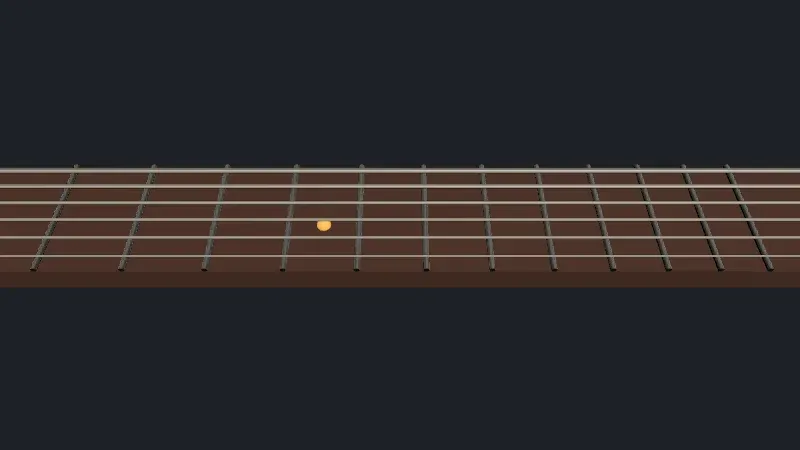
Live page: run it here
Open full screen. Try it: tick 240 px sidebar for the layout of exercise 3, and move the pointer over the strings; tick damping and drag to feel what enableDamping changes.
The screenshot is taken after the first move: the orange marker sits where the pointer is. The picked point differs from the script’s in the third decimal, (−0.515, 0.36, 0.046) instead of (−0.514, 0.36, 0.045), since the page rounds the target to whole CSS pixels before the mouse moves there. Three things are worth reading:
- 20 draw calls for the neck, 12 frets, 6 strings and the output pass. Picking costs nothing on the GPU.
- One raycast per frame. The page raycasts at most once per frame, and only when the pointer moved (lines 75-92). A mouse can send more
pointermoveevents than the screen shows frames, and a raycast in the event handler would test the scene for positions nobody sees. - The orbit. A 120-pixel drag turned the camera by 96° around the target:
OrbitControlsrotates by 2π × pixels ÷ the element’s height, “yes, height” says the source (OrbitControls.js, line 1118), so 120 ÷ 450 of a full turn. The camera stays 1.6 units from the axis and at the same height.
Controls
Section titled “Controls”const controls = new OrbitControls(camera, renderer.domElement);controls.target.set(-0.2, 0.3, 0);controls.enableDamping = params.has('damping');controls.update();OrbitControls lives in three/addons/controls/OrbitControls.js, not in the core. It listens to pointerdown on the canvas, then captures the pointer (setPointerCapture) and listens to pointermove and pointerup on the document, so a drag that leaves the canvas keeps turning (lines 1553-1564). It sets touch-action: none on the canvas, so that a finger turns the camera instead of scrolling the page. With enableDamping, the camera keeps moving for a while after the drag: controls.update() must then run every frame, which the loop does. controls.dispose() removes the listeners (lines 512-538); a component that creates controls and never disposes them leaves those listeners behind.
The addons have other controls, with the same constructor: MapControls (panning first, as in a map), TrackballControls (no fixed up direction), PointerLockControls (first person), TransformControls (a gizmo to move an object) and DragControls.
When the canvas doesn’t start at (0, 0)
Section titled “When the canvas doesn’t start at (0, 0)”Many examples on the web compute NDC from the window: event.clientX / window.innerWidth * 2 - 1. That is right only when the canvas fills the window. With ?sidebar, the page puts a 240-pixel panel left of the canvas, and computes both versions for the same pointer event (lines 50-54):
$ node scripts/probe.mjs 05-picking --query sidebar{ "frame": 4, "render": { "calls": 6, "drawCalls": 20, "triangles": 781 }, "memory": { "geometries": 9, "textures": 3, "programs": 4 }, "canvas": [240, 0, 560, 450], "after": { "string 3, fret 5": { "pick": { "object": "neck", "point": [-0.515, 0.36, 0.046], "fret": 5, "string": 3, "note": "C4" }, "pickFromWindow": { "object": "neck", "point": [-0.072, 0.36, 0.046], "fret": 7, "string": 3, "note": "D4" } }, "string 6, fret 8": { "pick": { "object": "neck", "point": [0.286, 0.36, -0.226], "fret": 8, "string": 6, "note": "C3" }, "pickFromWindow": { "object": "neck", "point": [0.511, 0.36, -0.226], "fret": 9, "string": 6, "note": "C#3" } }, "beside the neck": { "pick": null, "pickFromWindow": null }, "orbit 120 px right": { "camera": [-1.791, 2.4, -0.167], "target": [-0.2, 0.3, 0] } }}The canvas is now 560 by 450 pixels at x = 240. From its own rectangle, the page still finds string 3 fret 5. From the window, the same pointer lands two frets further, on a note a whole tone higher, with no error anywhere. The page’s resize listener has the same trap: it sizes the renderer from its container, not from the window (lines 94-103).
In GuitarAlchemist/ga
Section titled “In GuitarAlchemist/ga”GA has Raycaster in 14 files. All of them compute NDC from the canvas’s rectangle, so the sidebar bug above isn’t there. The differences are in when they raycast, and what they clean up.
- A listener per effect run.
ThreeHeadstock.tsxadds its click handler withcanvas.addEventListener('click', handleClick)insetupMouseInteraction(lines 698-744), called from auseEffectwhose dependencies include the guitar model, the style, the tuning, the width and the height (line 178). The cleanup disposes the controls and the renderer, but never removes the listener, and the canvas is the same element across runs (canvasRef). After each change of tuning, one more handler runs on every click, each with the scene of its own run. Whether the old scenes still callonTuningPegClickis to verify in the browser. The handler also testsscene.childrenrecursively (line 713): every mesh of the headstock, where only the pegs are clickable. - A raycast per mouse event.
TonalOrbit.tsxpicks on everypointermove(lines 835-850), and builds a newVector2and a new array of meshes each time (lines 799-813).MinimalThreeInstrument.tsxcreates a newRaycasterin its ReactonMouseMovehandler (lines 664-675). The garbage is small; the raycasts for positions no frame shows are the larger cost. - The pattern of this lesson, already in GA. Prime Radiant’s
InteractionHandler.tsstores the NDC inmousemove(lines 64-68), raycasts from the render loop, and removes its three listeners indispose(lines 58-62). Its nodes carry an invisible, larger sphere for the ray to hit (NodeRenderer.ts, lines 86-95), the technique of exercise 1. It checks hover on every frame, even when the pointer didn’t move; thepointerMovedflag of this lesson’s page would skip those. - Controls without
dispose. Of the 25 files that createOrbitControls, four never dispose them, among themBSP/HarmonicNavigator3D.tsx(line 189), whose cleanup disposes the renderer only (lines 250-260). The canvas is removed with the component, and its listeners with it, but thekeydownlistener that the controls add to the document (line 505) stays.
Live demo: a whole guitar
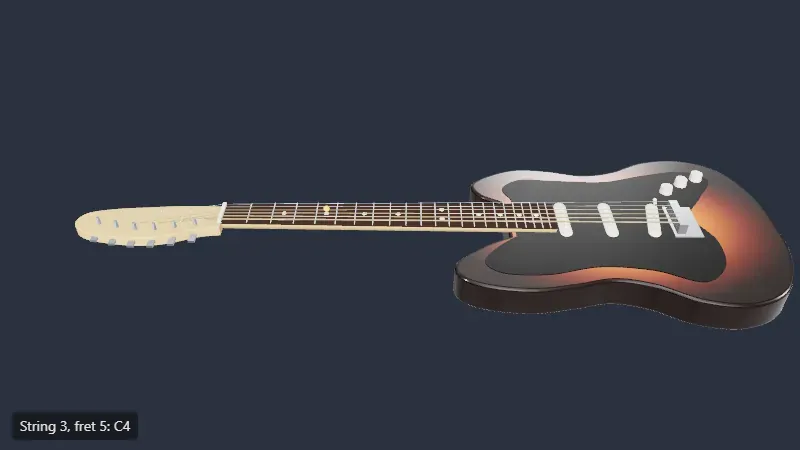
Section titled “Live demo: a whole guitar”The same two steps on a whole guitar, modeled in code rather than loaded: the body and the headstock are extruded outlines, and the frets, inlays, pole pieces, saddles and tuners are instanced meshes. A ray against an invisible box over the fretboard, then its crossing with the plane of the strings, gives a fret from its x coordinate and a string from its z coordinate, with lesson 13’s fretAtX and noteAt. A click plucks the string, which vibrates in its vertex shader, and plays the note through a small Karplus-Strong synthesizer on the Web Audio API. Its probe clicks string 3 at fret 5 with Playwright’s mouse and reads string 3, fret 5: C4, with 32 draw calls and 47,405 triangles. The source is in code/threejs/demos/guitar.
Live page: run it here
Open full screen. Try it: click any string between two frets; the panel strums chords, and ?view=body or ?view=headstock starts closer. The pick doesn’t hit the string meshes, so the problem of exercise 1 doesn’t arise here: compare the two approaches.
GA experiment
Section titled “GA experiment”Lesson 14’s experiment 3 picks one note among 10,000: Raycaster takes half a millisecond, seven times less than a GPU ID pass with its readback, and the two meet around 100,000 notes. On WebGL 2, the readback alone took 17 ms.
Key takeaways
Section titled “Key takeaways”Raycaster.setFromCameratakes normalized device coordinates: compute them from the canvas’sgetBoundingClientRect(), not from the window.intersectObject(object, true)returns every hit along the ray, nearest first, with point, distance, face, UV and, for instanced meshes,instanceId.- The raycaster tests layers, not
visible;far,nearand the list of objects you pass limit the work. - Raycasting is CPU math: test it in Node.js, but update the world matrices yourself, the camera’s included.
- Raycast from the frame loop, once, when the pointer moved; remove your listeners and dispose controls when the component goes.
Exercises
Section titled “Exercises”- The strings are thin: a pointer 0.012 units beside string 1 lands on the neck. Make each string easier to hit without making it look thicker. Check with
scripts/l05-exercises.ts. - Note dots drawn as
Pointshave no surface. How doesRaycasterdecide that a point is hit? Aim 0.04 units to the right of the dot at fret 5, and try thresholds of 1, 0.1, 0.05 and 0.02. - With the
?sidebarlayout, the window-based pick said fret 7. Without running the page, which fret would it say for a sidebar of 480 pixels, and why can’t you tell from the NDC alone?
Solution 1
Add an invisible, thicker cylinder at each string’s position, in the same group. Raycaster tests layers, not visible, and the renderer skips invisible objects (lines 13-31):
const proxyMaterial = new THREE.MeshBasicMaterial();for (const string of strings) { const proxy = new THREE.Mesh(new THREE.CylinderGeometry(0.02, 0.02, 1, 8).rotateZ(Math.PI / 2), proxyMaterial); proxy.name = `${string.name} (hit area)`; proxy.visible = false; proxy.scale.x = (string.geometry as THREE.CylinderGeometry).parameters.height; proxy.position.copy(string.position); board.add(proxy);}$ node scripts/l05-exercises.ts0.012 beside string 1: neck at 2.654with invisible hit areas: string 1 (hit area) at 2.584 | neck at 2.654...The hit area’s name says which string it stands for. GA’s NodeRenderer.ts does the same with visible: false on the material instead of the mesh; Mesh.raycast returns early only when there is no material at all (Mesh.js, line 244), so both work.
Solution 2
threshold 1: 3 hit(s), nearest to the ray: index 2, first: index 3threshold 0.1: 1 hit(s), nearest to the ray: index 2, first: index 2threshold 0.05: 1 hit(s), nearest to the ray: index 2, first: index 2threshold 0.02: 0 hit(s)For Points, a hit is a point whose distance to the ray is below raycaster.params.Points.threshold, in world units; the default is 1, larger than this whole fretboard’s width. With 1, three of the four dots count, and hits[0] is the one nearest the camera along the ray, index 3 (fret 7), not the one nearest the ray: each hit has a distanceToRay to sort by. From 0.1 down to 0.05, only the dot at fret 5 is left; at 0.02, the ray passes 0.04 away and nothing is hit. Line has the same parameter, params.Line.threshold. With PointsMaterial.sizeAttenuation, a dot’s size on screen changes with distance but the threshold doesn’t: a threshold in pixels needs your own conversion.
Solution 3
It depends on where the pointer is, not only on the sidebar. The window-based NDC is clientX / innerWidth, the correct one is (clientX − left) / width: the error grows with the panel and shrinks toward the right edge of the window, where both reach 1. With a 480-pixel panel, the canvas would be 320 pixels wide, and the pointer at string 3 fret 5 would be at a different clientX too, so the wrong fret can’t be read from the first result. Reasoned, not measured: run the page with a wider .sidebar to check (to verify).
Sources
Section titled “Sources”- three.js documentation:
Raycaster,Layers,OrbitControls,InstancedMesh,Points - three.js source at r186:
Raycaster.js,Mesh.js,OrbitControls.js - MDN: Pointer events,
Element.getBoundingClientRect(),Element.setPointerCapture() - Playwright:
Mouse