6. TSL and node materials
Sections
Reading settings
No voice for this language in this browser.
More voices
Code and English terms
Off: the page’s voice reads everything, with no pause between two voices.
No voice for this language in this browser.
More voices
More voices: Microsoft Edge has natural online voices, and Windows (Settings › Time & language › Speech), macOS and Android install others.
Code: the page in src/06-tsl/main.ts, and the generated shaders that check.sh writes to out/l06_shader_webgpu.txt and out/l06_shader_webgl.txt.
Shaders, in three toolkits
Section titled “Shaders, in three toolkits”A shader is a small program that runs on the GPU for every vertex or every pixel. In MonoGame, you write it in HLSL, in an .fx file that the content pipeline compiles into an Effect, and you set its parameters from C#. WPF’s 3D has no custom shaders; its ShaderEffect runs an HLSL pixel shader on a rendered element, in 2D. JavaFX has none.
three.js has had two ways. With WebGLRenderer, a ShaderMaterial takes GLSL source as strings. With WebGPURenderer, a string of GLSL can’t run on WebGPU, which speaks WGSL, and a string of WGSL can’t run on the WebGL 2 fallback. So WebGPURenderer materials are built from nodes, written in TSL, the Three Shading Language: TypeScript functions that build a graph, which the renderer turns into WGSL or GLSL for the backend it runs on.
| MonoGame | WPF | three.js, WebGLRenderer |
three.js, WebGPURenderer |
|
|---|---|---|---|---|
| Language | HLSL | HLSL (pixel shaders only) | GLSL strings | TSL, in TypeScript |
| Compiled | at build time, by the content pipeline | at build time, by fxc |
by the browser, at the first render | to WGSL or GLSL by three.js, then by the browser, at the first render |
| Parameters | Effect.Parameters["name"].SetValue |
dependency properties bound to registers | uniforms: { name: { value } } |
uniform(value) nodes, set with .value |
| Lighting | yours to write | none | yours, or onBeforeCompile patches |
the material’s own: you replace one input, such as the color |
The last line is where TSL changes the work most. A ShaderMaterial replaces the whole shader: to get lights, shadows and fog, you rewrite them or patch three.js’s GLSL chunks. A node material keeps its lighting model and lets you plug a node into one of its inputs.
A node material with one input replaced
Section titled “A node material with one input replaced”The neck of this lesson’s page gets a rosewood grain computed per pixel, with no texture (main.ts, lines 26-37):
// Rosewood: dark and light bands along the neck, bent by noise, computed per pixel on the GPUconst grain = Fn(() => { const p = positionWorld; const bend = mx_noise_float(vec3(p.x.mul(0.8), p.y.mul(6), 0)).mul(0.6); const bands = sin(p.y.mul(90).add(bend.mul(12))).mul(0.5).add(0.5); return mix(color(0x2a160d), color(0x5a3422), smoothstep(0.2, 0.9, bands));});const neckMaterial = new THREE.MeshStandardNodeMaterial({ roughness: 0.75 });neckMaterial.colorNode = grain();const neck = new THREE.Mesh(new THREE.PlaneGeometry(3.6, 0.9), neckMaterial);Reading it as TypeScript is misleading at first: nothing here computes a color. positionWorld is a node that stands for “the world position of the pixel being shaded”; p.y.mul(90) returns a new node, a multiplication; sin, mix and smoothstep are the GLSL and WGSL functions of the same name, as nodes. There are no operators: JavaScript has no operator overloading, so a * b is a.mul(b). Fn wraps the builder function, and grain() calls it once, to build the graph.
MeshStandardNodeMaterial is MeshStandardMaterial of lesson 2 as a node material. Its colorNode replaces the base color, and everything else stays: the roughness, the lights, the tone mapping. Other inputs follow the same naming: normalNode, roughnessNode, metalnessNode, emissiveNode, opacityNode, and positionNode for the vertices (NodeMaterial.js, lines 153-372). mx_noise_float is Perlin noise from three.js’s port of MaterialX’s node library.
Uniforms: values that change without a new shader
Section titled “Uniforms: values that change without a new shader”The string is a thin box, 64 segments long, whose vertices move in the vertex shader as a standing wave. Its amplitude, phase and harmonic are uniforms: values that the shader reads, and that JavaScript can change between frames (lines 39-57):
// The string: a thin box along X from −1.6 to 1.6, fixed at both endsconst LENGTH = 3.2;const amplitude = uniform(0.2);const phase = uniform(0); // 2π × frequency × time, set from JavaScriptconst startHarmonic = Number(params.get('harmonic') ?? 1);const harmonic = uniform(startHarmonic); // 1 = fundamental, 2 = octave: a node at the middleconst vibrate = Fn(() => { const u = positionLocal.x.div(LENGTH).add(0.5); // 0 at one end, 1 at the other const shape = sin(u.mul(PI).mul(harmonic)); // the standing wave's shape, 0 at both ends const offset = amplitude.mul(shape).mul(sin(phase)); return positionLocal.add(vec3(0, offset, 0));});const stringMaterial = new THREE.MeshBasicNodeMaterial();stringMaterial.colorNode = color(0xf2efe6);stringMaterial.positionNode = vibrate();The loop sets phase.value every frame. When probed, the page fixes the time at a quarter period, where sin(phase) is 1 and the middle of the string is 0.2 units above its rest position:
$ node scripts/probe.mjs 06-tsl --extract shader out/l06_shader_webgpu.txt{ "frame": 4, "render": { "calls": 6, "drawCalls": 3, "triangles": 519 }, "memory": { "geometries": 3, "textures": 3, "programs": 6 }, "t": 0.25, "harmonic": 1, "offsetAtMiddle": 0.2, "nodeBuilds": { "firstFrames": 3, "afterUniformChange": 3, "afterNewNodeGraph": 4 }, "pixels": { "string middle, displaced": "rgb(242, 239, 230)", "string middle, at rest": "rgb(56, 39, 34)", "quarter length, displaced": "rgb(242, 239, 230)" }}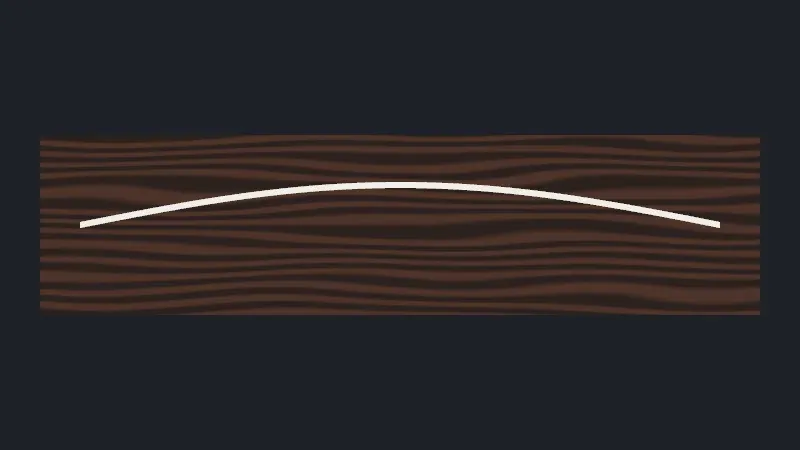
Live page: run it here
Open full screen. Try it: set harmonic to 2, the octave of exercise 1, and compare the string with your prediction. The strings of the whole guitar of lesson 5 vibrate the same way: a positionNode whose amplitude, start point and time are uniforms that a click sets.
The pixels confirm the shape: cream at the displaced middle and at the displaced quarter point, and wood at the middle’s rest position, where the string no longer is. Three draw calls: the neck, the string and the output pass. The --webgl run gives the same counts and the same three colors.
When the shader is rebuilt
Section titled “When the shader is rebuilt”renderer.debug.onNodeBuilderCreated is called each time the renderer turns a material’s node graph into shader code (Renderer.js, lines 736-760). The page counts the calls (lines 72-91):
- 3 builds for the first frames: the neck, the string, and the renderer’s output pass, a node material too.
- Still 3 after
harmonic.value = 2: a uniform change is a write to a GPU buffer. The shader stays. - 4 after replacing
colorNodewith a new graph and settingneedsUpdate: a new graph is new code, built and compiled again. On a large material, that is a visible hitch.
So anything that changes while the page runs belongs in a uniform, not in a JavaScript number baked into the graph. color(0xffb454) and float(1) are constants: they are written into the shader’s source.
What the graph becomes
Section titled “What the graph becomes”renderer.debug.getShaderAsync(scene, camera, object) returns the code generated for one object, for the backend the renderer runs on. The page extracts it, once from the default run and once from the --webgl run. On the author’s machine, the two files hold the same line in WGSL and in GLSL:
$ grep -h 'positionLocal = ' out/l06_shader_webgpu.txt out/l06_shader_webgl.txt positionLocal = position; positionLocal = ( positionLocal + vec3<f32>( 0.0, ( ( object.nodeUniform0 * sin( ( ( ( ( positionLocal.x / 3.2 ) + 0.5 ) * 3.141592653589793 ) * object.nodeUniform1 ) ) ) * sin( object.nodeUniform2 ) ), 0.0 ) ); positionLocal = position; positionLocal = ( positionLocal + vec3( 0.0, ( ( nodeUniform0 * sin( ( ( ( ( positionLocal.x / 3.2 ) + 0.5 ) * 3.141592653589793 ) * nodeUniform1 ) ) ) * sin( nodeUniform2 ) ), 0.0 ) );The same expression, from the same TSL, in the two languages: object.nodeUniform0 is the amplitude, nodeUniform1 the harmonic and nodeUniform2 the phase, and LENGTH, a JavaScript constant, is the literal 3.2. In WGSL, the uniforms sit in a struct named object: a uniform() belongs by default to the object group, uploaded for each object it is used by (UniformNode.js, line 55). A value shared by a whole frame, such as a time, can join the frame group with .setGroup(frameGroup), uploaded once per frame (UniformGroupNode.js, lines 152-168).
The rest of the file, around 250 lines per backend, is three.js’s own: the lighting model, the tone mapping, the structs. It changes between releases, which is why check.sh compares only the GLSL line. It prints the other one without comparing it: on the Linux and Windows CI runners, which have no GPU, the default run falls back to WebGL 2, and its file holds GLSL too.
From GLSL to TSL
Section titled “From GLSL to TSL”A GLSL ShaderMaterial has three parts, and each has a TSL counterpart:
GLSL ShaderMaterial |
TSL |
|---|---|
uniforms: { exponent: { value: 0.6 } } |
const exponent = uniform(0.6) |
varying vec3 vWorldPosition; and the vertex shader that fills it |
positionWorld, computed where it is used; varying(node) when you need one |
gl_FragColor = vec4(…) in main() |
a node returned to colorNode, or fragmentNode to replace the whole output |
pow(max(h, 0.0), exponent) |
pow(max(h, 0), exponent), or h.max(0).pow(exponent) |
built-ins: modelMatrix, cameraPosition |
nodes: modelWorldMatrix, cameraPosition |
TSL also has control flow, If, Loop and select, variables with .toVar(), and functions with typed parameters, all described in the TSL specification on the project’s wiki.
In GuitarAlchemist/ga
Section titled “In GuitarAlchemist/ga”GA is in the middle of this migration: ShaderMaterial appears in 15 files and three/tsl in 33.
-
A GLSL sky, twice.
BSP/Sunburst3D.tsxdraws its sky as a large sphere with aShaderMaterial: a vertex shader that passes the world position, and a fragment shader that mixes two colors along the height (lines 450-481).BSP/ImmersiveMusicalWorld.tsxhas a copy (lines 144-171). Neither can render withWebGPURenderer, even on its WebGL 2 backend, since it doesn’t run GLSL strings. Exercise 3 ports it. -
A TSL port that works, with frozen parameters.
PrimeRadiant/shaders/FresnelGlowTSL.tsreplaces the GLSL corona of the solar system with acolorNode(lines 25-44):material.colorNode = Fn(() => {const viewDir = cameraPosition.sub(positionWorld).normalize();const f = float(1.0).sub(abs(normalWorld.dot(viewDir)));const corona = pow(f, float(power)).mul(intensity);return vec3(corona.mul(color[0]), corona.mul(color[1]), corona.mul(color[2]));})();power,intensityand the color are JavaScript numbers, so they become constants in the shader: changing the corona’s intensity means a new material, and a new build, as measured above. The atmosphere factory in the same file usesuniformfor its parameters (lines 58-81), which is the pattern to follow when a value should change. -
Not TSL, despite the name.
PrimeRadiant/shaders/MoebiusPassTSL.tssays in its header that it is “Implemented as a Three.js ShaderPass” (line 16), and creates aTHREE.ShaderMaterial(line 174): GLSL, forWebGLRendereronly. -
Searching for the material every frame.
BSP/PortalDoor.tsxupdates its portal’stimeuniform by searching the children for aShaderMaterialon each frame (lines 218-228). With TSL, the built-intimenode needs no update at all, and auniformkept in a variable needs no search.
GA experiment
Section titled “GA experiment”Lesson 14 measures TSL on GA’s needs twice: experiment 2 vibrates 600 strings in the vertex shader, against displaced vertices and morph targets, and experiment 4 transposes 4,096 pitch-class bracelets in TSL for 8 times less CPU time than in JavaScript.
Key takeaways
Section titled “Key takeaways”WebGPURendererdoesn’t run GLSL strings: its materials are node graphs, written in TSL and compiled to WGSL or GLSL for the backend it picks.- TSL code builds a graph; it doesn’t compute. Methods replace operators:
a.mul(b),a.add(b). - A node material keeps its lighting: replace one input,
colorNode,positionNode,normalNode, instead of the whole shader. - A
uniformchanges without a rebuild; a JavaScript number in the graph is a constant, and a new graph is a new shader.renderer.debug.onNodeBuilderCreatedcounts the builds. renderer.debug.getShaderAsyncshows the generated code, for one object and one backend.
Exercises
Section titled “Exercises”- Probe the page with
?harmonic=2, the octave. Before running it, predict the colors at the three sample points, and the value ofoffsetAtMiddle. - In
out/l06_shader_webgl.txt, find the GLSL declarations ofnodeUniform0tonodeUniform2. Where are they, and how does this differ from the WGSL file? - Port GA’s GLSL sky gradient to a TSL
colorNodefor aMeshBasicNodeMaterial, with the two colors and the exponent as uniforms. You don’t need to run it, but compare your graph with the GLSL line by line.
Solution 1
$ node scripts/probe.mjs 06-tsl --query harmonic=2 --extract shader out/l06_shader_harmonic_2.txt{ "frame": 4, "render": { "calls": 6, "drawCalls": 3, "triangles": 519 }, "memory": { "geometries": 3, "textures": 3, "programs": 6 }, "t": 0.25, "harmonic": 2, "offsetAtMiddle": 0, "nodeBuilds": { "firstFrames": 3, "afterUniformChange": 3, "afterNewNodeGraph": 4 }, "pixels": { "string middle, displaced": "rgb(242, 239, 230)", "string middle, at rest": "rgb(242, 239, 230)", "quarter length, displaced": "rgb(242, 239, 230)" }}The second harmonic is sin(2πu): zero at the middle, where u = 0.5, and largest at the quarter point. So the string’s middle stays at rest, and both middle samples, which are now the same point, read the string’s color; the quarter point is displaced by the full 0.2 and reads the string’s color too. The builds are the same as for the fundamental: the harmonic is a uniform.
Solution 2
On the WebGL 2 backend, the uniforms are members of a uniform block, declared near the top of each shader, and used without a prefix: nodeUniform0 * sin(…). In WGSL, they are members of a struct bound as var<uniform> object : objectStruct in bind group 1, and used as object.nodeUniform0. Both group the per-object uniforms into one buffer, so that one write updates them all. The numbering, and the names, belong to three.js’s node builder: don’t depend on them outside debugging.
Solution 3
import { color, float, Fn, max, mix, normalize, positionWorld, pow, uniform } from 'three/tsl';
const topColor = uniform(color(0x0077ff));const bottomColor = uniform(color(0x000033));const offset = uniform(33);const exponent = uniform(0.6);
const sky = new THREE.MeshBasicNodeMaterial({ side: THREE.BackSide });sky.colorNode = Fn(() => {  // float h = normalize(vWorldPosition + offset).y;  const h = normalize(positionWorld.add(offset)).y;  // mix(bottomColor, topColor, max(pow(max(h, 0.0), exponent), 0.0))  return mix(bottomColor, topColor, max(pow(max(h, float(0)), exponent), 0));})();
The varying disappears: positionWorld in a fragment node is the interpolated world position, which the vertex shader of the GLSL version passed by hand. gl_FragColor’s alpha of 1 is the material’s default opacity. One difference to check: the GLSL writes the mixed color to the output as it is, while a node material’s output goes through the renderer’s tone mapping and color space conversion, so the sky can look different (to verify on a page). For a sky, scene.backgroundNode can take the same kind of node without a sphere. This snippet was not compiled in check.sh (to verify).
Sources
Section titled “Sources”- three.js documentation: TSL,
MeshStandardNodeMaterial,MeshBasicNodeMaterial,ShaderMaterial; the wiki’s Three.js Shading Language specification - three.js source at r186:
NodeMaterial.js,UniformNode.js,UniformGroupNode.js,Renderer.js - W3C: WGSL; Khronos: GLSL ES 3.00
- MonoGame:
Effect; WPF:ShaderEffect