Blender for developers — Mission
Sections
Reading settings
No voice for this language in this browser.
More voices
Code and English terms
Off: the page’s voice reads everything, with no pause between two voices.
No voice for this language in this browser.
More voices
More voices: Microsoft Edge has natural online voices, and Windows (Settings › Time & language › Speech), macOS and Android install others.
Why I’m learning this
Section titled “Why I’m learning this”The site’s three.js course loads glTF models, and GuitarAlchemist draws a 3D guitar neck in the browser. So far those models are written by code, primitive by primitive. Blender is where 3D models are usually made, and it is free, open source and scriptable in Python from end to end.
I want to understand how Blender stores a scene, how to model, texture and light something simple but real, and how to export it for the web. I also want to drive it from scripts, because that is where a developer brings the most to a 3D pipeline: batch exports, generated scenes, and checks in CI.
Who this course is for
Section titled “Who this course is for”You write C# or Java, and you have never done 3D. You don’t need to know Python well: the scripts are short, and the Python course covers the language. You need a mouse with a wheel; a graphics card helps for EEVEE and the viewport, but every script in the course runs on the CPU, as CI does.
A different order: scripts from lesson 1
Section titled “A different order: scripts from lesson 1”Most Blender tutorials leave scripting for the end. This course brings bpy, Blender’s Python API, into every lesson from the first one, for two reasons. A developer understands a data model faster by printing it than by clicking through it. And a script that builds a scene gives a result that can be checked: the same vertex counts, the same material values and, as lesson 4 shows, the same rendered pixels on three operating systems.
Each lesson therefore has two halves: what you do in the interface, and what the same thing looks like in bpy. Lesson 5 then goes further into the API itself.
By the end of this course, I will be able to
Section titled “By the end of this course, I will be able to”- find my way in Blender’s interface, and explain what a
.blendfile holds; - model with meshes and modifiers, and read a mesh’s topology;
- build node materials with the Principled BSDF, unwrap UVs, and use image textures;
- light a scene, and choose between EEVEE and Cycles, samples and denoising;
- write
bpyscripts that build, check and render scenes without a window; - build procedural geometry with Geometry Nodes;
- animate with keyframes, armatures and constraints;
- export glTF 2.0 for three.js, and know what the exporter keeps and drops;
- write an add-on and package it as an extension;
- run renders and exports in CI.
Outline
Section titled “Outline”| # | Lesson | In C# or Java terms |
|---|---|---|
| 1 | The interface, and the .blend file as a database | an object model with reference counting, and reflection |
| 2 | Polygonal modeling and modifiers | a chain of decorators, evaluated lazily |
| 3 | Materials, UVs, and what glTF keeps of them | a dataflow graph, and a lossy serializer |
| 4 | Lights, cameras, and rendering with EEVEE and Cycles | a Monte Carlo estimate, and a seeded Random |
| 5 | Scripting with bpy: data, operators, context and the command line |
the API behind the UI |
| 6 | Geometry Nodes: procedural modeling as a dataflow program | LINQ over vertices |
| 7 | Animation: keyframes, curves, armatures and constraints | — |
| 8 | Exporting for the web: glTF 2.0, Draco, meshopt and KTX2, loaded in three.js | — |
| 9 | Add-ons: operators, panels and properties, packaged as an extension | a plugin API, and a package registry |
| 10 | An automated pipeline: batch renders and exports, and tests for bpy scripts in CI |
— |
| 11 | Sculpting and retopology (overview) | — |
| 12 | Simulation: physics, particles and fluids (overview, with their compute costs) | — |
| 13 | Project: a guitar neck for GuitarAlchemist, exported to glTF and shown in three.js | — |
| — | Journal |
Lessons 5 to 13 are the plan; they will change as the first ones teach me what matters.
The course’s model
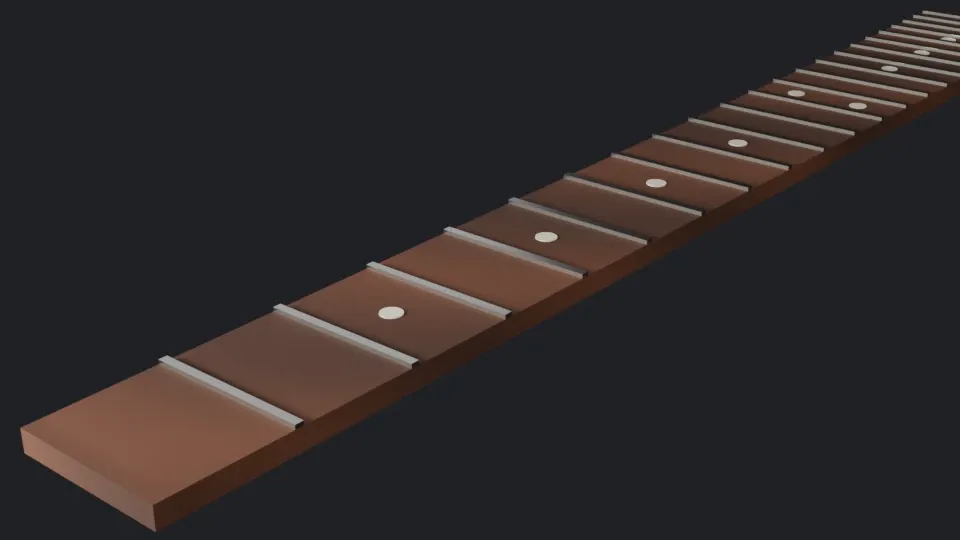
Section titled “The course’s model”Every lesson works on the same object: a 22-fret guitar fretboard with a 648 mm (25.5 inch) scale, built by scripts/fretboard.py. The frets sit where equal temperament puts them, which a modifier can’t do and a script does in one line. No .blend file is in the repository: the scripts rebuild the scene each time.
Resources
Section titled “Resources”- Blender 5.2 manual and Python API reference.
- Blender’s source, at the v5.2.2 tag (commit
d13f752e3b9c). - Blender LTS releases, with their support periods.
- Khronos, glTF 2.0 specification, and the glTF exporter’s repository.