7. Post-processing with RenderPipeline
Sections
Reading settings
No voice for this language in this browser.
More voices
Code and English terms
Off: the page’s voice reads everything, with no pause between two voices.
No voice for this language in this browser.
More voices
More voices: Microsoft Edge has natural online voices, and Windows (Settings › Time & language › Speech), macOS and Android install others.
Code: the page in src/07-post/main.ts, which reuses the fretboard of lesson 5.
Post-processing, in three toolkits
Section titled “Post-processing, in three toolkits”Post-processing draws the scene into a texture instead of the screen, then runs pixel shaders on that texture: bloom, anti-aliasing, depth of field, color grading. In MonoGame, you do it by hand: GraphicsDevice.SetRenderTarget with a RenderTarget2D, draw the scene, then draw the texture on a full-screen quad through an Effect. WPF applies a ShaderEffect to an element’s rendered pixels, including a Viewport3D’s.
three.js had EffectComposer for WebGLRenderer: a list of passes, each a ShaderMaterial drawn on a quad. WebGPURenderer replaces it with RenderPipeline, where the effects are TSL nodes of lesson 6, connected in a graph.
| MonoGame | three.js, WebGLRenderer |
three.js, WebGPURenderer |
|
|---|---|---|---|
| The chain | your code, target by target | EffectComposer, a list of passes |
RenderPipeline, a graph of nodes |
| Rendering the scene | SetRenderTarget, then draw |
RenderPass |
pass(scene, camera) |
| An effect | an Effect on a quad |
UnrealBloomPass, ShaderPass(shader) |
bloom(node), fxaa(node), any TSL node |
| Tone mapping and sRGB | your last shader | OutputPass, added by hand |
applied by the pipeline, unless outputColorTransform = false |
| Each frame | Draw |
composer.render() |
pipeline.render(), instead of renderer.render() |
RenderPipeline was called PostProcessing until r183. The old name still works, with a warning: “PostProcessing: “PostProcessing” has been renamed to “RenderPipeline”. Please update your code to use “THREE.RenderPipeline” instead.” (PostProcessing.js, lines 5-20).
Bloom on the inlays
Section titled “Bloom on the inlays”The fretboard gets five inlays that emit light, with an emissive intensity of 6: far above 1, the brightest a pixel can show after tone mapping. Bloom takes the pixels above a threshold, blurs them at several sizes, and adds the blur to the image, so bright things glow as they do through a camera lens (lines 46-62):
// The chain, as a graph of nodes: the scene pass's color texture, bloom added on top, then the output transformlet pipeline: THREE.RenderPipeline | null = null;let direct: THREE.DirectRenderPipeline | null = null;const disposables: { dispose(): void }[] = [];if (mode === 'bloom' || mode === 'bloom-fxaa') { pipeline = new THREE.RenderPipeline(renderer); const scenePass = pass(scene, camera); const sceneColor = scenePass.getTextureNode('output'); const glow = bloom(sceneColor, 1.2, 0.4, threshold); disposables.push(scenePass, glow); if (mode === 'bloom') { pipeline.outputNode = sceneColor.add(glow); } else { // FXAA expects tone-mapped sRGB values: the pipeline's own output transform is turned off and applied before FXAA pipeline.outputColorTransform = false; pipeline.outputNode = fxaa(renderOutput(sceneColor.add(glow))); }}pass(scene, camera) renders the scene into a render target, and getTextureNode('output') is its color, as a node. bloom(node, strength, radius, threshold) comes from three/addons/tsl/display/BloomNode.js; the addons have about fifty such nodes in the same folder, from fxaa and smaa to ssao, ssr, dof and outline. sceneColor.add(glow) is TSL: the final image is the scene plus its glow. The pipeline renders that graph on a full-screen quad, then applies the renderer’s tone mapping and sRGB conversion, since outputColorTransform is true by default.
The page’s loop calls pipeline.render() instead of renderer.render(scene, camera): the scene is rendered by the pass, inside the pipeline.
What each chain costs
Section titled “What each chain costs”The page takes ?pipeline=none, bloom, bloom-fxaa or direct. For each, the probe reads four pixels: the inlay at fret 5, the neck 0.06 units beside it, where the halo should be, the neck 0.15 units away, and the background in a corner.
$ node scripts/probe.mjs 07-post --query pipeline=none{ "frame": 4, "render": { "calls": 6, "drawCalls": 25, "triangles": 941 }, "memory": { "geometries": 10, "textures": 3, "programs": 4 }, "pipeline": "none", "threshold": 1, "renderTargets": 1, "pixels": { "inlay at fret 5": "rgb(242, 250, 252)", "halo, 0.06 beside it": "rgb(53, 28, 20)", "neck, 0.15 beside it": "rgb(53, 28, 20)", "background": "rgb(12, 15, 20)" }}$ node scripts/probe.mjs 07-post --query pipeline=bloom{ "frame": 4, "render": { "calls": 42, "drawCalls": 37, "triangles": 953 }, "memory": { "geometries": 10, "textures": 14, "programs": 13 }, "pipeline": "bloom", "threshold": 1, "renderTargets": 12, "pixels": { "inlay at fret 5": "rgb(247, 252, 254)", "halo, 0.06 beside it": "rgb(127, 168, 190)", "neck, 0.15 beside it": "rgb(74, 81, 94)", "background": "rgb(13, 17, 23)" }}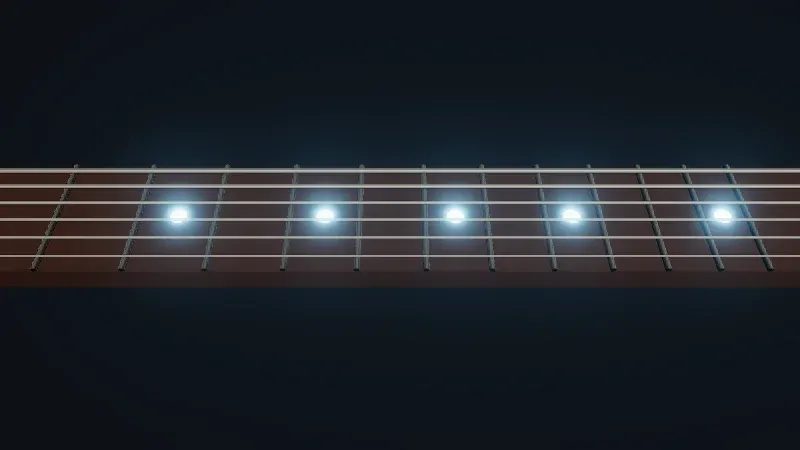
Live page: run it here
Open full screen. Try it: set bloom threshold to 0, exercise 1’s scene; pipeline switches between the chains of the next section.
?pipeline= |
calls, 3 frames | draw calls | render targets | programs | halo, 0.06 away | neck, 0.15 away | background |
|---|---|---|---|---|---|---|---|
none |
6 | 25 | 1 | 4 | 53, 28, 20 | 53, 28, 20 | 12, 15, 20 |
bloom |
42 | 37 | 12 | 13 | 127, 168, 190 | 74, 81, 94 | 13, 17, 23 |
bloom-fxaa |
45 | 38 | 13 | 15 | 132, 174, 195 | 74, 82, 96 | 13, 17, 23 |
direct |
3 | 25 | 0 | 4 | 53, 28, 20 | 53, 28, 20 | 12, 15, 20 |
Without bloom, the neck beside the inlay is the same brown as anywhere else. With it, the halo turns the neck light blue at 0.06 units, still tints it at 0.15, and even lifts the background by a few levels. The price is in the other columns:
- Draw calls: 37 instead of 25. The 24 objects are drawn once, into the scene pass. Then come 13 full-screen quads: one to keep the bright pixels, five blurred horizontally and five vertically at halving sizes, one to combine them, and the pipeline’s output quad. Per frame, the
callscount 14 renders instead of 2. - Render targets: 12 instead of 1. The scene pass has one;
BloomNodecreates eleven, one for the bright pixels and a horizontal and a vertical one for each of its five sizes (BloomNode.js, lines 156-180). They are half-float textures, sized from the canvas: memory that grows with the screen. - Programs: 13 instead of 4. Each step is a shader.
FXAA adds one pass, one render target and two programs. The table comes from WebGPU. On the WebGL 2 backend, the bloom chains count one more program, 14 and 16, and on the CI runners without a GPU, which render with SwiftShader on the CPU, FXAA’s halo pixel reads 135, 176, 197: 3 more than here, beyond the difference of 2 per channel that compare.mjs accepts. check.sh keeps those WebGL 2 outputs in expected/*.webgl.txt.
FXAA, after the output transform
Section titled “FXAA, after the output transform”FXAA smooths jagged edges by looking at the contrast between neighboring pixels, and “requires sRGB input”, says its source: tone mapping and the sRGB conversion must come first (FXAANode.js, lines 5-6). So the page turns the pipeline’s own output transform off, and applies it inside the graph with renderOutput, before fxaa. The renderer is created with antialias: false in that mode: MSAA on the scene pass and FXAA after it would do the work twice.
DirectRenderPipeline: no output pass
Section titled “DirectRenderPipeline: no output pass”Even without effects, WebGPURenderer renders into a render target, then copies it to the screen through an output pass that does the tone mapping and the sRGB conversion: the none row has 1 render target and 2 calls per frame. r186 adds DirectRenderPipeline, which “applies output processing directly in material shaders”, avoiding “the intermediate framebuffer and output pass”, but “changes blending and is not compatible with materials that sample the framebuffer, such as transmissive materials” (lines 6-20). Its render takes the scene and the camera, unlike RenderPipeline’s:
$ node scripts/probe.mjs 07-post --query pipeline=direct{ "frame": 4, "render": { "calls": 3, "drawCalls": 25, "triangles": 2924 }, "memory": { "geometries": 10, "textures": 1, "programs": 4 }, "pipeline": "direct", "threshold": 1, "renderTargets": 0, "pixels": { "inlay at fret 5": "rgb(242, 250, 252)", "halo, 0.06 beside it": "rgb(53, 28, 20)", "neck, 0.15 beside it": "rgb(53, 28, 20)", "background": "rgb(12, 15, 20)" }}The same four pixels as none, with 0 render targets and one call per frame. The draw calls stay at 25, but the 25th is no longer a quad: a solid scene.background becomes a sphere of 1,984 triangles drawn behind the scene (DirectRenderPipeline.js, lines 156-175, and Background.js, line 131), hence 2,924 triangles instead of 941. On a phone, one less full-screen copy per frame can matter; measure it on the device (to verify).
What dispose() frees
Section titled “What dispose() frees”A component that creates a pipeline must free it when it goes. The page’s ?dispose= mode disposes after three frames and counts the render targets:
$ node scripts/probe.mjs 07-post --query dispose=pipeline{ "frame": 4, "render": { "calls": 42, "drawCalls": 37, "triangles": 953 }, "memory": { "geometries": 10, "textures": 14, "programs": 12 }, "pipeline": "bloom", "renderTargets": { "before": 12, "afterPipelineDispose": 12 }}$ node scripts/probe.mjs 07-post --query dispose=all{ "frame": 4, "render": { "calls": 42, "drawCalls": 37, "triangles": 953 }, "memory": { "geometries": 10, "textures": 1, "programs": 2 }, "pipeline": "bloom", "renderTargets": { "before": 12, "afterPipelineDispose": 12, "afterNodesDispose": 0 }}pipeline.dispose() frees one program, its output quad’s material, and none of the 12 render targets: it disposes only that material (RenderPipeline.js, lines 162-169). The render targets belong to the nodes, and go only when the scene pass and the bloom node are disposed too: 0 render targets, 1 texture and 2 programs left. So keep a reference to every node that owns a render target, and dispose them with the pipeline.
In GuitarAlchemist/ga
Section titled “In GuitarAlchemist/ga”-
The old name, and a pipeline never disposed.
Ocean/Ocean.tsximportsPostProcessingfromthree/webgpu(line 10) and builds the same chain as this lesson (lines 534-541):let postProcessing: PostProcessing | null = null;if (quality.enableBloom) {postProcessing = new PostProcessing(renderer);const scenePass = pass(scene, camera);const scenePassColor = scenePass.getTextureNode('output');const bloomPass = bloom(scenePassColor, quality.bloomStrength, quality.bloomRadius, quality.bloomThreshold);postProcessing.outputNode = scenePassColor.add(bloomPass);}With GA’s three.js 0.180, the name is right; from r183, it logs the warning above. The cleanup disposes the controls, geometries, materials, textures, the Draco loader and the renderer, but neither the pipeline, nor
scenePass, norbloomPass(lines 641-673). Whetherrenderer.dispose()frees their render targets with the renderer is to verify; with a renderer kept across mounts, they would stay.PrimeRadiant/LunarLanderEngine.tshas the same chain under the same name (lines 420-424). -
Effects dropped on the WebGPU path.
PrimeRadiant/ForceRadiant.tsxswitched toWebGPURendererwithconst USE_WEBGPU = true(lines 1672-1676), and its comment explains the cost: “The old EffectComposer + UnrealBloomPass + ShaderPass chain is disabled when useWebGPU is on”, with the TSL replacement “a follow-up task”. The bloom is created onlyif (!USE_WEBGPU)(lines 1883-1898): today, the graph renders without bloom. Thebloomnode of this lesson is that follow-up; theShaderPasseffects that come after it would need porting to TSL nodes, as in lesson 6. -
EffectComposerdone right, for WebGL. The 10 files that useEffectComposerall end with anOutputPass, resize the composer and dispose it;CheeseAvalanche/CheeseAvalanche.tsxis a compact example (lines 496-501, line 673 and line 682). Moving one of them toWebGPURenderermeans rewriting the chain, not adapting it.
Live demo: a studio
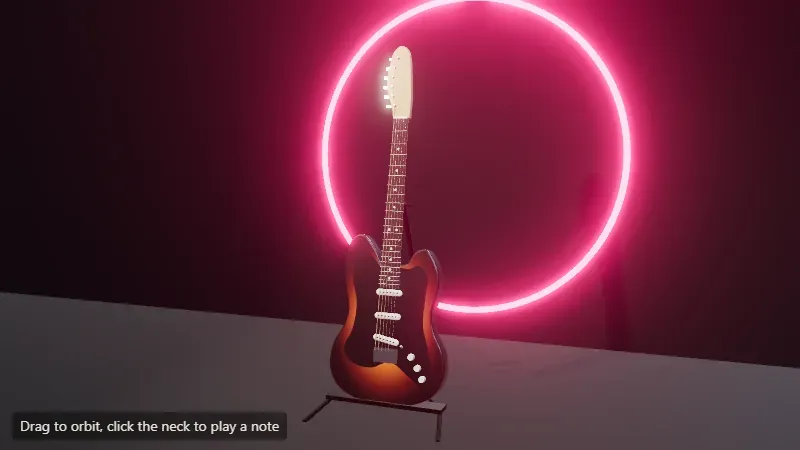
Section titled “Live demo: a studio”Lessons 2, 3 and 7 together: a guitar on a stand, a spotlight with a 2048 × 2048 shadow map and a soft radius, lesson 3’s studio.hdr as the environment, ACES tone mapping, and a neon ring whose color is multiplied by 6, far above 1, so that the bloom in a RenderPipeline picks it up. Its probe reads 62 render calls, 91 draw calls and 15 render targets after three frames. The source is in code/threejs/demos/studio.
Live page: run it here
Open full screen. Try it: the panel changes the exposure, the key light’s intensity, the environment’s, the bloom’s strength and threshold, and the neon’s color. Set bloom threshold to 0, as in exercise 1, to see what else crosses the threshold. Clicking the neck plays a note, as on lesson 5’s guitar.
GA experiment
Section titled “GA experiment”Lesson 14’s experiment 9 puts bloom on a fretboard’s active notes: 0.14 ms per 1080p frame on the author’s GPU, and selective bloom through MRT costs about the same while leaving the wood and the frets sharp.
Key takeaways
Section titled “Key takeaways”- With
WebGPURenderer, post-processing isRenderPipeline: a graph of TSL nodes that starts withpass(scene, camera), rendered bypipeline.render().PostProcessingis its pre-r183 name. - Every effect costs draw calls, programs and render targets that scale with the canvas: bloom took 13 more quads and 11 more render targets here.
- Effects that expect sRGB, like FXAA, come after
renderOutput, withoutputColorTransform = false. DirectRenderPipelineremoves the output pass when no effect is needed, with limits on blending and transmission.pipeline.dispose()doesn’t free the passes’ render targets: dispose each node that owns one.
Exercises
Section titled “Exercises”- Probe the page with
?threshold=0. Which of the four pixels change compared with the default threshold of 1, and why does the background change so much? - The bloom’s render targets are sized from the canvas. Estimate the memory of the bloom’s first horizontal target on a 3840 × 2160 screen, from its source, then say what
renderer.setPixelRatiodoes to it. - GA’s
ForceRadiant.tsxneeds bloom and a chromatic aberration on the WebGPU path. Sketch theoutputNode, with the node that the addons provide.
Solution 1
$ node scripts/probe.mjs 07-post --query threshold=0{ "frame": 4, "render": { "calls": 42, "drawCalls": 37, "triangles": 953 }, "memory": { "geometries": 10, "textures": 14, "programs": 13 }, "pipeline": "bloom", "threshold": 0, "renderTargets": 12, "pixels": { "inlay at fret 5": "rgb(248, 252, 254)", "halo, 0.06 beside it": "rgb(183, 196, 207)", "neck, 0.15 beside it": "rgb(161, 146, 146)", "background": "rgb(66, 71, 84)" }}The inlay barely changes: it was already near white. Everything else does: the halo goes from 127, 168, 190 to 183, 196, 207, the neck 0.15 away from 74, 81, 94 to 161, 146, 146, and the background from 13, 17, 23 to 66, 71, 84. With a threshold of 0, every pixel is bright enough to bloom: the brown neck and the dark background are blurred and added back onto themselves, and the whole image turns milky. The threshold compares luminance, so a scene lit in the usual 0 to 1 range needs a threshold near 1, and the inlays, emissive above 1, are the only pixels meant to cross it. Counts don’t change: the same passes run whatever the threshold.
Solution 2
BloomNode sizes its targets at half the drawing buffer (_resolutionScale = 0.5), then halves the size for each of its five levels (BloomNode.js, lines 322-341). The targets are HalfFloatType, four channels of 2 bytes each, without a depth buffer (lines 164-180). At 3840 × 2160, the first horizontal target is 1920 × 1080 × 8 bytes: 16,588,800 bytes, about 16.6 MB. The bright-pixel target has the same size, and each level’s horizontal and vertical targets are a quarter of the level above: 1 + 2 × (1 + 1/4 + 1/16 + 1/64 + 1/256) ≈ 3.66 times 16.6 MB, about 61 MB for the bloom alone, before the scene pass. These are computed from the source, not measured in GPU memory.
setPixelRatio(2) on a 1920 × 1080 CSS canvas gives the same 3840 × 2160 drawing buffer. The lesson’s pages cap the ratio at 2; GA’s ThreeFretboard.tsx allows up to 6, which is 36 times the pixels of a ratio of 1, and 9 times those of a ratio of 2.
Solution 3
import { pass } from 'three/tsl';import { bloom } from 'three/addons/tsl/display/BloomNode.js';import { chromaticAberration } from 'three/addons/tsl/display/ChromaticAberrationNode.js';
const pipeline = new THREE.RenderPipeline(renderer);const scenePass = pass(scene, camera);const color = scenePass.getTextureNode('output');const glow = bloom(color, 0.6, 0.6, 0.5);const aberrated = chromaticAberration(color.add(glow));pipeline.outputNode = aberrated;
The strength, radius and threshold are the ones ForceRadiant passes to UnrealBloomPass on desktop. chromaticAberration(node, strength = 1.0, center = null, scale = 1.1) is in three/addons/tsl/display/ChromaticAberrationNode.js (lines 152-163). This sketch passes tsc against r186’s types, but was not rendered: the strength that matches ForceRadiant’s ShaderPass is to verify on the page. Keep scenePass, glow and aberrated to dispose them with the pipeline.
Sources
Section titled “Sources”- three.js documentation:
RenderPipeline,PassNode,BloomNode,FXAANode,EffectComposer; the manual’s post-processing page, written forWebGLRenderer - three.js source at r186:
RenderPipeline.js,DirectRenderPipeline.js,PostProcessing.js,BloomNode.js,FXAANode.js - MonoGame:
RenderTarget2D; WPF:ShaderEffect