2. Polygonal modeling and modifiers
Sections
Reading settings
No voice for this language in this browser.
More voices
Code and English terms
Off: the page’s voice reads everything, with no pause between two voices.
No voice for this language in this browser.
More voices
More voices: Microsoft Edge has natural online voices, and Windows (Settings › Time & language › Speech), macOS and Android install others.
Code: the lesson’s script, scripts/l02_modeling.py, the fretboard model, scripts/fretboard.py, and the report, expected/l02_modeling.txt.
What a mesh is made of
Section titled “What a mesh is made of”A mesh is a list of vertices (points), edges (pairs of vertices) and faces (closed polygons of three or more vertices). Blender adds a fourth element that tutorials rarely mention: the loop, or face corner. A face with four vertices has four loops, and a vertex shared by three faces belongs to three loops. Everything that can differ from one face to the next at the same vertex is stored per loop: UV coordinates (lesson 3), split normals, vertex colors.
The course’s fretboard starts as a tapered slab of eight vertices and six quads, given to Mesh.from_pydata as Python lists, the way you would fill a vertex buffer and an index buffer:
verts = [ (0, -w0, -THICKNESS), (length, -w1, -THICKNESS), (length, w1, -THICKNESS), (0, w0, -THICKNESS), (0, -w0, 0), (length, -w1, 0), (length, w1, 0), (0, w0, 0),]faces = [(0, 3, 2, 1), (4, 5, 6, 7), (0, 1, 5, 4), (1, 2, 6, 5), (2, 3, 7, 6), (3, 0, 4, 7)]mesh = bpy.data.meshes.new(name)mesh.from_pydata(verts, [], faces)mesh.validate()from_pydata derives the edges from the faces, and validate checks the result for invalid data and fixes what it finds. The report:
== A mesh from vertices and faces (from_pydata)fretboard slab: V 8 E 12 F 6 loops 24topology: {'quads': 6} boundary edges 0 non-manifold edges 0 V-E+F 2face 0 (bottom) vertices [0, 3, 2, 1] normal (0.000, 0.000, -1.000)face 1 (top) vertices [4, 5, 6, 7] normal (0.000, 0.000, 1.000)the bottom face wound the other way: normal (0.000, 0.000, 1.000)The order of a face’s vertices, its winding, sets its normal: seen from the side the normal points to, the vertices go counterclockwise. Wind the bottom face the other way and its normal points into the slab. Renderers and exporters use normals for shading and for back-face culling, so an inside-out face looks black or disappears in three.js. In Edit Mode, Mesh › Normals › Recalculate Outside (Shift + N) turns the selected faces outward.
Topology
Section titled “Topology”Modelers talk about topology: how the elements connect, independently of where the vertices are. The script counts a few properties with bmesh, Blender’s editable mesh structure:
== Open and non-manifold meshesone quad: V 4 E 4 F 1 {'quads': 1} boundary edges 4 non-manifold edges 4 V-E+F 1three quads sharing one edge: V 8 E 10 F 3 {'quads': 3} boundary edges 9 non-manifold edges 10 V-E+F 1the slab triangulated: V 8 E 18 F 12 {'tris': 12} boundary edges 0 non-manifold edges 0 V-E+F 2- A manifold mesh is one where every edge has exactly two faces: a closed surface, like the slab. A boundary edge has one face, the edge of an open sheet. An edge with three faces, like the spine of a book with three pages, is non-manifold too. 3D printing and boolean operations expect manifold meshes.
- For a closed surface, V − E + F is the Euler characteristic: 2 for anything shaped like a sphere, however it is subdivided, 0 for a torus (exercise 1). It is a cheap check that a generated mesh has no holes.
- Quads are the norm when modeling, because loops of quads subdivide cleanly and edge-loop tools follow them. Triangles are what GPUs draw: the glTF exporter (lesson 3) and the GPU triangulate everything anyway. Faces with more than four sides, n-gons, are fine on flat surfaces and trouble on curved ones.
A Mesh stores flat arrays, compact and fast to read. A BMesh stores the adjacency: each vertex knows its edges, each edge its faces. It is what Edit Mode works on, and what scripts use to change topology. You convert between them with bm.from_mesh(mesh) and bm.to_mesh(mesh), as you would load an immutable array into a graph structure, edit it, and write it back.
Edit Mode
Section titled “Edit Mode”Select the cube, press Tab, and you are in Edit Mode, where you work on vertices (1), edges (2) or faces (3). The tools a beginner uses most, with their default shortcuts:
| Tool | Shortcut | What it does |
|---|---|---|
| Extrude | E |
pulls the selection out, with new faces along its sides |
| Inset | I |
makes a smaller face inside each selected face |
| Loop cut | Ctrl + R |
adds an edge loop across a strip of quads |
| Bevel | Ctrl + B |
replaces sharp edges with a strip of faces |
| Knife | K |
cuts new edges across faces |
These tools change the mesh itself. A model built only with them is a sequence of edits whose history is lost after you save: going back to change the bevel width means undoing everything after it.
The modifier stack
Section titled “The modifier stack”A modifier is an operation on an object’s geometry that is not applied to the mesh: the mesh stays as it is, and Blender computes the result each time something changes. The modifiers of an object form a stack, run from top to bottom, each one taking the previous one’s output. For a C# or Java developer, it is a chain of decorators around the mesh, or a LINQ or Stream pipeline, evaluated by a dependency graph when an input changes.
The script adds a Bevel then a Subdivision Surface to a cube, and asks the dependency graph for the evaluated mesh:
def evaluated(obj): depsgraph = bpy.context.evaluated_depsgraph_get() eval_obj = obj.evaluated_get(depsgraph) text = counts(eval_obj.to_mesh()) eval_obj.to_mesh_clear() return text== The modifier stack is evaluated; the mesh stays as it isstack ['Bevel', 'Subdivision']cube.data: V 8 E 12 F 6 | evaluated: V 866 E 1728 F 864stack ['Subdivision', 'Bevel'] | evaluated: V 98 E 192 F 96Subdivision hidden in the viewport | evaluated: V 56 E 108 F 54Bevel applied: stack ['Subdivision'] | cube.data: V 56 E 108 F 54 | evaluated: V 866 E 1728 F 864cube.datakeeps its 8 vertices, whatever the stack does. What the viewport draws and the renderer renders is the evaluated mesh, whichDepsgraphcomputes.to_meshgives a temporary copy, whichto_mesh_clearfrees. The glTF exporter is the exception: it writes the mesh without its modifiers unless you turn on Apply Modifiers (export_apply, off by default).- The order matters. Bevel first rounds the cube’s 12 edges, then subdivision smooths a mesh with bevels: a rounded cube. Subdivision first turns the cube into a near-sphere of 96 quads, then the bevel does nothing: its default limit method only bevels edges whose faces meet at more than 30°, and there are none left. The image shows both.
- Each modifier can be hidden in the viewport or in renders without being removed.
- Apply writes a modifier’s result into the mesh and removes it from the stack: the bevel’s 56 vertices are now real vertices of
cube.data. It is the only step that isn’t reversible.
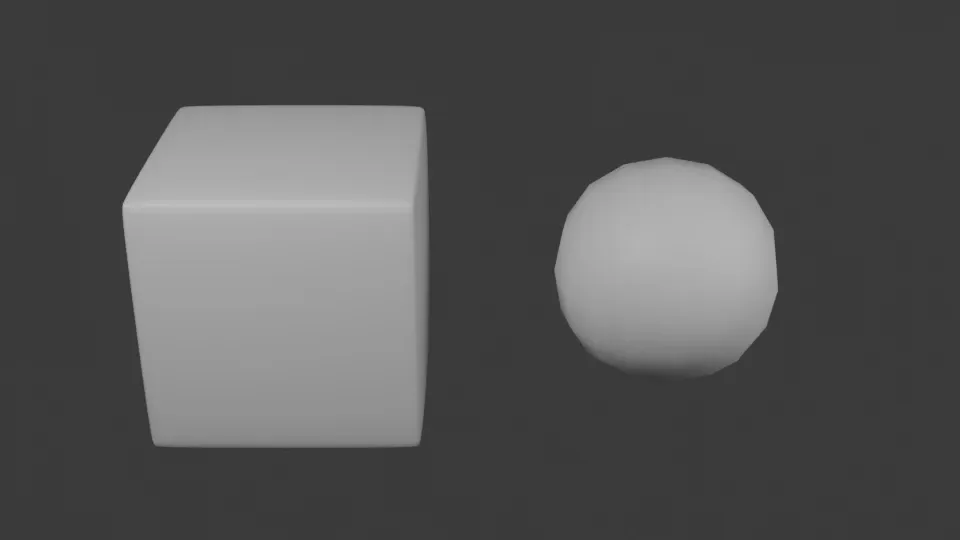
The image was rendered by scripts/render_images.py with Cycles, with smooth shading on both objects. Smooth shading only changes the normals used for lighting, not the geometry: the sphere’s silhouette still shows its facets.
Mirror and Array
Section titled “Mirror and Array”Two modifiers do the work of copying geometry. Mirror reflects the mesh across the object’s origin, so you model half of something symmetric. Array repeats it with an offset, relative to the object’s size or constant:
== Mirror and Arraya cube whose center is 1 m from the origin, mirrored in X, then 5 copies in Y: V 80 E 120 F 60copies that touch, with Merge on: V 48 E 88 F 52local bounds: evaluated (-1.50, -0.50, -0.50) (0.50, 4.50, 0.50) | cube.data (0.50, -0.50, -0.50) (1.50, 0.50, 0.50)The mirror works across the object’s origin, not the mesh’s center: moving the mesh 1 m away from the origin is what makes the two halves separate. With touching copies and Merge on, the Array modifier welds the vertices where copies meet: 8 contacts, 4 vertices and 4 edges each, 32 fewer of both, and the two faces pressed together at each contact become one, 8 fewer faces. That face stays, inside the solid. The evaluated bounds span −1.5 to 1.5 in X, while the mesh itself spans 0.5 to 1.5.
The course’s fretboard
Section titled “The course’s fretboard”fretboard.py builds the model the next lessons light, texture, render and export:
- the board, the slab above, 476 mm long, 43 mm wide at the nut and 56 mm at the last fret;
- 22 fret wires: one cube mesh, and 22 objects, each with its own location and scale, parented to the board;
- 10 inlay dots at frets 3, 5, 7, 9, 12 (two), 15, 17, 19 and 21, sharing one cylinder mesh.
Equal temperament puts fret n at scale × (1 − 2−n/12) from the nut, so each gap is 21/12 times shorter than the previous one. An Array modifier can only repeat a constant or relative offset, so it can’t place frets. A loop can:
for n in range(1, FRETS + 1): x = fret_x(n) obj = bpy.data.objects.new(f"Fret {n:02d}", wire) obj.location = (x, 0, FRET_WIRE_HEIGHT / 2) obj.scale = (FRET_WIRE_WIDTH, width_at(x), FRET_WIRE_HEIGHT) obj.parent = board coll.objects.link(obj)== The course's fretboardmesh 'Fret wire': V 8 E 12 F 6, 22 objects: Fret 01 to Fret 22mesh 'Fretboard': V 8 E 12 F 6, 1 objects: Fretboard to Fretboardmesh 'Inlay dot': V 48 E 72 F 26, 10 objects: Inlay 03 to Inlay 21Fret 01: x 36.37 mm, length 44.01 mmFret 12: x 324.00 mm, length 52.04 mmFret 22: x 466.16 mm, length 56.00 mmobjects 33 | vertices stored 64 | vertices drawn 664world bounds in mm (0.0, -28.1, -6.0) (476.2, 28.1, 1.2)The 12th fret is at 324 mm, half the scale: the octave. The linked duplicates from lesson 1 pay off here: 64 vertices are stored for 664 drawn, and changing the wire’s profile means changing one mesh. Before reading the world bounds, the script calls bpy.context.view_layer.update(): objects created from Python get their world matrix, which includes the parent’s transform, only when the view layer is next evaluated.
Key takeaways
Section titled “Key takeaways”- A mesh is vertices, edges, faces and loops; data that can differ per face at a vertex, such as UVs, lives on loops.
- A face’s winding sets its normal; a closed mesh has every edge on two faces, and V − E + F = 2 when it is shaped like a sphere.
Meshstores flat arrays;bmeshstores adjacency and is what you edit topology with.- Modifiers form a stack evaluated by the dependency graph; the mesh stays unchanged until you apply one, and the order of the stack changes the result.
- Read the evaluated mesh with
evaluated_get(depsgraph).to_mesh(), and free it withto_mesh_clear(). - Some shapes follow a rule that no modifier knows, like frets; a script places them in a loop.
Exercises
Section titled “Exercises”- Add a torus with
bpy.ops.mesh.primitive_torus_add(major_segments=48, minor_segments=12). Predict its vertex, edge and face counts and its V − E + F, then check. - Put Subdivision before Bevel, as in the lesson, and find the Bevel setting that makes it bevel the subdivided cube. How many vertices does the result have?
- Check from
fretboard.fret_xthat the ratio between two consecutive fret gaps is the same all along the neck, and compare it with 21/12.
Solution 1
== Exercise 1: the Euler characteristic of a torustorus: V 576 E 1152 F 576 {'quads': 576} boundary edges 0 non-manifold edges 0 V-E+F 048 × 12 = 576 quads and as many vertices, since each vertex starts one quad. Each quad has 4 edges shared by 2 faces: 576 × 4 / 2 = 1152 edges. The surface is closed and manifold, and V − E + F = 0, the value for a torus.
Solution 2
The bevel’s Limit Method (limit_method) defaults to ANGLE, with 30°. Set it to NONE and every edge is beveled:
== Exercise 2: Subdivision then Bevel, without the angle limitlimit_method ANGLE angle 30.0 | evaluated: V 98 E 192 F 96limit_method NONE | evaluated: V 866 E 1728 F 864The counts happen to match the other order, but the shapes differ: a sphere-like mesh with a narrow bevel on each of its edges, not a rounded cube.
Solution 3
gaps = [fretboard.fret_x(n + 1) - fretboard.fret_x(n) for n in range(fretboard.FRETS)]== Exercise 3: the spacing of fretsgap nut-1 36.369 mm | gap 21-22 10.813 mm | gap n / gap n+1 ['1.059463'] | 2 ** (1/12) 1.059463All 21 ratios round to the same six decimals, 1.059463, which is 21/12. The gap shrinks by that factor at each fret, which is why an Array modifier’s constant offset can’t do it.
Sources
Section titled “Sources”- Blender 5.2 manual: mesh structure, modifiers, Bevel, Subdivision Surface, Mirror, Array, Extrude Region, Bevel tool.
- Blender 5.2 Python API:
Mesh,bmesh,Depsgraph,BevelModifier. - Blender source at 5.2.2:
blender_default.py, the default keymap.