6. ControlNet: edges and depth
Sections
Reading settings
No voice for this language in this browser.
More voices
Code and English terms
Off: the page’s voice reads everything, with no pause between two voices.
No voice for this language in this browser.
More voices
More voices: Microsoft Edge has natural online voices, and Windows (Settings › Time & language › Speech), macOS and Android install others.
Code: the workflows 06-canny.api.json and 06-depth.api.json.
Lesson 5 started from an existing image, and denoise decided how much of it survived. That ties the colors and textures to the old image as much as its layout. ControlNet keeps only the layout: an edge map or a depth map guides the sampler at every step, and the sampler starts from pure noise. The starting point is again lesson 1’s metronome, seed 42.
A second network next to the UNet
Section titled “A second network next to the UNet”The ControlNet paper (L. Zhang, A. Rao and M. Agrawala, 2023) copies the encoder half of a trained UNet and trains the copy on pairs of a condition image and a picture. The original model doesn’t change: “ControlNet locks the production-ready large diffusion models, and reuses their deep and robust encoding layers”. The copy’s outputs go through convolutions initialized to zero, and are added to the UNet’s own activations. Before training, the ControlNet therefore adds nothing.
In ComfyUI, the addition is in control_merge. Each output of the ControlNet is multiplied by strength, then added to the output of the previous ControlNet, if there is one:
if x not in applied_to: #memory saving strategy, allow shared tensors and only apply strength to shared tensors once applied_to.add(x) if self.strength_type == StrengthType.CONSTANT: x *= self.strength... o[i] = prev_val + o[i] #TODO: change back to inplace add if shared tensors stop being an issueChaining two ControlNetApplyAdvanced nodes therefore adds their effects: an edge map and a depth map can guide the same image, and each has its own strength.
The workflow
Section titled “The workflow”| Node | What it does here |
|---|---|
LoadImage |
the image the layout comes from |
Canny, or the Lotus nodes |
turn it into an edge map, or a depth map |
ControlNetLoader |
loads the ControlNet from models/controlnet |
SetUnionControlNetType |
tells a union ControlNet which kind of map it gets |
ControlNetApplyAdvanced |
attaches the ControlNet, the map, strength, start_percent and end_percent to the positive and negative conditioning |
KSampler |
samples from an empty latent, as in lesson 1 |
ControlNetApplyAdvanced doesn’t run anything. It copies the conditioning and adds the ControlNet to it, for the positive and for the negative prompt, and the sampler calls it at each step. With strength 0 it returns the conditioning unchanged. The older ControlNetApply node is marked deprecated, and applies the ControlNet to one conditioning only.
One model for several kinds of map
Section titled “One model for several kinds of map”SDXL ControlNets were first trained one per condition: one for Canny edges, one for depth, and so on. The course uses xinsir’s ControlNet++ union model instead, in its ProMax version: one 2.5 GB file, under the Apache 2.0 license, whose card says it supports “10+ control conditions, no obvious performance drop on any single condition compared with training independently”.
A union model needs to know which kind of map it gets. SetUnionControlNetType sets it, from a list of 8 types in control_types.py:
UNION_CONTROLNET_TYPES = { "openpose": 0, "depth": 1, "hed/pidi/scribble/ted": 2, "canny/lineart/anime_lineart/mlsd": 3, "normal": 4, "segment": 5, "tile": 6, "repaint": 7,}The node’s documentation page lists 13 options, with names such as canny, lineart and normalbae that the node doesn’t offer: the model’s 12 conditions share 8 slots, and several edge detectors share one. The workflow’s JSON must use the names from the code, or the server rejects the prompt.
Edges, from the Canny node
Section titled “Edges, from the Canny node”ComfyUI’s core has few preprocessors, the nodes that turn a picture into a map. The ControlNet tutorial says so: “Since the current Comfy Core nodes do not include all types of preprocessors, in the actual examples in this documentation, we will provide pre-processed images.” A pose skeleton, for example, needs a custom node or an image made elsewhere; custom nodes are lesson 11’s subject. Edges are in the core: Canny calls Kornia’s canny on the GPU:
output = canny(image[..., :3].to(device=comfy.model_management.get_torch_device(), dtype=torch.float32).movedim(-1, 1), low_threshold, high_threshold)Its thresholds go from 0.01 to 0.99, on the scale of the image’s values. OpenCV’s cv2.Canny, used in most model cards, takes thresholds from 0 to 255: a card’s 100 and 200 are about 0.4 and 0.8 here, the node’s defaults.
Depth, from Lotus
Section titled “Depth, from Lotus”A depth map tells how far each pixel is, and says nothing about edges inside a surface. ComfyUI v0.36.0 can compute one without a custom node, with Lotus, a model derived from Stable Diffusion 2 that predicts depth in a single step. LotusConditioning has no input: it returns a fixed embedding, as the code’s comment explains, “lotus uses a frozen encoder and null conditioning, i’m just inlining the results”.
The course’s workflow copies the nodes of ComfyUI’s blueprint Image Depth Estimation (Lotus Depth): the image is encoded with the Stable Diffusion 1.x VAE, sampled for one step with no added noise and the first noise level set to 999, decoded, then inverted with ImageInvert so that near is bright. The lesson’s three files:
| File | Size | License |
|---|---|---|
lotus-depth-d-v1-1.safetensors |
1.7 GB | Apache 2.0 |
vae-ft-mse-840000-ema-pruned.safetensors |
335 MB | MIT |
xinsir_controlnet_union_sdxl_promax.safetensors |
2.5 GB | Apache 2.0 |
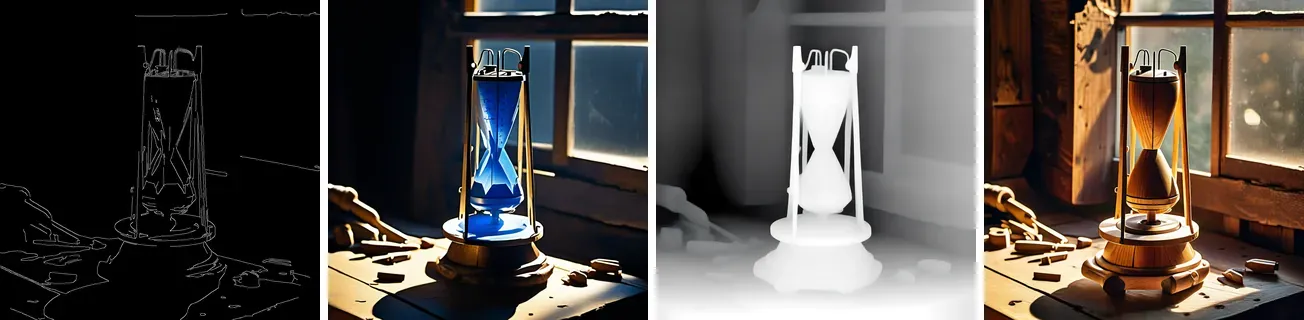
Rendered by ComfyUI v0.36.0: Stable Diffusion XL base 1.0 with xinsir’s ControlNet union SDXL ProMax at strength 0.8, seed 42, 25 steps, CFG 7, euler, normal. From left to right: the edges of lesson 1’s image, Canny 0.4 and 0.8; the render of 06-canny.api.json, prompt “a metronome carved from blue ice on an old wooden workbench, morning light through a window, photograph”; the Lotus depth map; the render of 06-depth.api.json, prompt “a small robot made of polished wood on an old wooden workbench, morning light through a window, photograph”.
Both renders kept the object’s silhouette and its place. The prompt asked for a metronome made of ice and for a robot, and got the old object’s shape made of ice and of wood: the map wins over the words where they disagree. The edges also kept the window’s bars and the tools on the bench; the depth map kept the bench and the window as surfaces, and let the sampler invent the rest of the detail.
The first render of each workflow took 17.0 seconds, measured by the client, most of it loading the ControlNet, and Lotus for the depth workflow. The following Canny renders took about 7.0 seconds each.
Strength, start and end
Section titled “Strength, start and end”strength scales the ControlNet’s residuals. start_percent and end_percent say when the ControlNet is active, but not as a fraction of the steps. percent_to_sigma converts them to noise levels over the model’s 1000 training timesteps:
def percent_to_sigma(self, percent): if percent <= 0.0: return 999999999.9 if percent >= 1.0: return 0.0 percent = 1.0 - percent return self.sigma(torch.tensor(percent * 999.0)).item()and get_control skips the ControlNet when the current noise level is outside that range. For SDXL, end_percent 0.3 is the noise level 3.33. With 25 steps and the normal scheduler, the first 8 steps start above it (14.6, 11.4, 9.08, 7.30, 5.95, 4.90, 4.09, 3.44), so the ControlNet guides 8 steps of 25, not 7.5.

Rendered by ComfyUI v0.36.0: Stable Diffusion XL base 1.0 with xinsir’s ControlNet union SDXL ProMax, seed 42, 25 steps, CFG 7, euler, normal, workflow 06-canny.api.json. From left to right: strength 0.3, strength 1.0, and strength 0.8 with end_percent 0.3.
Two observations on this image, which may not hold for others:
- At
strength0.3, the object’s silhouette is still that of the edge map. The room around it moved. - Stopping the ControlNet after 8 steps changed almost nothing. The layout is fixed in the first, noisiest steps, which lesson 2 described; the later steps add detail, and the map has no detail to give.
A late start_percent does the opposite: the prompt chooses the layout, and the map only corrects it. To verify: not rendered for this lesson.
Canny in CI, and four different hashes
Section titled “Canny in CI, and four different hashes”CI runs the Canny node on the CPU, on the 64 by 48 test pattern of lesson 5, with thresholds 0.05 and 0.15. The first run compared its pixel hash like the other nodes’ outputs, and failed on every OS. CI now prints the hash, and the number of pixels brighter than 127, as information:
| Machine | Pixel SHA-256 | Edge pixels |
|---|---|---|
| the author’s, Windows 11 | 77af5cb1b7e93a5c |
464 of 3072 |
CI, ubuntu-latest |
bb92bc1020c06a83 |
467 of 3072 |
CI, macos-latest |
4db7c3194e9fe1e2 |
467 of 3072 |
CI, windows-latest |
8e3e55838a7c9d46 |
467 of 3072 |
The same ComfyUI, PyTorch graph and pixels gave four different images. The three runners found the same number of edge pixels, but not in the same places. Canny smooths the image, computes gradients, thins the edges and keeps them by comparing values with thresholds. A gradient that falls just above a threshold in one floating-point computation and just below it in another adds or removes an edge pixel, and each CPU and math library rounds a little differently. Lesson 2 found the same kind of difference in the noise of two devices.
Which step stops agreeing
Section titled “Which step stops agreeing”data/canny-steps.py calls Kornia’s own functions in the order canny applies them and prints a hash per step. Its 64 by 48 pattern is built from integer arithmetic, so the input is the same bytes on every machine — the first line of the table proves it. check.sh runs it on the three CI machines on every commit; the first column is the author’s, whose PyTorch is the CUDA build, running on the CPU here.
| Step | the author’s, 2.13.0+cu130 |
windows-latest, +cpu |
ubuntu-latest, +cpu |
macos-latest, 2.13.0 |
|---|---|---|---|---|
| input | 1907433ac4d80c9f |
1907433ac4d80c9f |
1907433ac4d80c9f |
1907433ac4d80c9f |
| Gaussian blur | 769c45e000258c56 |
ee71eaac28f8cc27 |
ee71eaac28f8cc27 |
96d1452970dc7b72 |
| spatial gradient | b06a49b51ebc7fa1 |
bf069945ff2cd851 |
17564ac6064fd8d8 |
5d47abc9d0ba75f4 |
| magnitude | 0af967b932bcb57c |
bda4e821a72c09ed |
208a0f39607e1ae0 |
bf05d8003b885379 |
| edges | 08e9b5af22548246 |
08e9b5af22548246 |
08e9b5af22548246 |
08e9b5af22548246 |
The divergence starts at the first floating-point step. The blur already separates the author’s machine from the runners, and the Apple Silicon runner from the two x86 ones. The gradient then differs on all four, although Windows and Linux had agreed one step earlier: the same convolution takes a different path in a different build. Every magnitude differs, and yet their sum prints as 2729.489258 on all four — the differences are in the last bits. That sum is a trap in itself: printed to six decimals it adds the differences up and erases them, so anyone comparing sums would have concluded that the four machines agree and stopped there. A total is not a fingerprint. It is why every check in this course hashes bytes.
Precision is the other half of the story. The Hadamard probe of lesson 8 runs on the same three CI machines and works in float64: it prints the same five decimals on all three, 0.05674 and 0.00761, and only its exactness bound moves, between 1.11e-14 and 1.20e-14. Divergence is not a fatality — it depends on the precision you work in, and diffusion works in float32 or narrower.
The last row is the surprise: the edges are identical everywhere, 1,461 pixels of 3,072, the same hash on the four machines. This pattern is flat areas and hard borders, so no gradient sits close enough to a threshold for a last-bit difference to flip it. A render has no such margin, which is why the pattern of lesson 5, put through Canny inside ComfyUI, gives four hashes. So the answer has two halves: floating point diverges at the first convolution, on every machine, always; whether that reaches the output depends on how many pixels the image leaves near the threshold.
Key takeaways
Section titled “Key takeaways”- A ControlNet is a trained copy of the UNet’s encoder. Its outputs, multiplied by
strength, are added to the UNet’s activations, and chained ControlNets add up. - A union ControlNet needs
SetUnionControlNetType, with the type names from ComfyUI’s code, not from its documentation. - The core has
Cannyfor edges and Lotus for depth. Other maps need a custom node or an image made elsewhere. start_percentandend_percentare fractions of the noise range, not of the steps.- The layout is decided in the first steps: a ControlNet active only there kept almost the whole composition.
- Image filters are floating-point code too: don’t compare their output bit for bit across machines. The divergence starts at the first convolution; whether it reaches the output depends on how close the image sits to the threshold.
- A sum is not a fingerprint: a total adds up the differences a hash would show.
Your turn
Section titled “Your turn”Draw a rough layout yourself — three boxes and a horizon in any image editor — and use it as a control image. Run Canny on it at two threshold pairs, then sweep strength from 0.2 to 1.2 and find the value where your layout stops being followed. Finish with end_percent at 0.3: the composition should hold while the detail goes its own way.
Exercises
Section titled “Exercises”Cannythresholds from a model card are 50 and 150, for OpenCV. What values go in the node?- Chain the Canny and the depth ControlNets, each at
strength0.5, in one workflow. Which nodes change, and what do the twoControlNetApplyAdvancednodes take as input? - With 25 steps, the
normalscheduler and SDXL, how many steps does a ControlNet withstart_percent0.5 andend_percent1.0 guide? Use the list of noise levels in this lesson and the fact thatpercent_to_sigma(0.5)is 1.616.
Solution 1
The node’s values are on the 0 to 1 scale of the image’s pixels: 50 / 255 is about 0.2, and 150 / 255 about 0.59. To verify: this assumes that the card’s image was 8-bit and that Kornia’s thresholds compare the same gradient magnitudes as OpenCV’s, which this lesson hasn’t measured.
Solution 2
Load the ControlNet once, and give it to two SetUnionControlNetType nodes, one with canny/lineart/anime_lineart/mlsd and one with depth. The first ControlNetApplyAdvanced takes the prompts’ conditioning, the Canny edges and strength 0.5. The second takes the outputs of the first as its positive and negative, the depth map and strength 0.5. KSampler takes the outputs of the second. To verify: not rendered for this lesson.
Solution 3
The ControlNet is skipped while the noise level is above percent_to_sigma(0.5), 1.616, and end_percent 1.0 converts to 0, so it never stops. In the list, the last 13 steps start at 1.616 or below: 1.616, 1.408, 1.228, 1.071, 0.932, 0.808, 0.695, 0.591, 0.494, 0.400, 0.306, 0.203 and 0.029. The ControlNet guides 13 steps of 25, after the first 12 have chosen the layout.
The 13th step’s level is exactly 1.616 in Python’s double precision, because the normal scheduler places the steps on evenly spaced timesteps and 0.5 falls on one of them. The comparison is sigma > 1.616, so that step is included. To verify: the sampler compares a PyTorch tensor, whose precision may make the step fall on the other side.
Sources
Section titled “Sources”- L. Zhang, A. Rao, M. Agrawala, Adding Conditional Control to Text-to-Image Diffusion Models, 2023.
- J. He et al., Lotus: Diffusion-based Visual Foundation Model for High-quality Dense Prediction, 2024.
- ComfyUI documentation: ControlNet tutorial, mixing ControlNets,
SetUnionControlNetType,Canny,LotusConditioning. - ComfyUI at v0.36.0:
nodes.py,comfy/controlnet.py,comfy/cldm/control_types.py,comfy_extras/nodes_canny.py,comfy_extras/nodes_lotus.py,comfy/model_sampling.py. - Model cards: xinsir/controlnet-union-sdxl-1.0, Comfy-Org/lotus, jingheya/lotus-depth-d-v1-1, stabilityai/sd-vae-ft-mse-original.