1. Scene, camera, renderer
Sections
Reading settings
No voice for this language in this browser.
More voices
Code and English terms
Off: the page’s voice reads everything, with no pause between two voices.
No voice for this language in this browser.
More voices
More voices: Microsoft Edge has natural online voices, and Windows (Settings › Time & language › Speech), macOS and Android install others.
Code: the lesson’s page src/01-scene/main.ts, the same cube with the older renderer in src/01-scene-webgl/main.ts, the scene graph without a renderer in scripts/l01-scene-graph.ts, and the probe that opens a page in headless Chromium and prints what it reports, scripts/probe.mjs.
What three.js is, for a WPF, MonoGame or JavaFX developer
Section titled “What three.js is, for a WPF, MonoGame or JavaFX developer”three.js is a JavaScript library that draws 3D scenes into a <canvas> element. It sits where WPF’s retained 3D layer sits, above the GPU API: you describe objects, a camera and lights, and the library turns them into GPU buffers, shaders and draw calls. Under it, the browser offers two GPU APIs: WebGL 2, based on OpenGL ES 3.0, and WebGPU, a newer API designed to run on top of Direct3D 12, Metal and Vulkan.
| WPF 3D | MonoGame | JavaFX 3D | three.js | |
|---|---|---|---|---|
| The surface | Viewport3D in the visual tree |
the window of a Game |
SubScene in the scene graph |
a <canvas> that the renderer creates |
| What draws | WPF’s composition engine | your Draw method, through GraphicsDevice |
Prism, JavaFX’s graphics pipeline | a renderer object: WebGPURenderer or WebGLRenderer |
| The camera | PerspectiveCamera, horizontal field of view |
a projection matrix you build | PerspectiveCamera, vertical field of view by default |
PerspectiveCamera, vertical field of view |
| When it draws | when something changes | every frame, from the game loop | every pulse | every frame that your loop renders |
| Axes | right-handed, Y up | right-handed, Y up | Y down | right-handed, Y up |
The last line matters when you port code. The WPF documentation describes the same axes as three.js: X to the right, Y up, and Z toward the viewer. MonoGame’s Matrix is right-handed too. JavaFX 3D keeps its 2D convention, with the Y axis pointing down.
The versions are the current ones on 16 September 2026: three.js r186, published on npm as three 0.186.0, with the type declarations of @types/three 0.186.0, served and bundled by Vite 8.3.0 and checked with TypeScript 7.0.2. three.js numbers its releases: r186 is the 186th, and in 2026 a new one came out every two or three months. The API changes between them, and the migration guide lists what breaks.
Running the course’s scenes
Section titled “Running the course’s scenes”The course’s project in code/threejs has one HTML page per scene. Vite serves them during development and bundles them for production, as in the React (Vite) course. Playwright opens them in headless Chromium for check.sh, which needs a Chromium build of its own.
Set-Location code\threejsnpm cinpx playwright install chromium chromium-headless-shellnpm run dev# check.sh is a Bash script: run it from Git Bashbash check.shcd code/threejsnpm ci# --with-deps also installs the system libraries that Chromium needs (sudo)npx playwright install --with-deps chromium chromium-headless-shellnpm run devbash check.shcd code/threejsnpm cinpx playwright install chromium chromium-headless-shellnpm run devbash check.shnpm run dev serves the pages on port 5188: open http://localhost:5188/01-scene.html. To start a project of your own, three is an ordinary npm package, and @types/three gives TypeScript its types:
npm install three@0.186.0npm install --save-dev @types/three@0.186.0Three objects: a renderer, a scene and a camera
Section titled “Three objects: a renderer, a scene and a camera”Every three.js page creates the same three objects. Here is the start of the lesson’s page (src/01-scene/main.ts, lines 1-21); the probe.ts module it imports is the course’s test hook, described below:
// Lesson 1: a scene, a camera, a renderer, an animation loop, and a canvas that follows the windowimport * as THREE from 'three/webgpu';import { backendName, forceWebGL, probing, report } from '../probe.ts';
const renderer = new THREE.WebGPURenderer({ antialias: true, forceWebGL });renderer.setPixelRatio(Math.min(window.devicePixelRatio, 2));renderer.setSize(window.innerWidth, window.innerHeight);document.body.append(renderer.domElement);// ?linear: write linear values to the canvas, which removes the output pass (lesson 3 explains why it exists)if (new URLSearchParams(location.search).has('linear')) renderer.outputColorSpace = THREE.LinearSRGBColorSpace;
const scene = new THREE.Scene();scene.background = new THREE.Color(0x1e2127);
// 50° vertical field of view, the window's aspect ratio, and everything between 0.1 and 100 units is drawnconst camera = new THREE.PerspectiveCamera(50, window.innerWidth / window.innerHeight, 0.1, 100);camera.position.set(0, 1.5, 4);camera.lookAt(0, 0, 0);
const cube = new THREE.Mesh(new THREE.BoxGeometry(1, 1, 1), new THREE.MeshNormalMaterial());scene.add(cube);- The renderer owns the
<canvas>, inrenderer.domElement, and the GPU device.setSizesets the canvas’s size in CSS pixels, andsetPixelRatiomultiplies it for the drawing buffer: on a screen at 200 %, a 800 by 450 canvas draws 1600 by 900 pixels. The course caps the ratio at 2, because each step up multiplies the pixels to shade. - The scene is the root of a tree of objects, like WPF’s
Viewport3D.Children.Scene,Mesh,Group, the lights and the cameras all extendObject3D, which carries a position, a rotation, a scale and a list of children. - The camera is an
Object3Dtoo, but it doesn’t need to be in the scene:renderer.render(scene, camera)takes both.PerspectiveCameratakes a vertical field of view in degrees, an aspect ratio, and the near and far distances between which objects are drawn. - A mesh is a geometry and a material.
MeshNormalMaterialcolors each face by the direction it faces and needs no light, which makes it the “hello world” material. Lesson 2 builds real ones.
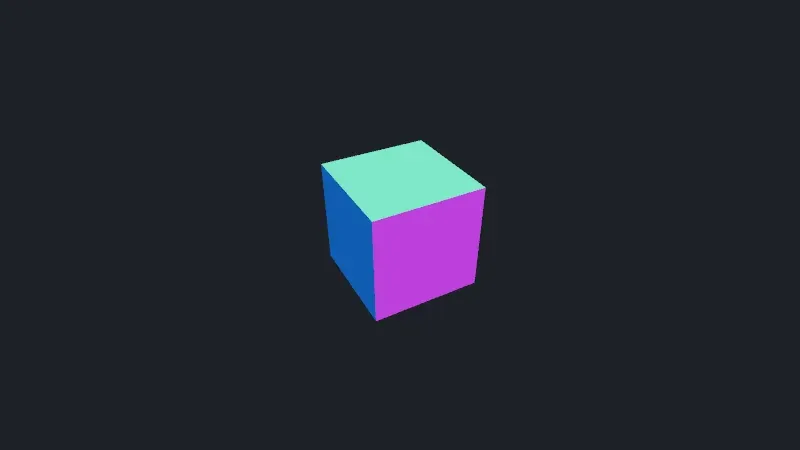
Live page: run it here
Open full screen. Try it: the panel’s cubes slider reloads the page with ?cubes=: set it to 3 for exercise 1’s scene. Opened full screen, the tab’s title names the backend the page picked, the answer to exercise 3.
The screenshot is the page’s third frame, taken by node scripts/probe.mjs 01-scene --shot out/cube.png, with WebGPU on the author’s machine.
WebGPURenderer and its fallback
Section titled “WebGPURenderer and its fallback”three.js has two renderers. WebGLRenderer, imported from 'three', has been the renderer for more than a decade. WebGPURenderer, imported from 'three/webgpu', is the new one: it talks to WebGPU when the browser offers it, and to WebGL 2 otherwise. The WebGPURenderer page of the manual calls it the “next-generation renderer”, still in an experimental state, and says that WebGLRenderer stays maintained without large new features, since the project’s focus is on WebGPURenderer. The course uses WebGPURenderer from the first lesson: the node materials of lesson 6 and the post-processing of lesson 7 exist only there.
The choice happens in the constructor (WebGPURenderer.js at r186, lines 57-73):
if ( parameters.forceWebGL ) {
  BackendClass = WebGLBackend;
} else {
  BackendClass = WebGPUBackend;
  parameters.getFallback = () => {
    warn( 'WebGPURenderer: WebGPU is not available, running under WebGL2 backend.' );
    return new WebGLBackend( parameters );
  };
}
The WebGPU device is requested asynchronously, so a renderer isn’t ready when its constructor returns. renderer.init() returns a promise that resolves once a backend works, and setAnimationLoop calls init() itself before it starts the loop (Renderer.js, lines 2067-2073). The await renderer.init() at the end of the page only waits for it to print the backend in the tab’s title.
Which backend runs depends on the browser and the machine, not on the code. scripts/probe.mjs opens the page with ?probe; after three frames, the page reports the backend, the GPU that answered, and the renderer’s counters. On the author’s machine (Windows 11, an NVIDIA GeForce RTX 5080), in Chromium 153’s headless mode:
$ node scripts/probe.mjs 01-scene{ "backend": "WebGPU", "gpu": "nvidia, blackwell", "frame": 4, "render": { "calls": 6, "drawCalls": 2, "triangles": 13 }, "memory": { "geometries": 2, "textures": 2, "programs": 4 }, "canvas": [800, 450], "pixelRatio": 1, "coordinateSystem": "WebGPU"}With ?webgl, the page passes forceWebGL: true. The counters are the same; the GPU is now reached through ANGLE, which Chromium on Windows uses to run WebGL on Direct3D 11:
$ node scripts/probe.mjs 01-scene --webgl{ "backend": "WebGL 2", "gpu": "ANGLE (NVIDIA, NVIDIA GeForce RTX 5080 (0x00002C02) Direct3D11 vs_5_0 ps_5_0, D3D11)", ... "coordinateSystem": "WebGL"}Playwright ships two headless browsers. chromium runs Chromium’s new headless mode, the one used above. chromium-headless-shell is a lighter build, and on the same machine it has no WebGPU adapter at all: the browser prints a warning, three.js prints its own, and the page runs on WebGL 2 through SwiftShader, a GPU emulated on the CPU:
$ PROBE_CHANNEL=chromium-headless-shell node scripts/probe.mjs 01-sceneconsole.warning: No available adapters.console.warning: THREE.WebGPURenderer: WebGPU is not available, running under WebGL2 backend.{ "backend": "WebGL 2", "gpu": "ANGLE (Google, Vulkan 1.3.0 (SwiftShader Device (Subzero) (0x0000C0DE)), SwiftShader driver)", ...}The GitHub runners have no GPU. On each of them, check.sh printed:
| Runner image | Chromium’s headless mode | Chromium’s headless shell |
|---|---|---|
ubuntu-24.04 |
WebGL 2 after the fallback warning, on SwiftShader Device (Subzero) |
the same |
windows-2025-vs2026 |
WebGL 2 after the fallback warning, on SwiftShader Device (Subzero) |
the same |
macos-26-arm64 |
WebGPU, adapter apple; with ?webgl, ANGLE Metal Renderer: Apple Paravirtual device |
WebGL 2 after the fallback warning, on SwiftShader Device (LLVM 10.0.0) |
The macOS runner is a virtual machine with a paravirtualized Apple GPU, and Chromium offers WebGPU there; the Linux and Windows runners have no GPU, and even Chromium’s full headless mode falls back to SwiftShader (run 35115118564).
The code didn’t change, and every counter was identical on all of them; only a few pixel colors in lesson 3 differed, by one. That is the promise of the fallback, and also its trap: a page can run on WebGL 2 for months without anyone noticing. Log the backend, as the course does in the page’s title.
coordinateSystem is the only field that follows the backend. WebGL’s clip space runs from −1 to 1 in depth, WebGPU’s from 0 to 1, and the renderer builds the camera’s projection matrix for the backend it runs on. Your code doesn’t see it, unless it builds projection matrices itself.
The animation loop
Section titled “The animation loop”const timer = new THREE.Timer();timer.connect(document);let frames = 0;
renderer.setAnimationLoop((time) => { timer.update(time); // Probing: the same angles on every machine, whatever the frame rate cube.rotation.y = probing ? frames * 0.25 : timer.getElapsed(); cube.rotation.x = cube.rotation.y / 2; renderer.render(scene, camera); frames++;setAnimationLoop calls the callback before each frame the browser paints, with time in milliseconds, like requestAnimationFrame, which it uses underneath. Three reasons to prefer it: it waits for init(), it pauses when the tab is hidden since the browser stops painting, and in WebXR (lesson 11) the headset, not the page, drives the frames, which setAnimationLoop handles and requestAnimationFrame doesn’t. setAnimationLoop(null) stops it.
There is no Update and Draw split as in MonoGame: the callback changes the scene, then renders. Nothing is drawn unless the callback calls render(); unlike WPF, three.js keeps no picture of the scene, and doesn’t redraw by itself when an object changes.
Timer measures the time between frames. It replaced Clock, deprecated since r183, whose constructor now warns: Clock: This module has been deprecated. Please use THREE.Timer instead. A Timer is updated once per frame with the loop’s timestamp, so that every call to getDelta() in the same frame returns the same value, and connect(document) makes it ignore the time spent in a hidden tab.
The probe doesn’t use the clock: it sets the angle from the frame number, so the cube is in the same position on every machine, whatever the frame rate.
What renderer.info counts
Section titled “What renderer.info counts”renderer.info is the only profiler three.js has built in, and the counters above already tell a story. There is one cube, 12 triangles, yet the renderer reports 2 draw calls and 13 triangles per frame:
render.drawCallsandrender.trianglescount the last frame. The renderer resets them at the start of each animation frame (Animation.js), so the page reads them right afterrender(), inside the loop.render.callscounts the calls torender()since the start: 6 for 3 frames, 2 per frame.frameis 4 after 3 rendered frames, because the loop ticks once duringinit(), before the callback is set.
The second draw call, with its single triangle, is the output pass. WebGPURenderer draws the scene into an internal render target in linear color, then draws that target onto the canvas with one triangle covering the screen, converting to sRGB and applying tone mapping on the way. The renderer’s source says it: “Unlike in WebGLRenderer, this is done in a separate render pass and not inline to achieve more correct results” (Renderer.js, lines 1553-1561). The extra geometry, the two extra textures (the render target’s color and depth) and the extra shader programs come from there. With ?linear, the page sets renderer.outputColorSpace to linear, no conversion is needed, and the pass disappears:
$ node scripts/probe.mjs 01-scene --query linear{ "backend": "WebGPU", "gpu": "nvidia, blackwell", "frame": 4, "render": { "calls": 3, "drawCalls": 1, "triangles": 12 }, "memory": { "geometries": 1, "textures": 0, "programs": 2 }, ...}The colors are then wrong, which lesson 3 explains. The same cube with WebGLRenderer, from 'three', converts colors inside each material’s shader instead: one draw call, no render target. Its info object has a different shape, with no drawCalls, and calls counts the draw calls of the last frame:
$ node scripts/probe.mjs 01-scene-webgl{ "backend": "WebGLRenderer", "render": { "frame": 3, "calls": 1, "triangles": 12 }, "memory": { "geometries": 1, "textures": 0, "programs": 1 }}The scene graph, without a renderer
Section titled “The scene graph, without a renderer”The core of three.js runs in Node.js: objects, math and serialization don’t need a GPU. scripts/l01-scene-graph.ts places a tuning peg inside a guitar that is moved 2 units along X and turned a quarter turn around Y, then projects a few points with a camera 5 units away:
$ node scripts/l01-scene-graph.tslocal position of the peg: [ 1, 0, 0 ]matrixWorld before any update: [ 0, 0, 0 ]getWorldPosition(): [ 2, 0, -1 ][0,0,0] -> NDC [0,0,0.962][1,0,0] -> NDC [0.241,0,0.962][0,1,0] -> NDC [0,0.429,0.962][0,0,-95] -> NDC [0,0,1]toJSON: { metadata: { version: 4.7, type: 'Object', generator: 'Object3D.toJSON' }, geometries: 1, materials: 1, children: [ 'Group guitar' ]}position,rotationandscaleare local to the parent, as a WPFTransform3Dis local to its model. A quarter turn around Y takes the local X axis to world −Z, so the peg ends up at (2, 0, −1).matrixWorldis a cache. Setting a position changes nothing else until something recomputes the matrices:renderer.render()does it for the whole scene,getWorldPosition()for one object. Code that readsmatrixWorldbefore the first render reads the identity.project(camera)gives normalized device coordinates: X and Y from −1 to 1 across the screen, and a depth that is not linear. The origin, 5 units away, is already at 0.962, and the far plane, 100 units away, at 1. Most of the depth range goes to the objects close to the near plane, which is whynearshouldn’t be smaller than the scene needs. In Node.js, the camera uses WebGL’s clip space.toJSON()writes the scene in three.js’s JSON format, with geometries and materials listed once and referenced by UUID. It is how the editor at threejs.org/editor saves scenes, not an exchange format: lesson 4 uses glTF for that.
The types of that JSON are wrong in @types/three 0.186.0. They declare children as an array of strings and no geometries or materials at the top, while Object3D.toJSON() writes the children as objects and adds both arrays. The script casts the result to its own interface; without the cast, tsc rejects code that works (errors/l01_tojson_types.ts):
errors/l01_tojson_types.ts(7,18): error TS2339: Property 'geometries' does not exist on type 'SceneJSON'.errors/l01_tojson_types.ts(8,56): error TS2339: Property 'type' does not exist on type 'string'.@types/three isn’t written by the three.js team: it is developed in three-types/three-ts-types and published through DefinitelyTyped. Its version follows three.js’s, but it is a separate description of the library, and it can be wrong.
Resizing
Section titled “Resizing”window.addEventListener('resize', () => { camera.aspect = window.innerWidth / window.innerHeight; camera.updateProjectionMatrix(); renderer.setSize(window.innerWidth, window.innerHeight);});Two things must follow the window. The camera’s aspect ratio, or the cube stretches; and the camera caches its projection matrix, so updateProjectionMatrix() must follow any change to fov, aspect, near or far. Then the canvas and its drawing buffer, through setSize. A canvas inside a layout rather than the whole window should watch its own size with a ResizeObserver instead of the window’s resize event.
What the renderer weighs
Section titled “What the renderer weighs”vite build bundles the pages for production. The course’s Vite configuration puts each of three.js’s build files in a chunk of its own, so the sizes can be read directly:
dist/assets/three.core-p_ik4R10.js 249.85 kB │ gzip: 64.99 kBdist/assets/three.module-CFLRzNqX.js 352.34 kB │ gzip: 84.70 kBdist/assets/three.webgpu-DyXHSfxk.js 581.15 kB │ gzip: 162.14 kBThe page with WebGLRenderer loads three.core and three.module: 602 kB, 150 kB compressed. The page with WebGPURenderer loads three.core and three.webgpu: 831 kB, 227 kB compressed, for a spinning cube. The node system and both backends are in it, whether the scene uses them or not. Vite warns about any chunk above 500 kB: (!) Some chunks are larger than 500 kB after minification.
In GuitarAlchemist/ga
Section titled “In GuitarAlchemist/ga”GA’s ThreeFretboard.tsx creates a WebGPURenderer with samples: 8, awaits init(), and catches an error to fall back to WebGLRenderer, at commit 05c8eda:
            await renderer.init();
            // Check again after async init            if (!isMounted) {              renderer.dispose();              return;            }
            console.log('✅ ThreeFretboard: Using WebGPU renderer with 8x MSAA');            setIsWebGPU(true);          } catch (error) {            console.warn('ThreeFretboard: WebGPU initialization failed, falling back to WebGL:', error);            renderer = null;          }
This lesson’s measurements say what happens on a machine without a WebGPU adapter: init() doesn’t throw, because WebGPURenderer has already switched to its WebGL 2 backend. The catch doesn’t run, the console says “Using WebGPU renderer”, and two lines later (line 201) the component calls setIsWebGPU(true) for every renderer. The shadows are enabled only for a WebGLRenderer (line 208), so a WebGPURenderer running on WebGL 2 gets none. Asking the renderer, renderer.backend.isWebGPUBackend, would give the real answer. Whether 8 samples are accepted on each backend is to verify: the WebGPU specification allows a texture’s sample count to be 1 or 4.
Two more points from the same file and from the rest of GA’s React components:
- The pixel ratio is
Math.min(window.devicePixelRatio * 3, 6)(line 204): on an ordinary screen, three times as many pixels in each direction as the canvas shows, nine times the shading work. - There is no resize listener: the width and height are dependencies of the React effect, so a new size builds the whole scene again.
- Of the 139 files under
srcthat import three.js, 33 userequestAnimationFrameand 3 usesetAnimationLoop; 29 create aWebGLRendererand 8 aWebGPURenderer; 15 create aClock, deprecated since r183. GA asks for three.js 0.180, whereClockwasn’t deprecated yet.
These findings are in the journal.
GA experiment
Section titled “GA experiment”Lesson 14’s experiment 15, a weak GPU renders a neck on SwiftShader: with GA’s pixel ratio of 3, a frame takes 208 ms, and a controller that lowers the pixel ratio to 0.655 brings it back to 60 frames per second. It also shows that powerPreference can’t pick the GPU on Windows.
Key takeaways
Section titled “Key takeaways”- A three.js page is a renderer, a scene and a camera; nothing is drawn unless the loop calls
render(). WebGPURendererfromthree/webgpupicks WebGPU or WebGL 2 at run time. The code doesn’t change, so log the backend: headless browsers and GPU-less machines fall back silently, except for a console warning.- Use
setAnimationLoopandTimer, notrequestAnimationFrameandClock. renderer.infocounts per frame and resets at each frame: withWebGPURenderer, one draw call and one triangle go to the output pass.- Positions are local to the parent;
matrixWorldis a cache thatrender()updates. @types/threeis a separate project and can disagree with the library.
Exercises
Section titled “Exercises”- Predict
render.drawCalls,render.trianglesandmemory.geometrieswhen the page shows three cubes that share one geometry and one material (?cubes=3). Check withnode scripts/probe.mjs 01-scene --query cubes=3. - In
scripts/l01-scene-graph.ts, the guitar is also scaled by 2. Where is the peg in world space? And which local position would put the peg at the world’s origin, without changing its parent? Check withscripts/l01-exercises.ts. - Open the page in your own browser with
npm run dev, then in its developer tools, runnavigator.gpuandawait navigator.gpu?.requestAdapter(). Which backend should the page pick? Compare with the tab’s title.
Solution 1
$ node scripts/probe.mjs 01-scene --query cubes=3{ "backend": "WebGPU", "gpu": "nvidia, blackwell", "frame": 4, "render": { "calls": 6, "drawCalls": 4, "triangles": 37 }, "memory": { "geometries": 2, "textures": 2, "programs": 4 }, ...}Each mesh is one draw call, whatever it shares: 3 for the cubes and 1 for the output pass, 36 triangles plus 1. The GPU keeps one copy of the shared geometry, so geometries is still 2, and the material compiles once. Sharing saves memory and compilation, not draw calls; lesson 8 uses instancing to draw many copies in one call.
Solution 2
$ node scripts/l01-exercises.tspeg in world space, guitar scaled by 2: [ 2, 0, -2 ]world (0, 0, 0) in the guitar's local space: [ 0, 0, -1 ]The scale applies before the rotation and the translation: (1, 0, 0) becomes (2, 0, 0), then (0, 0, −2) after the quarter turn, then (2, 0, −2). worldToLocal applies the inverse of the parent’s matrixWorld: setting peg.position to (0, 0, −1) puts the peg at the origin.
Solution 3
The answer depends on your machine. If navigator.gpu is undefined, the browser has no WebGPU at all; if requestAdapter() resolves to null, it has the API but no adapter, as in the headless shell above. In both cases the title reads Lesson 1 — WebGL 2. The WebGPU implementation status lists which browsers and systems enable it by default; I checked only Chromium 153 on the machines above (to verify elsewhere).
Sources
Section titled “Sources”- three.js manual: Creating a scene, Fundamentals, Responsive design, WebGPURenderer
- three.js documentation:
WebGPURenderer,Renderer,Object3D,PerspectiveCamera,Timer, and the migration guide - three.js source at r186:
WebGPURenderer.js,Renderer.js,Info.js - WebGPU, W3C, and MDN’s WebGPU API
- Microsoft: 3D graphics overview; MonoGame:
Matrix; JavaFX:PerspectiveCamera - Playwright: Browsers