2. Geometries, materials, lights and shadows
Sections
Reading settings
No voice for this language in this browser.
More voices
Code and English terms
Off: the page’s voice reads everything, with no pause between two voices.
No voice for this language in this browser.
More voices
More voices: Microsoft Edge has natural online voices, and Windows (Settings › Time & language › Speech), macOS and Android install others.
Code: the lesson’s page src/02-materials-lights/main.ts, the geometry counts and material defaults in scripts/l02-geometries.ts, and the exercises in scripts/l02-exercises.ts.
The scene
Section titled “The scene”Lesson 1 drew a cube with a material that needs no light. This lesson builds a piece of guitar neck on a table: a rosewood fretboard, five nickel frets, a mother-of-pearl dot, a sky light and a sun that casts shadows. Every part is a three.js primitive.
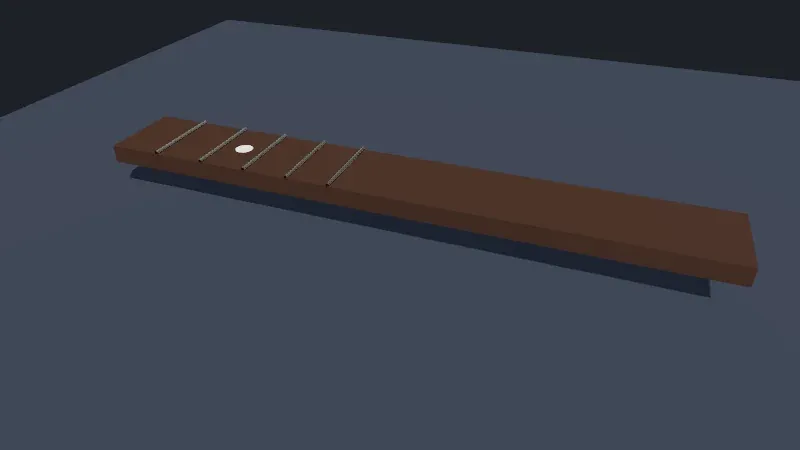
Live page: run it here
Open full screen. Try it: untick neck casts a shadow for exercise 3’s scene (?neckshadow=off), or shadows to see what the shadow map adds. The studio scene of lesson 7 puts a whole guitar under a spotlight with soft shadows.
The screenshot comes from node scripts/probe.mjs 02-materials-lights --shot out/neck.png, in headless Chromium on the author’s machine, with WebGPU.
| WPF 3D | MonoGame | three.js | |
|---|---|---|---|
| Geometry | MeshGeometry3D: Positions, Normals, TextureCoordinates, TriangleIndices |
VertexBuffer and IndexBuffer |
BufferGeometry: named attributes and an index |
| Built-in shapes | none | none | box, plane, sphere, cylinder, torus and more |
| Material | DiffuseMaterial, SpecularMaterial, EmissiveMaterial |
BasicEffect: diffuse, specular, three directional lights |
MeshStandardMaterial, MeshPhysicalMaterial: metalness and roughness |
| Lights | AmbientLight, DirectionalLight, PointLight, SpotLight |
what the effect computes | the same four, plus HemisphereLight, in physical units |
| Shadows | none | your own shadow map | shadow maps, enabled per renderer, light and object |
What a geometry holds
Section titled “What a geometry holds”A BufferGeometry is a set of typed arrays that the renderer uploads to the GPU as they are: an attribute per vertex property, position, normal and uv, and an optional index that lists the triangles by vertex number. The primitives only fill those arrays. scripts/l02-geometries.ts prints what the scene’s geometries contain, without a renderer:
$ node scripts/l02-geometries.tsBoxGeometry(1, 1, 1) position 24×3, normal 24×3, uv 24×2; index 36; triangles 12; groups 6PlaneGeometry(8, 8) position 4×3, normal 4×3, uv 4×2; index 6; triangles 2; groups 0CircleGeometry(0.06, 32) position 34×3, normal 34×3, uv 34×2; index 96; triangles 32; groups 0CylinderGeometry(0.012, 0.012, 0.55, 12) position 76×3, normal 76×3, uv 76×2; index 144; triangles 48; groups 3SphereGeometry(1, 32, 16) position 561×3, normal 561×3, uv 561×2; index 2880; triangles 960; groups 0normals at the corner (0.5, 0.5, 0.5): (1, 0, 0) (0, 1, 0) (0, 0, 1)MeshStandardMaterial: { color: 'ffffff', roughness: 1, metalness: 0 }MeshPhysicalMaterial: { ior: 1.5, reflectivity: 0.5, clearcoat: 0, transmission: 0 }PointLight with power 800 lm: { intensity: 63.66, decay: 2, distance: 0 }- A cube has 24 vertices, not 8. A vertex is a position and a normal and a UV. Each corner belongs to three faces that point in three directions, so the box stores it three times, as the last lines show for the corner (0.5, 0.5, 0.5). WPF’s
MeshGeometry3Dworks the same way: sharing a position between faces shares its normal, and the edges look rounded. - Groups split a geometry into parts that can take different materials: a box has one per face, a cylinder one for its side and one for each cap. Passing an array of materials to a
Meshuses them. - The parameters after the size are segments.
CylinderGeometry(…, 12)has 12 sides, which is enough for a fret this thin seen from a distance; the 32 segments of the inlay are for its round edge. Segments cost triangles, and triangles are whatrenderer.infocounts. SphereGeometry(1, 32, 16)has 32 × 16 quads, which would be 1,024 triangles, but reports 960: at each pole, a row of quads collapses into triangles, and the degenerate halves are left out (exercise 1).- A
PlaneGeometrylies in the XY plane, facing +Z. The table is turned by −90° around X to face up; a front face seen from behind isn’t drawn unless the material setsside: THREE.DoubleSide.
Physically based materials
Section titled “Physically based materials”The neck, the frets and the dot use two materials (main.ts, lines 31-63):
// The neck: rosewood is a dielectric (metalness 0) with a rough surfaceconst neck = new THREE.Mesh(  new THREE.BoxGeometry(4, 0.12, 0.55),  new THREE.MeshStandardMaterial({ color: 0x4a2c1d, metalness: 0, roughness: 0.75 }),);neck.position.y = 0.3;// ?neckshadow=off: the neck receives shadows but casts none (exercise 3)neck.castShadow = params.get('neckshadow') !== 'off';neck.receiveShadow = true;scene.add(neck);
// Frets: nickel silver, a metal, so metalness 1 and the color tints the reflectionsconst fretMaterial = new THREE.MeshStandardMaterial({ color: 0xc9c5bd, metalness: 1, roughness: 0.3 });const fretGeometry = new THREE.CylinderGeometry(0.012, 0.012, 0.55, 12);for (let fret = 1; fret <= 5; fret++) {  // Each fret is at scale length × (1 − 2^(−n/12)) from the nut, here with a scale length of 6.5 units  const x = -2 + 6.5 * (1 - 2 ** (-fret / 12));  const mesh = new THREE.Mesh(fretGeometry, fretMaterial);  mesh.rotation.x = Math.PI / 2;  mesh.position.set(x, 0.37, 0);  mesh.castShadow = true;  scene.add(mesh);}
// An inlay: mother of pearl, with a clear coat that MeshPhysicalMaterial adds on top of the standard modelconst inlay = new THREE.Mesh(  new THREE.CircleGeometry(0.06, 32),  new THREE.MeshPhysicalMaterial({ color: 0xf2efe6, roughness: 0.4, clearcoat: 1, clearcoatRoughness: 0.05, iridescence: 0.6 }),);inlay.rotation.x = -Math.PI / 2;// Between the second and the third fret, where a guitar has its first dotinlay.position.set(-1.13, 0.361, 0);scene.add(inlay);
WPF’s DiffuseMaterial and MonoGame’s BasicEffect use the classic lighting model: a diffuse color, and a specular color with a power that sets the size of the highlight. The values look right under one light and wrong under another. MeshStandardMaterial is physically based: it describes the surface, and the renderer derives how light reflects from it. The model is the metallic-roughness model of glTF 2.0 (lesson 4), so a material exported from Blender arrives with the same values.
metalnessis 0 for a dielectric, such as wood, plastic, skin or stone, and 1 for a metal. A dielectric shows its color in diffuse light and reflects a little white light at grazing angles; a metal has no diffuse part, and its color tints the reflection. Values in between are for transitions, such as rust on metal, not for “slightly metallic” materials.roughnessgoes from 0, a mirror, to 1, a matte surface. It blurs the reflection and widens the highlight at the same time, instead of the separate specular power of the classic model.coloris the albedo, the color of the surface without lighting: the hex values are sRGB, and the renderer converts them to linear values, as lesson 3 measures.- The defaults printed above are a white, fully rough dielectric:
color: 'ffffff', roughness: 1, metalness: 0.
MeshPhysicalMaterial extends the standard material with layers for the surfaces the standard one can’t describe: clearcoat for varnish or car paint, iridescence for the rainbow of mother of pearl or soap bubbles, sheen for fabric, transmission for glass. Each layer costs shader work, so use it where it shows.
With WebGPURenderer, both materials are converted to node materials behind the scenes, MeshStandardNodeMaterial and MeshPhysicalNodeMaterial, which lesson 6 extends with TSL.
Lights in physical units
Section titled “Lights in physical units”// A sky and ground light fills the shadows; a directional light, like the sun, casts themscene.add(new THREE.HemisphereLight(0xdde6ff, 0x302820, 1.2));const sun = new THREE.DirectionalLight(0xffffff, 3);sun.position.set(2, 4, 3);- A
DirectionalLightsends parallel rays from its position toward its target, the origin by default, like the sun. Only the direction counts, not the distance. - A
HemisphereLightblends a sky color from above with a ground color from below, according to the direction of each surface. It is a cheap substitute for the light that a real room reflects back; lesson 3 replaces it with an environment map. - A
PointLightshines in all directions from a point, and aSpotLightin a cone. Their light falls off with the square of the distance (decay: 2), anddistance: 0means no cutoff.
Since r155, three.js uses physical units by default (migration guide), and r186’s source no longer has the useLegacyLights switch that brought back the old behavior. The intensity of a point or spot light is in candela, and its power property converts from lumens: 800 lm, a common household bulb, is 800 / 4π ≈ 63.66 cd, as the script printed. Directional and hemisphere lights have no position to fall off from; their intensity applies the same everywhere. Scene units then matter: the inverse-square falloff treats one unit as one meter, so a scene modeled in centimeters needs lights 10,000 times stronger to look the same (to verify on a scene of your own).
Shadows
Section titled “Shadows”Shadows are opt-in at three levels, and all three are needed:
renderer.shadowMap.enabled = shadows;renderer.shadowMap.type = THREE.PCFShadowMap;sun.castShadow = true;sun.shadow.mapSize.set(1024, 1024);// The shadow camera is orthographic: the box it covers is the only place where shadows can fallObject.assign(sun.shadow.camera, { left: -3, right: 3, top: 3, bottom: -3, near: 0.5, far: 12 });sun.shadow.camera.updateProjectionMatrix();and each mesh says whether it casts shadows, receives them, or both (castShadow, receiveShadow).
A shadow map is a depth image rendered from the light: before drawing the scene, the renderer draws the casting objects into a texture, here 1024 by 1024 pixels, from the sun’s point of view, keeping only their distance. Then, for each pixel of a receiving surface, the material compares its own distance to the light with the one stored in the map: if something was closer, the pixel is in shadow. For a directional light, the “camera” of that render is orthographic, and the box left, right, top, bottom, near, far is all it sees: a shadow outside the box isn’t drawn, and a box larger than the scene spreads the 1024 pixels over empty space and makes the shadow blocky. The default box is 10 units wide, (-5, 5, 5, -5, 0.5, 500) in DirectionalLightShadow.js.
WebGPURenderer updates the shadow camera’s projection once, when it builds the shadow (ShadowNode.js, line 379); a change made after the first frame needs updateProjectionMatrix(), and the course calls it every time.
What shadows cost
Section titled “What shadows cost”The page reports its counters with and without shadows (?noshadows):
$ node scripts/probe.mjs 02-materials-lights{ "backend": "WebGPU", "gpu": "nvidia, blackwell", "frame": 4, "render": { "calls": 9, "drawCalls": 15, "triangles": 539 }, "memory": { "geometries": 5, "textures": 5, "programs": 10 }, "shadows": true, "objects": { "Scene": 1, "Mesh": 8, "HemisphereLight": 1, "DirectionalLight": 1 }}$ node scripts/probe.mjs 02-materials-lights --query noshadows{ ... "render": { "calls": 6, "drawCalls": 9, "triangles": 287 }, "memory": { "geometries": 5, "textures": 3, "programs": 6 }, "shadows": false, ...}Without shadows: 8 meshes and the output pass, 9 draw calls, and 2 + 12 + 5 × 48 + 32 + 1 = 287 triangles. With shadows, the six casters are drawn a second time into the shadow map: 6 more draw calls and 12 + 240 = 252 more triangles. calls, which counts renders since the start (lesson 1), goes from 2 per frame to 3: the shadow map is a render of its own. The shadow map also adds textures and its own shader programs. The table and the inlay don’t cast shadows and aren’t drawn into the map. Each light that casts shadows adds a pass like this one, and a point light adds six, one per face of a cube, which is why real-time scenes keep one or two shadow-casting lights.
PCFShadowMap filters the edge of the shadow by comparing several samples of the map. r186 removed PCFSoftShadowMap from WebGPURenderer: the constant still exists, marked deprecated in constants.js, and a renderer given it warns WebGPURenderer: PCFSoftShadowMap has been removed. Using PCFShadowMap instead. (Renderer.js, lines 902-906). VSMShadowMap remains for softer shadows.
In GuitarAlchemist/ga
Section titled “In GuitarAlchemist/ga”GA’s fretboard at 05c8eda lights the neck with an ambient light, five directional lights and a point light. The main light casts shadows, with a shadow box of 60 by 60 units, where one unit is 10 mm (scaleLength / 10, a scale length of 65 units), a 1024 by 1024 map, and a bias against shadow acne, the stripes a surface gets when it shadows itself:
const directionalLight = new THREE.DirectionalLight(0xffffff, 1.3); directionalLight.position.set(15, 30, 15); directionalLight.castShadow = true; directionalLight.shadow.camera.near = 0.1; directionalLight.shadow.camera.far = 100; directionalLight.shadow.camera.left = -30; directionalLight.shadow.camera.right = 30; directionalLight.shadow.camera.top = 30; directionalLight.shadow.camera.bottom = -30; directionalLight.shadow.mapSize.width = 1024; directionalLight.shadow.mapSize.height = 1024; directionalLight.shadow.radius = 4; directionalLight.shadow.bias = -0.0005;What this lesson adds to that code:
- The shadows are for
WebGLRendereronly. Lesson 1 showed that the fretboard enables them, asVSMShadowMap, only when the renderer is aWebGLRenderer(lines 207-211). WithWebGPURenderer,renderer.shadowMap.enabledstays false, and the shadow settings above do nothing. - The point light barely counts.
new THREE.PointLight(0xffffff, 0.6, 20)at (0, 3, 0) is 0.6 cd: 3 units below it, on the neck, 0.6 / 3² ≈ 0.07, against 1.3 for the main light, about 5 %. Withdistance: 20, the parts of the neck more than 20 units away receive none. The values look like the ones written before r155, when intensities weren’t physical. - One texture plays four roles. The fretboard’s
MeshStandardMaterial(lines 805-819) uses the samewoodTextureasmap,roughnessMap,normalMapandbumpMap. A roughness map reads its green channel as roughness, and a normal map reads its red, green and blue channels as a direction: a wood color image gives neither. Lesson 3 explains why a color image and a data image must also differ in color space. - The wound strings use
MeshPhysicalMaterialwithmetalness: 1,clearcoat,sheen, a normal map and a clear-coat normal map (lines 761-774): three layers of shading on every string, each paid for on every pixel the strings cover.
GA experiment
Section titled “GA experiment”Lesson 14’s experiment 8 puts shadows under a whole neck’s strings: a 4096 shadow map costs about what a 1024 one does, a static neck can render its shadow once with shadow.autoUpdate = false, and a baked texture removes even that.
Key takeaways
Section titled “Key takeaways”- A
BufferGeometryis typed arrays: a vertex is a position, a normal and a UV together, so hard edges duplicate vertices. MeshStandardMaterialdescribes the surface withmetalness(0 or 1) androughness;MeshPhysicalMaterialadds clear coat, sheen, iridescence and transmission.- Light intensities are physical since r155: candela for point and spot lights, with
powerin lumens, and the falloff treats one unit as one meter. - Shadows need the renderer, the light and each mesh; each shadow-casting light draws its casters again, and the shadow camera’s box decides where shadows can appear.
PCFSoftShadowMapis gone fromWebGPURendererin r186.
Exercises
Section titled “Exercises”- Without running anything, how many vertices and triangles does
SphereGeometry(1, 8, 4)have? Then check withscripts/l02-exercises.ts. - A
SpotLightgetspower = 800. What is its intensity in candela, and does it change when you narrow the cone withangle = Math.PI / 12? ReadSpotLight.jsbefore checking with the script. - With
?neckshadow=off, the neck receives shadows but casts none. PredictdrawCallsandtriangles, and what appears on the table, then check withnode scripts/probe.mjs 02-materials-lights --query neckshadow=off --shot out/neck.png.
Solution 1
$ node scripts/l02-exercises.tsSphereGeometry(1, 8, 4): { vertices: 45, triangles: 48 }The vertices form a grid of (8 + 1) × (4 + 1) = 45: the seam of the sphere is stored twice, so that the texture coordinates can go from 0 to 1 around it. There are 8 × 4 = 32 quads, 64 triangles, minus one triangle per quad in the top and bottom rows, where the quad has collapsed to a triangle at the pole: 64 − 8 − 8 = 48. For SphereGeometry(1, 32, 16): 33 × 17 = 561 vertices and 2 × 32 × 16 − 2 × 32 = 960 triangles, as printed above.
Solution 2
SpotLight with power 800 lm: { intensity: 254.65, angle: 1.0472 }after angle = π/12: { intensity: 254.65, power: 800 }SpotLight’s power is intensity × π, “by convention for a spotlight”, says its source, so 800 lm gives 800 / π ≈ 254.65 cd, four times the point light’s 63.66. Narrowing the cone doesn’t change the intensity or the power: three.js doesn’t concentrate the lumens into a smaller cone, as a real reflector would. The default angle is π/3 (1.0472 radians).
Solution 3
$ node scripts/probe.mjs 02-materials-lights --query neckshadow=off{ ... "render": { "calls": 9, "drawCalls": 14, "triangles": 527 }, ...}One draw call and 12 triangles fewer: the neck is no longer drawn into the shadow map. The frets still are, so their thin shadows now reach the table through the neck, which no longer hides them:
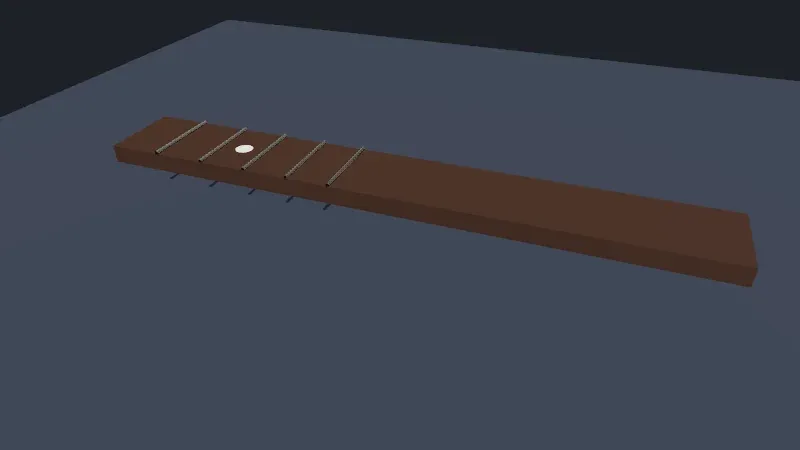
Live page: run it here
The neck still receives the frets’ shadows on its top face. A mesh that casts no shadow but should hide another one is a common cause of light leaking where it shouldn’t.
Sources
Section titled “Sources”- three.js manual: Primitives, Materials, Lights, Shadows
- three.js documentation:
BufferGeometry,MeshStandardMaterial,MeshPhysicalMaterial,DirectionalLight,LightShadow - three.js source at r186:
PointLight.js,SpotLight.js,DirectionalLightShadow.js,ShadowNode.js - The migration guide for r155’s physical lights and r186’s shadow types
- Khronos: glTF 2.0, materials
- Microsoft: 3D graphics overview, materials and lights